使用vue写一个类似金山打字通

文章目录
- 需求
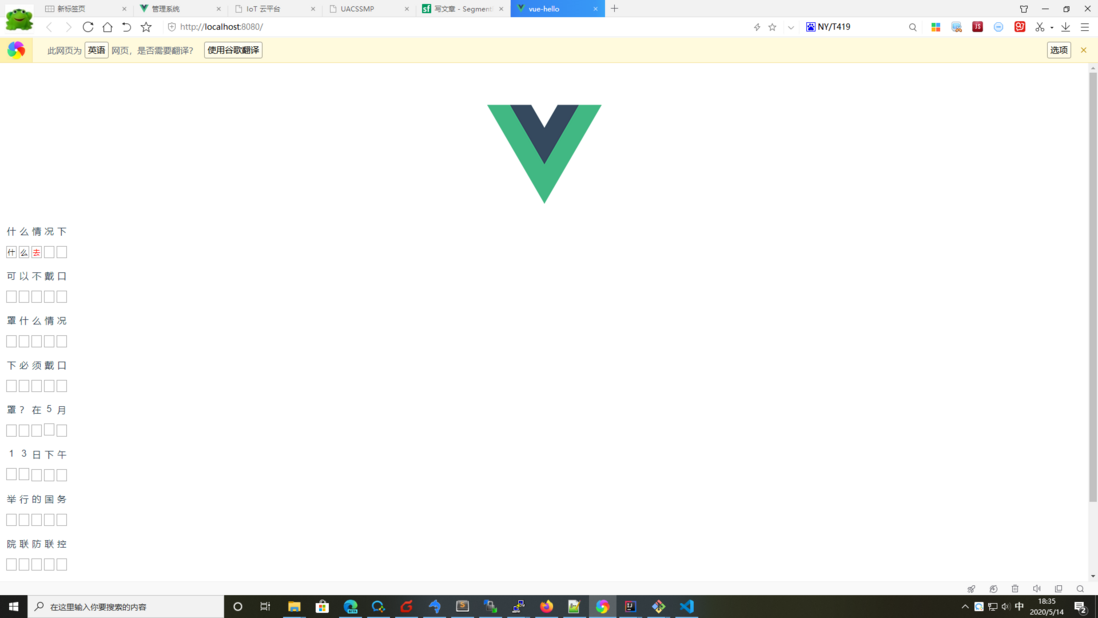
上一行文字,下一行输入框,在输入框中输入文字,然后比较输入的文字与上一行对应的文字是否相同,如果不相同,就将输入的文字变红。
- 思路
最重要的是思路,最早的想法是用表格,每个字占一个td,第一行(奇数行)放文字,第二行(偶数行)放input标签。然后将input输入的内容与第一行的比较。
| 字 | 字 | 字 |
|---|---|---|
| <input /> | <input /> | <input /> |
后来在写代码的时候发现这样写非常费力。要找到每个input输入的值并要与上一行对应的文字比较,太难了,几乎难以实现。
于是将文字与输入框当作一个组件,去比较输入的文字与提示文字是否一致,这样代码就好写多了。
- 创建工程
使用 vue ui 创建vue工程
- 创建 文字
Char.vue组件
<template>
    <div>
        <p>{{ cw }}</p>
        <div>
            <input type="text" maxlength="1" @input ="wordChange()" v-model="inputChar" :style="errorStyle"/>
        </div>
    </div>
</template>
<script>
export default {
  name: 'Char',
  props: {
    word: String
  },
  computed: {
      cw(){
          if(this.word == ''){
              return ';nbsp'
          }else{
              return this.word;
          }
      }
  },
  data(){
      return {
          inputChar: '',
          errorStyle: {}
      }
  },
  methods: {
      wordChange(){
          if(this.inputChar != this.word){
              this.errorStyle = {
                  color: 'red'
              }
          }else{
              this.errorStyle = {}
          }
      }
  }
}
</script>
<style scoped>
input {
    width: 1em;
    border: 1px solid groove;
    outline: 0;
}
</style>- 创建文本编辑
EditorPane.vue组件
<template>
    <table>
        <tr v-for="row in rows" :key="row">
            <td v-for="col in cols" :key="col">
                <Char :word="text.charAt((row -1) * cols + (col -1 ))"/>
            </td>
        </tr>
    </table>
</template>

<script>
import Char from './Char.vue'

export default {
    name: 'EditorPane',
    components: {
        Char
    },
    props: {
        rows: Number,
        cols: Number,
        text: String
    }
}
</script>

<style scoped>
table {
    border: 0;
}
</style>- 修改
App.vue,使用打字组件
<template>
  <div id="app">
    <img alt="Vue logo" src="./assets/logo.png">
    <!-- <HelloWorld msg="Welcome to Your Vue.js App"/> -->
    <EditorPane :text="turtorail" :rows="10" :cols="5"/>
  </div>
</template>

<script>
// import HelloWorld from './components/HelloWorld.vue'
import EditorPane from './components/EditorPane.vue'

export default {
  name: 'App',
  components: {
    EditorPane
  },
  data() {
    return {
      turtorail: '什么情况下可以不戴口罩'
        + '什么情况下必须戴口罩?在5月13日下午举行的国务院联防联控机制新闻发布会上'
        +'中国疾控中心流行病学首席专家吴尊友就相关问题作出回应'
    }
  }
}
</script>

<style>
#app {
  font-family: Avenir, Helvetica, Arial, sans-serif;
  -webkit-font-smoothing: antialiased;
  -moz-osx-font-smoothing: grayscale;
  text-align: center;
  color: #2c3e50;
  margin-top: 60px;
}
</style>
- 运行效果
评论
登录后参与技术讨论,分享你的经验与见解。
登录 / 注册暂无评论