react之性能优化

文章目录
问题分析
我们在本文讨论的是react性能优化问题,核心就一点:渲染。
围绕的内容有:
- shouldComponent
- 协调
- PureComponent
- 可变数据 和 不可变数据
本文主要解决如下四个问题:
- 重渲染处于react生命周期的哪个阶段?
- 如何进行重渲染?
- 如何合理使用shouldComponentUpdate控制react重渲染?
(包含PureComponent在性能优化中的作用)
一、前置知识
1. 生命周期

上图所示为react v16.4开始使用的react生命周期,详细总结请看我另一篇文章:
| 组件周期 | 说明 |
|---|---|
| Mounting | 组件初次挂载到页面(初次渲染) |
| Updating | 组件更新阶段(重渲染) |
| Unmounting | 组件卸载(卸载) |
2. 协调 - Reconciliation
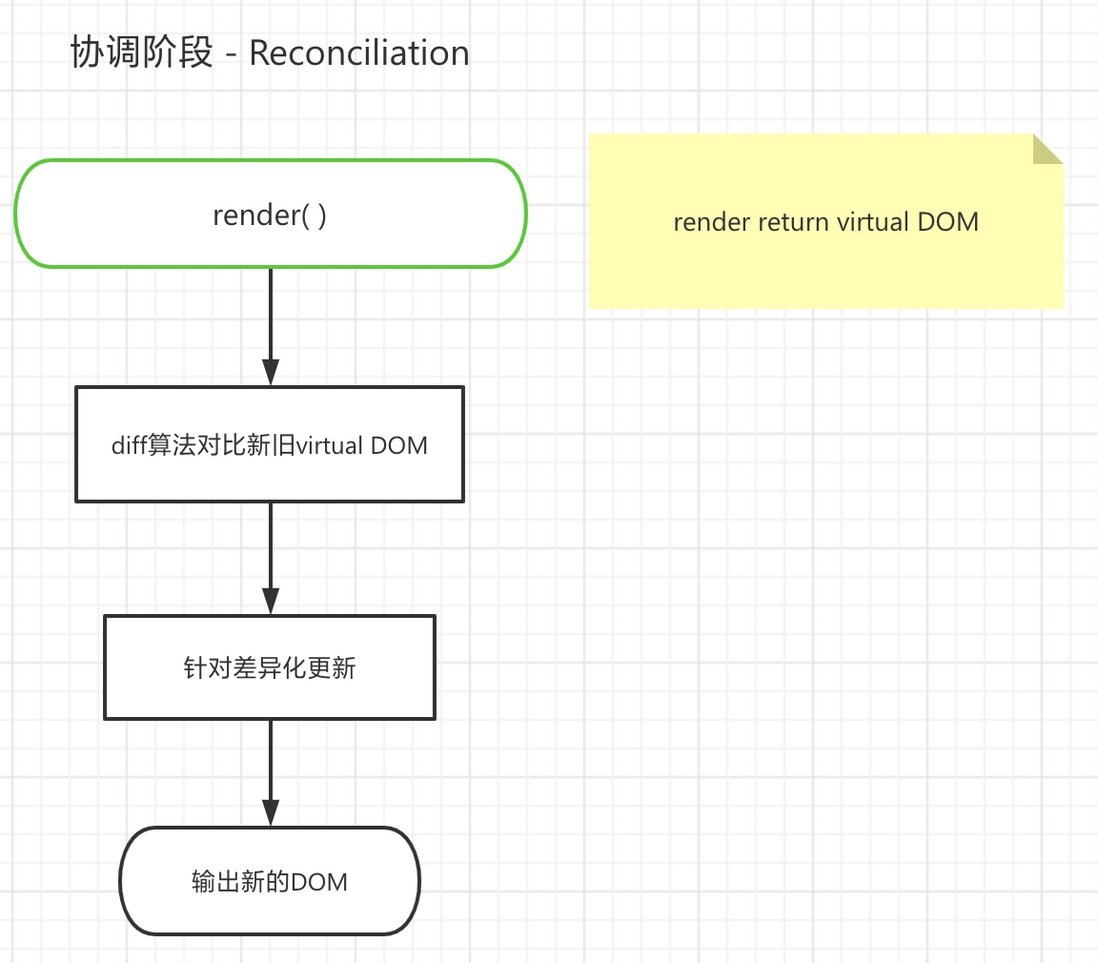
- render return 的 JSX 经 React 转换为 virtual DOM
- diff 算法对比新旧 virtual DOM
- 针对差异化进行更新
- React.createElement( ) 输出 DOM
相对协调有更多理解,请点击 协调 - React
3. 回答第一个问题:重渲染处于 react 生命周期的哪个阶段?
由生命周期示意图,可以看到大部分的API集中在组件更新(Updating)阶段,这个阶段进行的就重渲染。
二、 分析Updating
1. render
Updating 阶段的核心是 render 涉及的协调,协调的大致流程如下
对比新旧DOM性能损耗是很大的,尽管 react 使用 diff 算法并进行优化,我们也应该尽可能减少使用协调。为此,需要把调用 render 的权利,握在开发者手里!
2. 梳理Updating流程
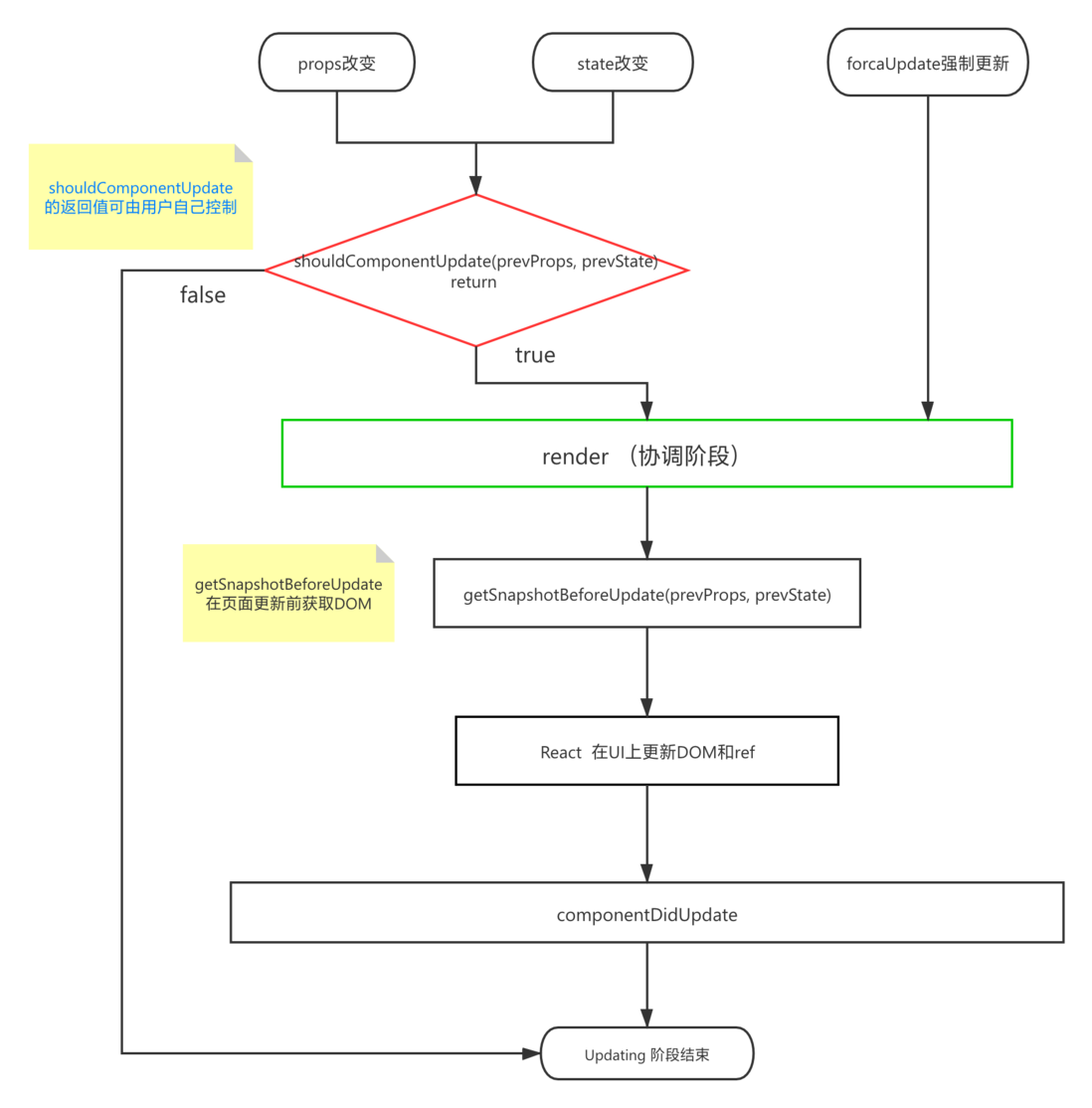
为验证是否有控制 render 的方案,需要梳理 Updating 阶段的流程
react 留给我们控制 render 的API —— shouldComponentUpdate
3. 回答第二个问题:react 如何进行重渲染?
其实问的是 Updating 流程,也就是上面流程图所叙述的过程
- props 或 state 改变
- 调用 shouldComponent ,默认返回 true,进入 render
- render 返回 virtual DOM,进入协调阶段
- (协调流程此处不再叙述)协调输出 DOM
- 执行 getSnapshotBeforeUpdate ,用处是在 UI 重渲染之前获取 DOM 信息(比如滚动位置)
- UI 重渲染,ref 更新
- 执行 componentDidUpdate
三、关注点
经过二的讨论,我们得出,shouldComponent 是 react 重渲染的关键点。其实有些片面,应该说“ render 前所有的流程,都是关键点 ”。
state 或 props 改变 => shouldComponent => 是否重渲染
所以,性能优化的关注点应该有两个:
- state 和 props
- shouldComponent
下面分别进行探讨:
1. shouldComponent
shouldComponentUpdate 内执行的逻辑是判断是否需要重渲染,并返回布尔值
默认返回值是 true,也就是说默认情况下 props 和 state 所有变化,都会引起组件重渲染
i. shouldComponent 的影响力

这里有一张图,绿色节点是 shouldComponentUpdate 返回 false,没有被重渲染,红色节点表示shouldComponentUpdate 返回 true,执行重渲染。
请注意红色节点 C6 的 shouldComponent 返回 true,引起其自身 C6 重渲染 、父节点 C3 重渲染、祖代节点 C1 重渲染。而其同代节点 ( C7 C8 C4 C5 ) 、父节点的兄弟节点 ( C2 ) 则不会渲染。
可能比较扰,目的是阐明 shouldComponent 对组件自身、父组件、祖代组件的影响。
ii. 合理使用 shouldComponentUpdate
可以这样
shouldComponentUpdate(prevProps, prevState) {
  if (this.props.userID !== prevProps.userID) {
    // props有变化!是否需要重渲染呢?
    // 我能想到有两个场景:
    // 1. userId不用于展示,只与后端交互会传递,不需要重渲染
    return false;
    // 2. userId用于展示,那必须重渲染!
    // return true;
    // 也就是说:不涉及UI展示,只涉及数据交互,可以return false,就算遇到这个场景也建议return true,思路仅供参考!思路仅供参考!!思路仅供参考!!
  }
  return true;
} 每个数据都进行对比,写一堆if 或 switch,岂不是很麻烦?
iii. PureComponent
这是 React 提供的 API,原理是覆写组件的shouldComponent,自动对新旧 props 和 state 进行浅比较,不同,则返回 true,执行重渲染。
需求如下
- StudentList 组件维持一个 state ,其内包含 studentList 对象数组
- StudentList 其内用 map 渲染 Student 组件
- PureComponent 组件 Student 接收 name,age,sid(均为
浅比较可以比较出来的值类型) - 点击按钮 add yuanhua ,在 studentList 尾部添加数据 {name: 'yuanhua' ...} 注意各组件console.log执行情况
- 点击按钮 change xialuo age,为在原数据修改 {name: 'xialuo', age:1, ...}为{name: 'xialuo', age: 100},注意各组件console.log执行情况
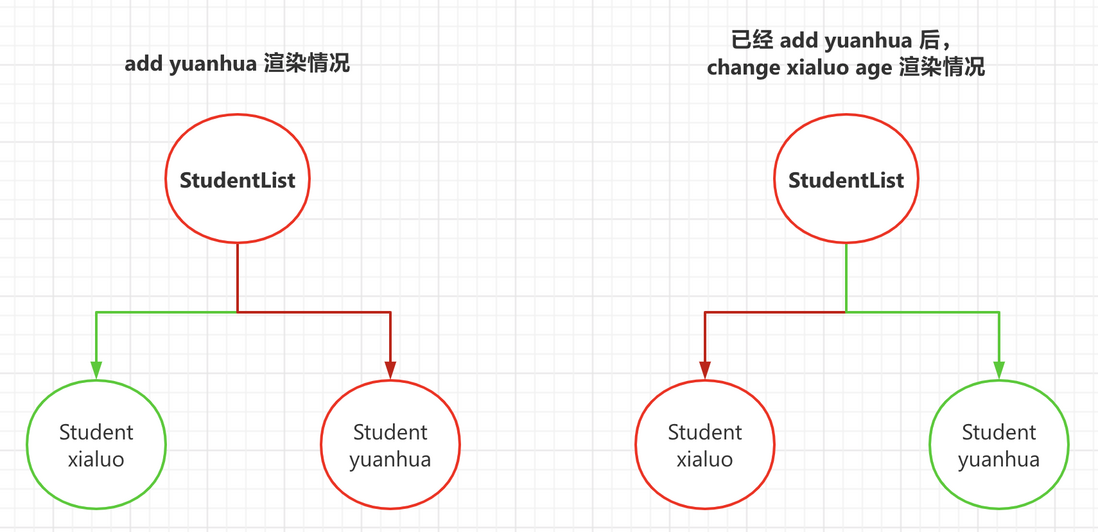
demo演示
import React, { Component, PureComponent } from 'react';

interface StudentType {
    name: string;
    age: number;
    sid: number;
}

interface StudentListState {
    studentList: StudentType[];
    time: number;
};

class StudentList extends Component<any, StudentListState> {
    constructor(props: any) {
        super(props);
        this.state = {
            studentList: [{
                name: 'xialuo',
                age: 1,
                sid: Date.now()
            }],
            time: Date.now(),
        };
        this.handleClick = this.handleClick.bind(this);
        this.handleChange = this.handleChange.bind(this);
    }

    handleClick() {
        this.setState((state, props) => ({
            studentList: [...state.studentList, {
                name: 'yuanhua',
                age: 21,
                sid: Date.now()
            }]
        }))
    }

    handleChange() {
        // 在oldState修改,setState
          // 这是用可变数据的方法,修改state,不推荐!后面会提到最佳实践
        this.setState((state, props) => {
            const newStateList = state.studentList;
            newStateList[0].age = 100;
            return {
                studentList: newStateList,
                time: Date.now()
            }
        })
    }

    render() {
        console.log('StudentList render', this.state);

        return (
            <div>
                {
                    this.state.studentList.map((student, index) => {
                        return <Student key={student.sid} name={student.name} age={student.age} sid={student.sid} />
                    })
                }
                <button onClick={this.handleClick}>add yuanhua</button>
                <button onClick={this.handleChange}>change xialuo age</button>
            </div>
        );
    }
}

interface StudentProps extends StudentType { }

class Student extends React.PureComponent<StudentProps, any> {
    render() {
        console.log(`Student ${this.props.name} render`);
        return (
            <>
                <div>name: {this.props.name}</div>
                <div>age: {this.props.age}</div>
            </>
        );
    }
}

export default StudentList;
符合预期
2. PureComponent 与 不可变数据
i. PureComponent 的缺陷
1中提到,PureComponent 可以覆写组件的 shouldComponentUpdate,以浅比较的方式,return比较结果,来控制重渲染。
but,刷过面试题 or 踩过坑的同学都知道,浅比较对于引用类型 Array Object 等的变化,是感知不到的,也就是说,如果有一个组件 Middle,接收的 props 为 StudentList 维持的 studentList ,那么add yuanhua、change xialuo age 都无法让 Middle 重渲染,其子组件也不会重渲染。
组件层级是这样

import React, { Component, PureComponent, memo } from 'react';

// function generateWords(oldWords: string[], newWord: string) {
//     return Object.assign({}, oldWords, { right: 'blue' });
// }

interface StudentType {
    name: string;
    age: number;
    sid: number;
}

interface StudentListState {
    studentList: StudentType[];
    time: number;
};

class StudentList extends Component<any, StudentListState> {

    constructor(props: any) {
        super(props);
        this.state = {
            studentList: [{
                name: 'xialuo',
                age: 1,
                sid: Date.now()
            }],
            time: Date.now(),
        };
        this.handleClick = this.handleClick.bind(this);
        this.handleChange = this.handleChange.bind(this);
    }

    handleClick() {
        // 可变数据
        this.setState((state, props) => {
            const newState = state;
            newState.studentList.push({
                name: 'yuanhua',
                age: 21,
                sid: Date.now()
            })
            return newState;
        })
    }

    handleChange() {
        // 可变数据。在oldState修改,setState
        this.setState((state, props) => {
            const newStateList = state.studentList;
            newStateList[0].age = 100;
            return {
                studentList: newStateList,
                time: Date.now()
            }
        })
    }

    render() {
        console.log('StudentList render', this.state);

        return (
            <div>
                <Middle studentList={this.state.studentList} />
                <button onClick={this.handleClick}>add yuanhua</button>
                <button onClick={this.handleChange}>change xialuo age</button>
            </div>
        );
    }
}


interface MiddleProps {
    studentList: StudentType[];
    time?: number;
};


class Middle extends PureComponent<MiddleProps> {

    constructor(props: MiddleProps) {
        super(props);
    }

    render() {

        console.log('component Middle render...', this.props)

        return (
            <div>
                {
                    this.props.studentList.map((student, index) => {
                        return <Student key={student.sid} name={student.name} age={student.age} sid={student.sid} />
                    })
                }
            </div>
        )
    }
}


interface StudentProps extends StudentType { }

class Student extends React.PureComponent<StudentProps, any> {
    render() {
        console.log(`Student ${this.props.name} render`);
        return (
            <>
                <div>name: {this.props.name}</div>
                <div>age: {this.props.age}</div>
            </>
        );
    }
}

export default StudentList;
渲染结果是这样
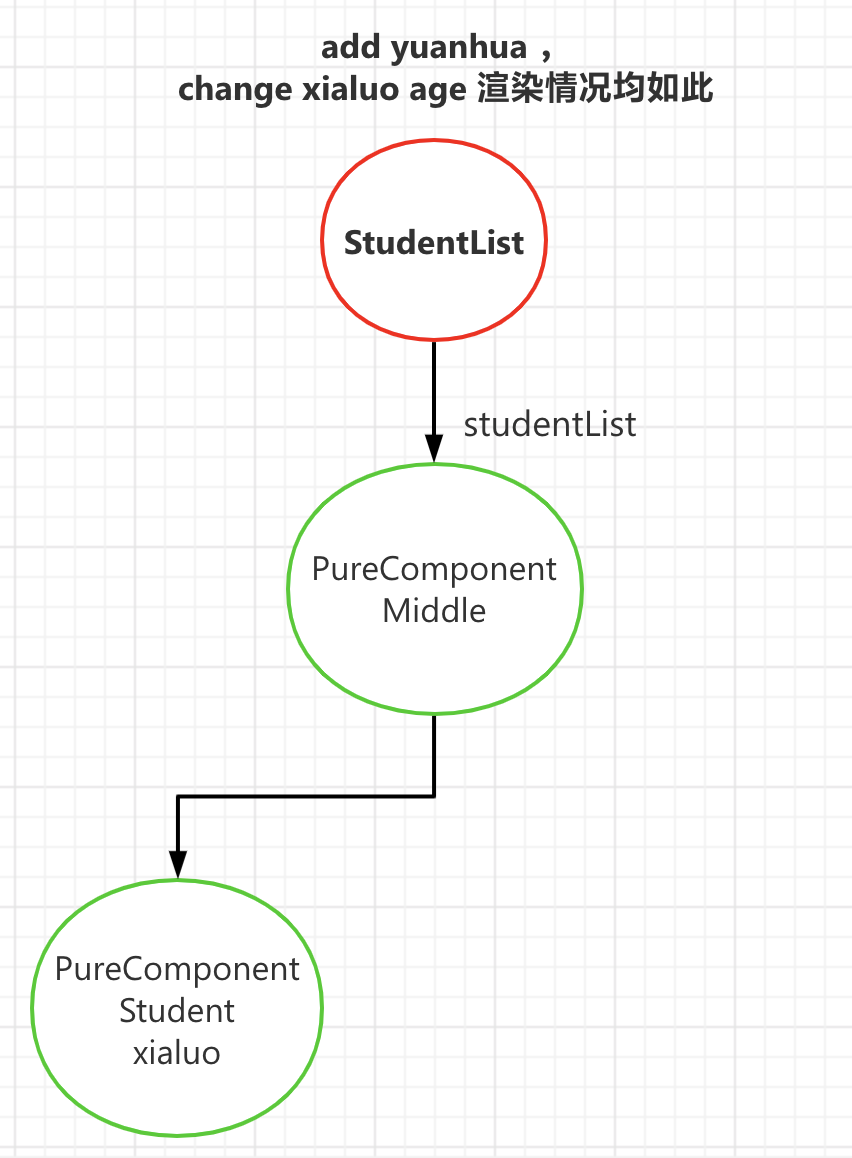
吐血,Bug,大大的bug,add yuanhua 未生效,change xialuo age 也未生效,只有StudentList在那里原地重渲染。
不符合预期。如何解决这个问题?
ii. 不可变数据的引入
上边提到,浅比较的缺陷就是,只能比较引用类型指针是否变化,而不能比较指针所指向的数据是否变化。又一个解决方案——不可变数据,即变 直接在原数据修改并setState 为 创建新引用类型,继承旧数据,修改并setState
再来个demo
import React, { Component, PureComponent, memo } from 'react';

// function generateWords(oldWords: string[], newWord: string) {
//     return Object.assign({}, oldWords, { right: 'blue' });
// }

interface StudentType {
    name: string;
    age: number;
    sid: number;
}

interface StudentListState {
    studentList: StudentType[];
    time: number;
};

class StudentList extends Component<any, StudentListState> {

    constructor(props: any) {
        super(props);
        this.state = {
            studentList: [{
                name: 'xialuo',
                age: 1,
                sid: Date.now()
            }],
            time: Date.now(),
        };
        this.handleClick = this.handleClick.bind(this);
        this.handleChange = this.handleChange.bind(this);
    }

    handleClick() {
        // 不可变数据
        this.setState((state, props) => {
            return {
                studentList: [...state.studentList, {
                    name: 'yuanhua',
                    age: 21,
                    sid: Date.now()
                }]
            }
        })
    }

    handleChange() {
        // 不可变数据。创建新数组 setState
        this.setState((state, props) => {
            state.studentList.splice(0, 1);
            console.log(state);
            return {
                studentList: [{
                    name: 'xialuo',
                    age: 100,
                    sid: Date.now()
                }, ...state.studentList]
            }
        })
    }

    render() {
        console.log('StudentList render', this.state);

        return (
            <div>
                <Middle studentList={this.state.studentList} />
                <button onClick={this.handleClick}>add yuanhua</button>
                <button onClick={this.handleChange}>change xialuo age</button>
            </div>
        );
    }
}


interface MiddleProps {
    studentList: StudentType[];
    time?: number;
};


class Middle extends PureComponent<MiddleProps> {

    constructor(props: MiddleProps) {
        super(props);
    }

    render() {

        console.log('component Middle render...', this.props)

        return (
            <div>
                {
                    this.props.studentList.map((student, index) => {
                        return <Student key={student.sid} name={student.name} age={student.age} sid={student.sid} />
                    })
                }
            </div>
        )
    }
}


interface StudentProps extends StudentType { }

class Student extends React.PureComponent<StudentProps, any> {
    render() {
        console.log(`Student ${this.props.name} render`);
        return (
            <>
                <div>name: {this.props.name}</div>
                <div>age: {this.props.age}</div>
            </>
        );
    }
}

export default StudentList;
渲染结果如下

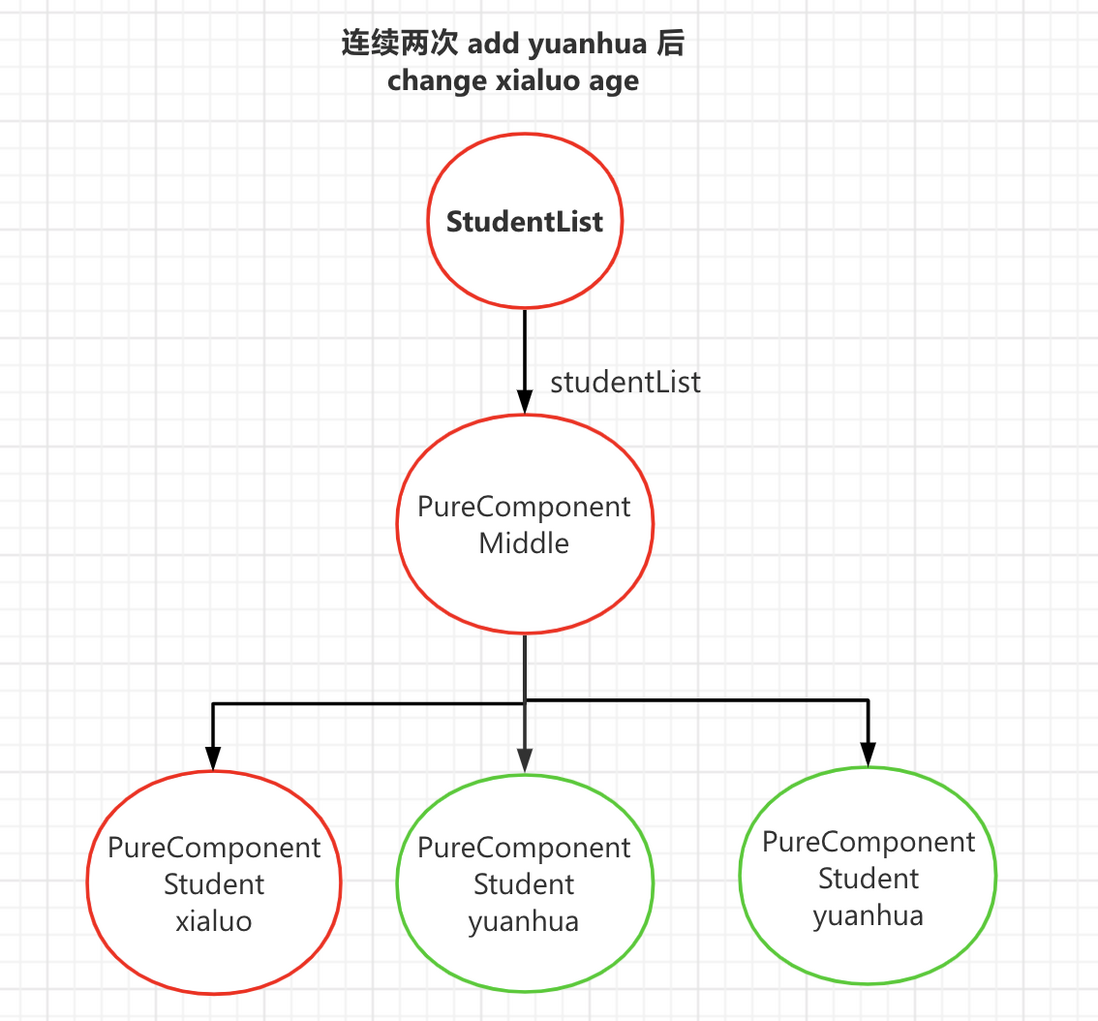
3. 回答第三个问题:如何合理使用shouldComponentUpdate控制react重渲染?
答:PureComponent + immutable不可变数据,也就是我上边demo演示的
评论
登录后参与技术讨论,分享你的经验与见解。
登录 / 注册暂无评论