gem5 SPECPU2006测试说明

文章目录
基本信息
- 版本:SPECCPU2006
- base SPEC 使用 gcc 12 进行编译,优化选项为 O3,指令集是 RV64GCB。speccpu详细编译参数:https://github.com/OpenXiangShan/CPU2006LiteWrapper/blob/main/Makefile.apps 。当前gcc为12.2
- peak使用自研编译器编译,预计2024年H2提供。
SPECCPU 2006 base
使用说明
base使用O3编译。通过开源项目CPU2006LiteWrapper维护编译参数。使用说明见 https://github.com/OpenXiangShan/CPU2006LiteWrapper/blob/main/README.md
测试结果
下图是2023.12测试结果。最新进展以公众号《香山开源处理器》的《香山双周报》或香山开源处理器知乎为准,以下结果为base得分,没有加编译器优化。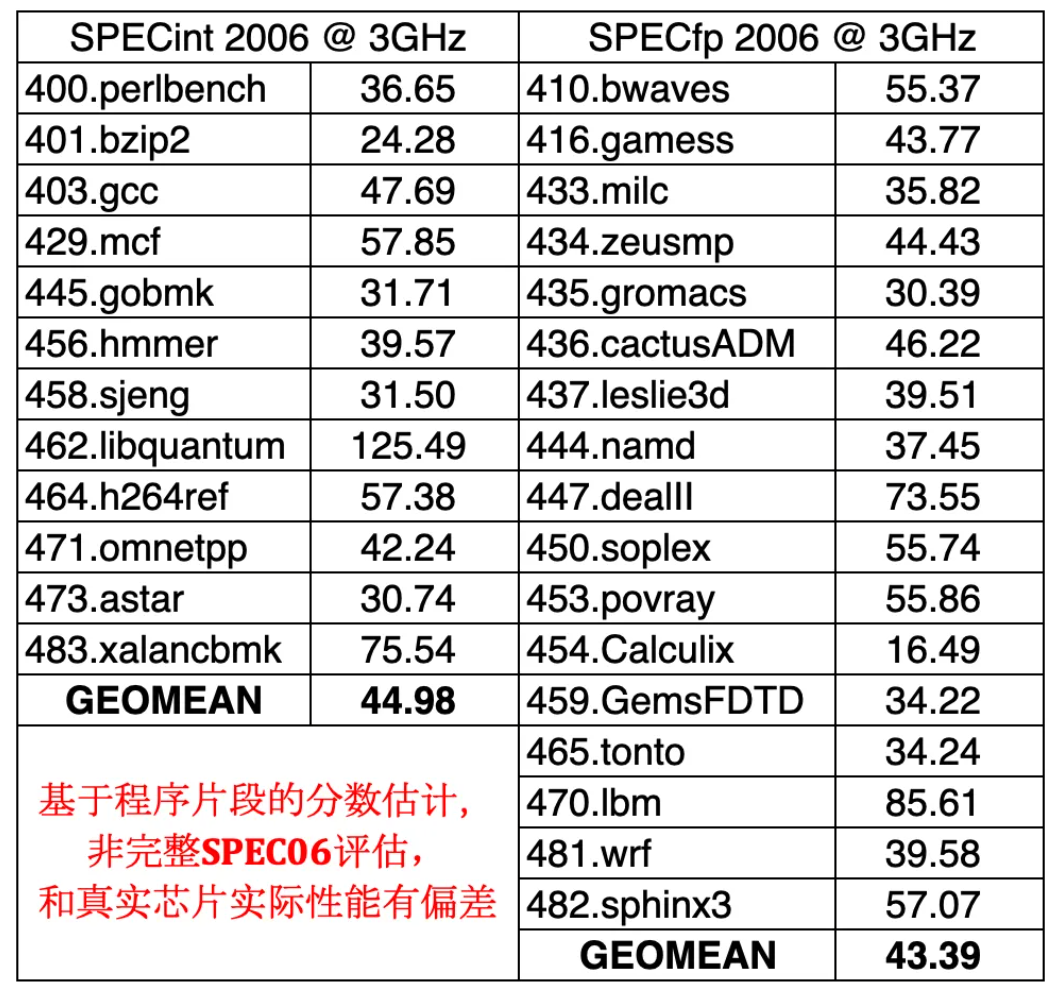
通过checkpoint测试speccpu2006
本文说明了如何基于已有checkpoint获得给定gem5模型和配置的speccpu2006分数。
官方文档详细说明了从通过NEMU生成checkpoint到香山gem5(以下简称xs gem5)使用checkpoint测试speccpu2006性能的全过程。如果已经有了checkpoint,希望使用xs gem5复现分数,部分文档可以跳过。本文目的是简述原理并说明如何操作。如果希望更深入了解原理建议参考官方文档和相关仓库。
香山性能评估方法见:https://bosc.yuque.com/uuichs/nca99q/evdgc7sihk7gyxap ,其中25-45分钟重点介绍了simpoint。
整体流程概述
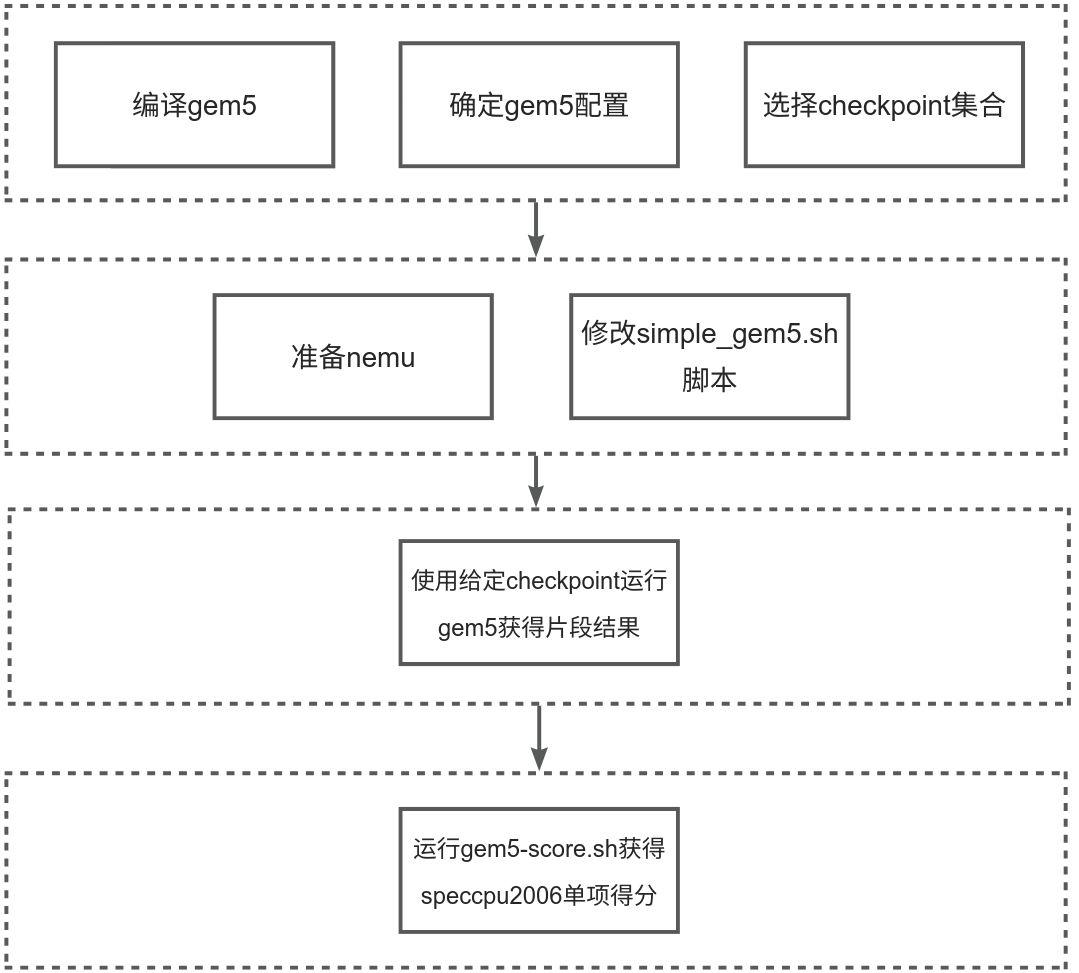
编译xs gem5
- 配置编译环境,参见官方文档:https://github.com/OpenXiangShan/GEM5/blob/backport/README.md#setup-on-ubuntu-2204
- 编译memory模型:DRAMSim3,参考官方文档:https://github.com/OpenXiangShan/GEM5/blob/backport/ext/dramsim3/README
- 编译gem5,参见官方文档:https://github.com/OpenXiangShan/GEM5/blob/backport/README.md#run-gem5 。其中scons的-jx,可以选择使用多少cpu编译。
确定gem5配置
https://github.com/OpenXiangShan/GEM5/blob/backport/util/warmup_scripts/simple_gem5.sh#L118 可以看到gem5的具体配置。xs gem5与RTL对齐情况参见文档:https://bosc.yuque.com/uuichs/nca99q/zuggt7ekor5s5g0v 。
备注:香山内部的GEM5作为RTL算法探索平台,性能比RTL高0.5分左右,同时,GEM5采取滚动开发方式,大约3-4个月后内部GEM5版本会推送到github。这样造成github上开源的xs gem5性能可能不会比同期github xiangshan性能高,甚至低一些。
选择checkpoint
每个checkpoint可以单独运行,也可以并行运行。如果希望了解步骤或调试,可以单独执行。如果希望获得单个用例或所有用例的跑分,需要把同一个用例的所有checkpoint都完整执行,并放到统一的目录。
为了便于理解,首先介绍下checkpoint的目录结构
checkpoint的目录结构
├── spec06_rv64gcb_20m_llvm_peak
│   ├── checkpoint-0-0-0
│   │   ├── checkpoint-0-0-0.lst
│   │   ├── cluster-0-0.json
│   │   ├── gcc_166
│   │   │   ├── 1595
│   │   │   │   └── _1595_0.031732_.gz
│   │   │   ├── 1638
│   │   │   │   └── _1638_0.019276_.gz
│   │   │   ├── aaaa
│   │   │   │   └── _aaaa_0.182384_.gz
│   │   │   └── ...
│   │   │       └── _..._0.022242_.gz
│   │   ├── ...
"checkpoint-0-0-0.lst" 是checkpoint的描述文件,具体含义参见"GEM5/util/warmup_scripts/simple_gem5.sh",例如"hmmer_nph3_15858 hmmer_nph3/15858 0 0 20 20"分别表示workload_name, checkpoint_path, skip insts(usually 0), functional_warmup insts(usually 0), detailed_warmup insts (usually 20), sample insts。
workload名称中,hmmer表示speccpu2006的用例名称,hmmer_xxx表示specpu2006该用例的多段测试。每段的含义和测试多少与具体测试用例相关。含义可以参见specpu2006的官方文档对测试用例的描述。
"checkpoint_path"表示具体checkpoint片段的相对路径。简单说,这里的checkpoint通过k-means cluster算法选择有代表性的片段,并根据片段的权重反推出完整代码的性能分数,香山的checkpoint基于UCSD Timothy Sherwood等人的工作,“提出了一套RISC-V的基础设施来使得checkpoint可以跨平台使用(XS-GEM5和香山RTL软仿)”。具体生成方法和相关论文参见:https://xiangshan-doc.readthedocs.io/zh-cn/latest/tools/simpoint/。
checkpoint举例
以specint2006的hmmer为例说明如果选择checkpoint。hmmer包含nph3和retro两部分,共有如下checkpoint。
hmmer_nph3_15858 hmmer_nph3/15858 0 0 20 20
hmmer_nph3_10723 hmmer_nph3/10723 0 0 20 20
hmmer_nph3_7382 hmmer_nph3/7382 0 0 20 20
hmmer_nph3_20949 hmmer_nph3/20949 0 0 20 20
hmmer_nph3_1717 hmmer_nph3/1717 0 0 20 20
hmmer_nph3_28138 hmmer_nph3/28138 0 0 20 20
hmmer_nph3_30961 hmmer_nph3/30961 0 0 20 20
hmmer_nph3_22001 hmmer_nph3/22001 0 0 20 20
hmmer_nph3_29897 hmmer_nph3/29897 0 0 20 20
hmmer_nph3_6391 hmmer_nph3/6391 0 0 20 20
hmmer_nph3_2991 hmmer_nph3/2991 0 0 20 20
hmmer_nph3_168 hmmer_nph3/168 0 0 20 20
hmmer_nph3_0 hmmer_nph3/0 0 0 20 20
hmmer_nph3_14259 hmmer_nph3/14259 0 0 20 20
hmmer_nph3_10356 hmmer_nph3/10356 0 0 20 20
hmmer_nph3_1 hmmer_nph3/1 0 0 20 20
hmmer_nph3_1238 hmmer_nph3/1238 0 0 20 20
hmmer_retro_36882 hmmer_retro/36882 0 0 20 20
hmmer_retro_24882 hmmer_retro/24882 0 0 20 20
hmmer_retro_63526 hmmer_retro/63526 0 0 20 20
hmmer_retro_54420 hmmer_retro/54420 0 0 20 20
hmmer_retro_12084 hmmer_retro/12084 0 0 20 20
hmmer_retro_192 hmmer_retro/192 0 0 20 20
hmmer_retro_33619 hmmer_retro/33619 0 0 20 20
hmmer_retro_25345 hmmer_retro/25345 0 0 20 20
hmmer_retro_22960 hmmer_retro/22960 0 0 20 20
hmmer_retro_9264 hmmer_retro/9264 0 0 20 20
hmmer_retro_30922 hmmer_retro/30922 0 0 20 20
hmmer_retro_70030 hmmer_retro/70030 0 0 20 20
hmmer_retro_32189 hmmer_retro/32189 0 0 20 20
hmmer_retro_58298 hmmer_retro/58298 0 0 20 20
hmmer_retro_7049 hmmer_retro/7049 0 0 20 20
hmmer_retro_8425 hmmer_retro/8425 0 0 20 20
hmmer_retro_0 hmmer_retro/0 0 0 20 20
hmmer_retro_37712 hmmer_retro/37712 0 0 20 20
hmmer_retro_26668 hmmer_retro/26668 0 0 20 20
hmmer_retro_20127 hmmer_retro/20127 0 0 20 20
假设把如上checkpoint保存到"/home/zhangjian/works/software/spec06_rv64gcb_20m_llvm_peak/checkpoint-0-0-0/checkpoint-0-0-0_hmmer.lst",同时还需要同步修改cluster文件,cluster文件的修改需要与lst对应。例如lst中"hmmer_nph3_15858 hmmer_nph3/15858 0 0 20 20",对应cluster文件中的
{
    "hmmer_nph3": {
        "points": {
...
            "15858": "0.0106084",
...
         }
    }
}
完整的修改如下:
{
    "hmmer_nph3": {
        "insts": "661748322048",
        "points": {
            "0": "3.02234e-05",
            "1": "6.04467e-05",
            "10356": "0.00486596",
            "10723": "0.0969263",
            "1238": "0.0485991",
            "14259": "0.145435",
            "15858": "0.0106084",
            "168": "0.000332457",
            "1717": "0.161816",
            "20949": "0.176232",
            "22001": "0.00217608",
            "28138": "0.128993",
            "29897": "0.0536162",
            "2991": "0.0894007",
            "30961": "0.0318554",
            "6391": "0.0205217",
            "7382": "0.0285308"
        }
    },
    "hmmer_retro": {
        "insts": "1452154848398",
        "points": {
            "0": "1.37728e-05",
            "12084": "0.0440591",
            "192": "0.0257689",
            "20127": "0.00464143",
            "22960": "0.0139105",
            "24882": "0.0494994",
            "25345": "0.0320768",
            "26668": "0.00696903",
            "30922": "0.0893302",
            "32189": "0.0690429",
            "33619": "0.0583966",
            "36882": "0.0377925",
            "37712": "0.0557797",
            "54420": "0.0789318",
            "58298": "0.0783396",
            "63526": "0.0182627",
            "70030": "0.0711088",
            "7049": "0.092374",
            "8425": "0.0878703",
            "9264": "0.0858319"
        }
    }
}
假设文件名为“/home/zhangjian/works/software/spec06_rv64gcb_20m_llvm_peak/checkpoint-0-0-0/cluster-0-0_hmmer.json”
准备nemu
可以使用release提供的nemu:
https://github.com/OpenXiangShan/GEM5/releases/tag/2023Oct27
也可以自己编译,方法可以参见:https://github.com/OpenXiangShan/GEM5?tab=readme-ov-file#difftest-with-nemu
注意,目前版本的GEM5依赖于NEMU_HOME 环境变量,如果没有指定该变量,运行时会报错。如果下载release中提供的nemu-ref.so,在运行GEM5前,需要进行如下配置:
mkdir -p NEMU/build把 riscv64-nemu-interpreter-231008.so 下载到 NEMU/build,并重命名为 riscv64-nemu-interpreter.so
然后设置环境变量:
export NEMU_HOME=`realpath NEMU`修改simple_gem5.sh脚本
diff --git a/util/warmup_scripts/simple_gem5.sh b/util/warmup_scripts/simple_gem5.sh                                                                                                                                 [0/277]
old mode 100644
new mode 100755
index 78d3ca09a3..7d290e6b6a
--- a/util/warmup_scripts/simple_gem5.sh
+++ b/util/warmup_scripts/simple_gem5.sh
@@ -1,7 +1,7 @@
 # DO NOT track your local updates in this script!
 set -x

# 配置xs gem5目录
-export gem5_home=$n/projects/xs-gem5 # The root of GEM5 project
+export gem5_home=/home/zhangjian/works/source/GEM5
 export gem5=$gem5_home/build/RISCV/gem5.opt # GEM5 executable


@@ -11,16 +11,15 @@ export gem5=$gem5_home/build/RISCV/gem5.opt # GEM5 executable
 # Note 2: The meaning of fields:
 # workload_name, checkpoint_path, skip insts(usually 0), functional_warmup insts(usually 0), detailed_warmup insts (usually 20), sample insts
 # Note 3: you can write a script to generate such a list accordingly
# 配置checkpoint list
-export desc_dir=$n/projects/BatchTaskTemplate/resources/simpoint_cpt_desc
-export workload_list=$desc_dir/spec06_rv64gcb_o2_20m__cover1.00_top100-normal-0-0-20-20.lst
+export workload_list=/home/zhangjian/works/software/spec06_rv64gcb_20m_llvm_peak/checkpoint-0-0-0/checkpoint-0-0-0_hmmer.lst


# 配置checkpoint目录
 # The checkpoint directory. We will find checkpoint_path in workload_list
 # under this directory to get the checkpoint path.
-export cpt_dir='/nfs-nvme/home/share/checkpoints_profiles/spec06_rv64gcb_o3_20m_gcc12-fpcontr-off/take_cpt'
+export cpt_dir='/home/zhangjian/works/software/spec06_rv64gcb_20m_llvm_peak/checkpoint-0-0-0'

# tag不影响测试结果
 # A tag to identify current batch run
-export tag="an-example-to-run-gem5-with-composite-prefetcher"
+export tag="bamvor"

# 日志文件可以用于调试
 export log_file='log.txt'

@@ -69,7 +69,7 @@ function run() {
     # replace the path of gcpt.bin with your gcpt restorer
     # gcpt restorer can be found in https://github.com/OpenXiangShan/NEMU/tree/gem5-ref-main/resource/gcpt_restore
     # Please use gem5-ref-main branch
# gcpt见:https://github.com/OpenXiangShan/GEM5/releases/tag/2023Oct27
-    cpt_option="--generic-rv-cpt=$cpt --gcpt-restorer=/nfs-nvme/home/zhouyaoyang/projects/gem5-ref-sd-nemu/resource/gcpt_restore/build/gcpt.bin "
+    cpt_option="--generic-rv-cpt=$cpt --gcpt-restorer=/home/zhangjian/works/software/gcpt-restorer-231016.bin"

     # You can also pass a baremetal bin here
     if [ $extension != "gz" ]; then
@@ -217,7 +217,7 @@ function single_run() {

# 单个的checkpoint
     # debug_gz=/nfs-nvme/home/share/checkpoints_profiles/spec06_rv64gcb_o2_20m/take_cpt/mcf_191500000000_0.105600/0/_191500000000_.gz
-    debug_gz=/nfs-nvme/home/share/checkpoints_profiles/spec06_rv64gcb_o2_20m/take_cpt/libquantum_1006500000000_0.149838/0/_1006500000000_.gz
+    debug_gz=/home/zhangjian/works/software/spec06_rv64gcb_20m_llvm_peak/checkpoint-0-0-0/gcc_166/1595/_1595_0.031732_.gz
     rm -f $work_dir/completed
     rm -f $work_dir/abort
     run $debug_gz $warmup_inst $max_inst $work_dir 1 > $work_dir/$log_file 2>&1
@@ -233,7 +233,7 @@ export -f prepare_env
 function parallel_run() {
     # We use gnu parallel to control the parallelism.
     # If your server has 32 core and 64 SMT threads, we suggest to run with no more than 32 threads.
-    export num_threads=30
+    export num_threads=8
     cat $workload_list | parallel -a - -j $num_threads arg_wrapper {}
 }
使用给定checkpoint运行gem5获得片段结果
执行xs gem5的simple_gem5.sh脚本
chmod +x util/warmup_scripts/simple_gem5.sh
./util/warmup_scripts/simple_gem5.sh
运行gem5-score.sh获得speccpu2006单项得分
脚本仓库:https://github.com/shinezyy/gem5_data_proc
clone仓库:
git clone https://github.com/shinezyy/gem5_data_proc.git 安装依赖库:
pip3 install --user matplotlib
pip3 install --user numpy
pip3 install --user pandas
pip3 install --user scipy
按前面的目录修改配置
diff --git a/example-scripts/gem5-score.sh b/example-scripts/gem5-score.sh
index 7e07d8c..5c89c73 100644
--- a/example-scripts/gem5-score.sh
+++ b/example-scripts/gem5-score.sh
@@ -5,14 +5,14 @@ ulimit -n 4096
 export PYTHONPATH=`pwd`

 # example_stats_dir=/nfs-nvme/home/share/tanghaojin/SPEC06_EmuTasks_topdown_0430_2023
-example_stats_dir=/nfs-nvme/home/share/zyy/gem5-results/mutipref-replay-merge-tlb-pref
+example_stats_dir=/home/zhangjian/works/source/GEM5/exec-storage/bamvor

 mkdir -p results

-tag="gem5-score-example"
+tag="bamvor"
 python3 batch.py -s $example_stats_dir -o results/$tag.csv

-python3 simpoint_cpt/compute_weighted.py \
-    -r results/$tag.csv \
-    -j simpoint_cpt/resources/spec06_rv64gcb_o2_20m.json \
-    --score results/$tag-score.csv
+ python3 simpoint_cpt/compute_weighted.py \
+     -r results/$tag.csv \
+     -j /home/zhangjian/works/software/spec06_rv64gcb_20m_llvm_peak/checkpoint-0-0-0/cluster-0-0_hmmer.json \
+     --score results/$tag-score.csv
batch.py生成的csv举例
,Cycles,Insts,bmk,ipc,point,workload
hmmer_nph3_1,4224158,19999996,hmmer,4.73467,1,hmmer_nph3
hmmer_nph3_10356,4261087,19999997,hmmer,4.693637,10356,hmmer_nph3
hmmer_nph3_10723,4241399,20000001,hmmer,4.715425,10723,hmmer_nph3
hmmer_nph3_1238,4262820,20000002,hmmer,4.69173,1238,hmmer_nph3
hmmer_nph3_14259,4224158,19999996,hmmer,4.73467,14259,hmmer_nph3
hmmer_nph3_15858,4248163,20000002,hmmer,4.707918,15858,hmmer_nph3
hmmer_nph3_168,4147849,20000000,hmmer,4.821776,168,hmmer_nph3
hmmer_nph3_1717,4264978,19999995,hmmer,4.689355,1717,hmmer_nph3
hmmer_nph3_20949,4279571,20000000,hmmer,4.673366,20949,hmmer_nph3
hmmer_nph3_22001,4246707,20000004,hmmer,4.709532,22001,hmmer_nph3
hmmer_nph3_28138,4225128,20000000,hmmer,4.733584,28138,hmmer_nph3
hmmer_nph3_29897,4255887,20000000,hmmer,4.699373,29897,hmmer_nph3
hmmer_nph3_2991,4244815,20000004,hmmer,4.711631,2991,hmmer_nph3
hmmer_nph3_30961,4230840,20000002,hmmer,4.727194,30961,hmmer_nph3
hmmer_nph3_6391,4256813,19999999,hmmer,4.69835,6391,hmmer_nph3
hmmer_nph3_7382,4150486,20000001,hmmer,4.818713,7382,hmmer_nph3
hmmer_retro_12084,4397361,20000002,hmmer,4.548183,12084,hmmer_retro
hmmer_retro_192,4393304,19999995,hmmer,4.552381,192,hmmer_retro
hmmer_retro_20127,4407808,20000003,hmmer,4.537403,20127,hmmer_retro
hmmer_retro_22960,4478801,19999998,hmmer,4.46548,22960,hmmer_retro
hmmer_retro_24882,4396195,20000003,hmmer,4.549389,24882,hmmer_retro
hmmer_retro_25345,4390408,19999998,hmmer,4.555385,25345,hmmer_retro
hmmer_retro_26668,4327975,19999997,hmmer,4.621098,26668,hmmer_retro
hmmer_retro_30922,4420078,20000003,hmmer,4.524808,30922,hmmer_retro
hmmer_retro_32189,4417055,20000001,hmmer,4.527904,32189,hmmer_retro
hmmer_retro_33619,4421292,19999996,hmmer,4.523564,33619,hmmer_retro
hmmer_retro_36882,4424934,19999996,hmmer,4.519841,36882,hmmer_retro
hmmer_retro_37712,4396358,20000001,hmmer,4.54922,37712,hmmer_retro
hmmer_retro_54420,4474135,19999996,hmmer,4.470137,54420,hmmer_retro
hmmer_retro_58298,4415262,20000001,hmmer,4.529743,58298,hmmer_retro
hmmer_retro_63526,4329308,19999996,hmmer,4.619675,63526,hmmer_retro
hmmer_retro_70030,4399277,19999997,hmmer,4.546201,70030,hmmer_retro
hmmer_retro_7049,4408093,20000003,hmmer,4.53711,7049,hmmer_retro
hmmer_retro_8425,4391392,19999997,hmmer,4.554364,8425,hmmer_retro
hmmer_retro_9264,4407788,19999996,hmmer,4.537422,9264,hmmer_retro
最终结果举例
================ Int =================
             time  ref_time      score  coverage
hmmer  153.602218    9330.0  20.247103  0.999981
================ FP =================
Empty DataFrame
Columns: [time, ref_time, score, coverage]
Index: []
hmmer得分是20.24。
评论
登录后参与技术讨论,分享你的经验与见解。
登录 / 注册暂无评论