Electron 使用 node-notifier 弹窗提示

文章目录
背景介绍
使用 Electron 做跨平台客户端开发时,无论是开发工具类的应用,还是聊天类的应用,消息提醒都是一个常见的需求。
Electron 提供了通知的方式。可以直接使用 HTML5 Notification API 来发送通知。
node-notifier是一个跨平台的 Node.js 跨平台消息发送模块,本文介绍 Electron 集成 node-notifier 的过程以及遇到的问题和解决办法。并且因为目前主要是用 Mac OS,所以以下内容主要针对 Mac 系统。
环境搭建
- 使用 electron-webpack-quick-start 初始化项目
electron-notifier - 添加
node-notifier依赖:yarn add node-notifier -
demo 代码
// main/index.js import { ipcMain } from "electron" const notifier = require("node-notifier"); ipcMain.on("notify", (evt, data) => { const { title, message } = data; console.log("notify:", title, message); notifier.notify( { title, message }, (err, res) => { if (err) { console.log("error:", err); } } ); }); // renderer/index.js const { ipcRenderer } = require("electron"); ipcRenderer.send("notify", { tite: "title", message: "This is a message" }); - 运行
yarn run dev弹出消息提示:
- 运行
yarn run dist打包,得到打包好的.dmg文件,打开运行,发现并没有消息提示。
问题排查
-
因为需要记录打包后应用的日志信息,引入 electron-log
// main/index.js const log = require("electron-log"); // 重写 console 的方法,日志会在控制台输出,并且输出到本地文件。具体用法参考官方文档 Object.assign(console, log.functions); // 获取本地日志文件路径 console.log('日志文件:', log.transports.file.getFile()) - 重新执行打包命令,并运行打包生成的应用,得到对应的日志信息
-
通过控制台打印的文件路径或者
~/Library/Logs/{app name}/{process type}.log目录下找到main.log,查看其中的内容。可以看到有对应的报错信息:error: Error: Command failed: ... com.electron.electron-notifier.bcYDBs -title "title" -message "message" -timeout "10" -json "true" ... No Info.plist file in application bundle or no NSPrincipalClass in the Info.plist file, exiting ... -
报错解读:
- 前一段是使用传入的参数调用
node-notifier - 后一段是说:缺少
application bundle的Info.plist文件或者Info.plist文件中 缺少NSPrincipalClass字段
- 前一段是使用传入的参数调用
-
问题排查
- 通过 “显示包内容” 查看打包好的应用程序,发现
Info.plist已经存在 - 参考 apple 开发者文档 中的说明,NSPrincipalClass 字段定义了一个 bundle 的主类的名称。对于应用程序来说,缺省情况下这个名字就是应用程序的名字。这里我的理解是 package.json 中的 name 已经指定应用的名称
- 通过 “显示包内容” 查看打包好的应用程序,发现
- 通过上面的分析,初步判断问题并不是提示所说的 “缺少
NSPrincipalClass” -
下面是一通 google。经测试都不行
-
无奈,只能更多的去翻看官方文档
-
根据文档的解释,
asar打包以后不能运行node-notifier中的二进制文件,该目录需要在打包时进行unpack处理,原文如下:Due to the way asar works, you cannot execute a binary from within an `asar`. As a simple solution, when packaging the app into an asar please make sure you `--unpack` the `vendor/` folder of `node-notifier`, so the module still has access to the notification binaries. -
因为项目中用到
electron-builder进行打包,翻看其文档,添加以下代码:通过asarUnpack指定不打包到asar的文件.如果按照 Electron 官方文档的打包方式,可以使用:asar pack app app.asar --unpack ./node_modules/node-notifier/vendor/**// package.json "build": { "appId": "com.codinglife.electron-notifier", "asar": true, "asarUnpack": [ "./node_modules/node-notifier/vendor/**" ] } - 重新运行打包命令,可以在
app.asar同目录看到对应的unpacked目录。
- 运行打包好的应用,可完美弹出对应的消息提示
-
另外,也可以通过不打包
asar的方式使用,配置如下:"build": { "appId": "com.codinglife.electron-notifier", "asar": false } - 打包后的应用中,源文件全部放在
app目录下。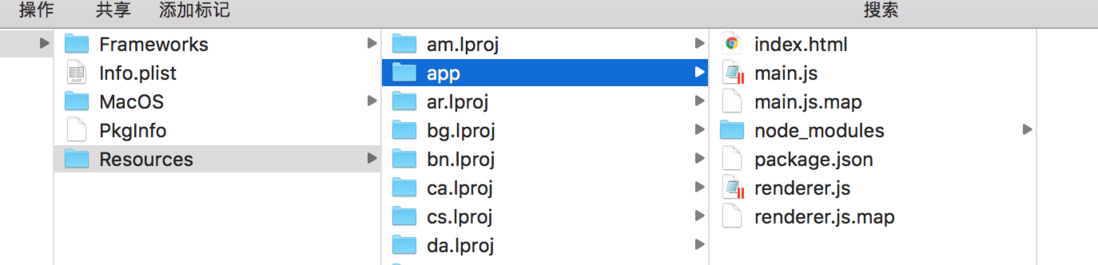
总结
-
asar是一种压缩文件,Electron 使用它来加快 require 代码的速度和隐藏源代码。Electron 实现了部分的 Node.js API 方法来操作 asar 文件,但也存在以下几个问题:-
asar中的文件是只读的 - 部分 API 需要解压到临时目录才能使用其中的文件,增加了开销
- 不能执行其中的二进制文件
- ...
-
- 多翻文档,多 google
-
electron-builder有对 Electron 应用打包,配置,升级等操作的处理,解决了大部分打包,升级安装过程的问题,强烈安利
评论
登录后参与技术讨论,分享你的经验与见解。
登录 / 注册暂无评论