From iOS To Flutter(1.加载本地图片)

文章目录
前言:
在这里目的是记录学习Flutter的过程,上班比较忙碌,主要是面向百度学习。
图片资源
iOS中,可以使用Asset Catalog管理本地图片资源。

不使用pdf矢量素材的情况,通常准备 1x、2x、3x 来交由系统适配使用。
在Flutter中,做如下操作
1、建立图片管理文件结构
根目录建图片管理目录images,二级目录建如下图结构
与iOS不同,不需要在图片后缀添加2x 3x,而是优先根据3.0x→2.0x→images的优先级。
2、pubspec.yaml添加资源文件
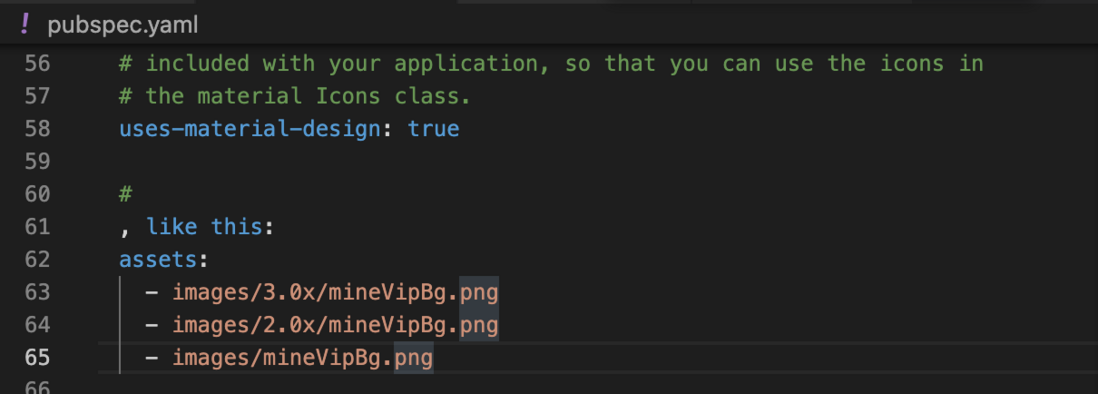
3、使用图片
Widget build(BuildContext context) {
        title: Text(widget.title),
      ),
      body: Center(
        child: Column(
          mainAxisAlignment: MainAxisAlignment.center,
          children: <Widget>[
            const Text(
              'You have pushed the button this many times:',
            ),
            Text(
              '$_counter',
              style: Theme.of(context).textTheme.headline4,
            ),
            const Image(image: AssetImage('images/mineVipBg.png')),
          ],
        ),
      ),
      floatingActionButton: FloatingActionButton(
        onPressed: _incrementCounter,
        tooltip: 'Increment',
        child: const Icon(Icons.add),
      ), // This trailing comma makes auto-formatting nicer for build methods.
    );
  }
}
效果图:

评论
登录后参与技术讨论,分享你的经验与见解。
登录 / 注册暂无评论