[Vue笔记] 仿照`Teambition`手写`task-panel` ---- 组装篇

文章目录
Introduction
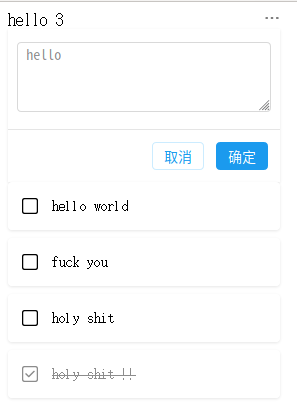
构成task-panel的组件都已经写好了,这是如何处理各组件
dropdown
接口
active
向上传递
toggletoggle-menu, 参数action
creator
接口
active
向上传递
toggle
editor
接口
active
向上传递
submit, 参数inputTextcancel
card
接口
donecontent
向上传递
toggle
组件实现
自身接口
1.title
表示标题
2.tasks
表示task-panel中所有的card的内容
基本结构
  <div class="task-panel">
    <div class="head">
      <span class="title"> {{ title }}
    <span class="task-count">
      {{ cards.length }}
    </span>
      </span>

      <dropdown
    :active="dropDownActive"
    @toggle="toggleDropDown"
    @toggle-menu="toggleMenu">
      </dropdown>

    </div>

    <div class="operator">
      <creator
    :active="editorActive"
    @toggle="toggleCreator"> </creator>
      <editor
    :active="editorActive"
    @submit="appendCard"
    @cancel="cancelEditor">
      </editor>
    </div>

    <div class="card-grid">
      <div class="notdone">
    <template v-for="(card, index) in cards">
      <card
        :content="card.content"
        :done="false"
        @toggle="toggleCard(false, index)">
      </card>
    </template>
      </div>

      <div class="done">
    <template v-for="(card, index) in donecards">
      <card
        :content="card.content"
        :done="true"
        @toggle="toggleCard(true, index)">
      </card>
    </template>
      </div>
    </div>

  </div>
组件样式 <style scoped>
设计需求
- 整体的布局用
flex flex的方向垂直- 固定整体的宽度
- 在
div.head部分确保内容分布在两边
.task-panel {
  display: flex;
  flex-direction: column;
  width: 272px;
}

.head {
  display: flex;
  align-items: center;
  justify-content: space-between;
}
处理各组件
1.设置接口默认值
  props: {
    title: {
      type: String,
      default: 'hello',
    },

    tasks: {
      type: Array,
      default: function() {
    return [
      {
        content: 'hello world',
      },

      {
        content: 'fuck you',
      },

      {
        content: 'holy shit',
      },

    ]
      }
    },
  },
2.控制各组件的显示
  data() {
    return {
      dropDownActive: false,
      editorActive: false,
      cards: this.tasks.slice(),
    }
  },
3.处理各组件的事件
  methods: {
    toggleDropDown() {
      this.dropDownActive = !this.dropDownActive
    },

    toggleMenu(action) {
      /* TODO match the action  */
      if(action == 'edit') {
    this.$emit('modify')
      } else if(action == 'add') {
    this.$emit('add-panel')
      } else if(action == 'delete') {
    this.$emit('delete')
      }


      this.dropDownActive = false
    },

    toggleCreator() {
      console.log('toggle creator')
      this.editorActive = true
    },

    appendCard(inputText) {
      var card = { content: inputText }
      this.cards.unshift(card)
      /* this.cancelEditor() */
    },

    cancelEditor() {
      /* STUB */
      console.log('cancel editor')
      this.editorActive = false
    },

    toggleCard(isdone, index) {
      /* STUB */

      if(isdone) {
    var card = this.donecards[index]
    this.cards.unshift(card)
    this.donecards.splice(index, 1)
      } else {
    var card = this.cards[index]
    this.donecards.push(card)
    this.cards.splice(index, 1)
      }
    },
  },
大功告成
评论
登录后参与技术讨论,分享你的经验与见解。
登录 / 注册暂无评论