flutter学习之路

文章目录
步骤:
1、添加PageContent组件
①新建文件/widgets/page_content.dart
②添加material依赖
③编写无状态组件
④添加name参数
⑤使用Scaffold
2、添加home页面
①新建文件/pages/home/index.dart
②添加material、page_content依赖
③编写无状态组件
④使用PageContent
3、添加Application应用根组件
①新建文件/application.dart
②添加依赖
③使用MaterialApp
4、测试
目录如下图: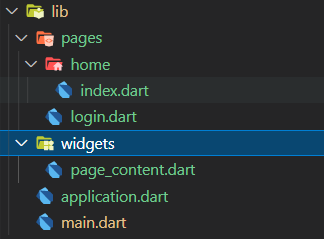
代码如下:
application.dart
import 'package:flutter/material.dart';
import './pages/home/index.dart';

class Application extends StatelessWidget {
  const Application({ Key key }) : super(key: key);

  @override
  Widget build(BuildContext context) {
    return MaterialApp(
      home: HomePage(),
    );
  }
}
index.dart代码
import 'package:flutter/material.dart';

import '../../widgets/page_content.dart';

class HomePage extends StatelessWidget {
  const HomePage({ Key key }) : super(key: key);

  @override
  Widget build(BuildContext context) {
    return Container(
      child: PageContent(name: '首页',),
    );
  }
}
PageContent代码
import 'package:flutter/material.dart';

class PageContent extends StatelessWidget {
  final String name;

  const PageContent({Key key, this.name}) : super(key: key);

  @override
  Widget build(BuildContext context) {
    return Scaffold(
      appBar: AppBar(title: Text('当前页面:$name'),),
    );
  }
}
入口main.dart
import 'package:flutter/material.dart';

import './application.dart';

void main() {
  runApp(Application());
}
效果图:
评论
登录后参与技术讨论,分享你的经验与见解。
登录 / 注册暂无评论