日历插件

文章目录
不忙的时候瞎整点小东西~ 整个日历组件
样式:
.weekday{
      /* display: flex; */
      border-left: 1px solid #ddd;
      border-top: 1px solid #ddd;
      list-style: none;
      margin: 0;
      padding: 0;
      width: 427px;
      overflow: hidden;
      /* height: ;
       */
    }
    .weekday li {
      float: left;
      margin: 0;
      padding: 0;
      list-style: none;
      width: 60px;
      height: 60px;
      line-height: 60px;
      text-align: center;
      border-right: 1px solid #ddd;
      border-bottom: 1px solid #ddd;
    }
    .monBox{
      margin-bottom: 20px;
    }
    .upMonth, .downMonth{
      display: inline-block;
      padding: 5px 8px;
      border:1px solid #ddd;
      cursor: pointer;
    }
    .downMonth{
      margin-left: 20px;
    }`

    html:
    <p class="year">年月</p>
  <div class="monBox">
    <span class="upMonth">上月</span>
    <span class="downMonth">下月</span>
  </div>
  <ul class="weekday">
    <li>日</li>
    <li>一</li>
    <li>二</li>
    <li>三</li>
    <li>四</li>
    <li>五</li>
    <li>六</li>
    ...省略42个
   </ul>
   为什么是42个呢?
核心代码:
代码有点乱  没整理...
// const weekArr = ['日', '一', '二', '三', '四', '五', '六'];
const ulE = document.getElementsByClassName('weekday')[0];
const yearE = document.getElementsByClassName('year')[0];
const upMonthE = document.getElementsByClassName('upMonth')[0];
const downMonthE = document.getElementsByClassName('downMonth')[0];
const liList = document.querySelectorAll('.weekday li:nth-child(n+8)')
// 获取后7个格子之后的所有元素

const weekObj = {
  '0': '日',
  '1': '一',
  '2': '二',
  '3': '三',
  '4': '四',
  '5': '五',
  '6': '六',
};
const monthArr = [1,3,5,7,8,10,12];// 31天的月份
// let nowTime = new Date('2021/1/18');
let nowTime = new Date(); // 当前时间
let getDay = nowTime.getDate(); // 当前月的几号
let firstDay = null; // 当月的第一天
let lastDay = null; // 当月的最后一天
let maxDay = null; // 当前月最大天数
let currentDate = null; // 当前是几号
let nowYear = nowTime.getFullYear() // 当前年份
let upMonTime = null; // 上个月
let nextMonTime = null;// 下个月
const currentMonth = nowTime.getMonth() + 1; // 当前月
currentDate = nowTime.getDate();
function getMaxDay (times) {
  let year = times.getFullYear()
  let currentMonth = times.getMonth() + 1
  if (year % 4 == 0 && year % 100 != 0 || year % 400 == 0) {
      if (currentMonth == 2) {
        maxDay = 29;
      } else if (monthArr.includes(currentMonth)) {
          maxDay = 31
      } else {
        maxDay = 30

      }
    } else {
      if (currentMonth == 2) {
        maxDay = 28;
      } else if (monthArr.includes(currentMonth)) {
          maxDay = 31
      } else {
        maxDay = 30

      }
    }
    // return maxDay;
}
yearE.innerText = '当前时间:' + nowYear + '年-' + (nowTime.getMonth() + 1) + '月-' + currentDate + '日-' + '星期' + (weekObj[nowTime.getDay()])
let index_biao; // 从日--六 一共是7个格子 index_biao 它记录是第几个格子显示当月的第一天
function getFirstDay (firsTimeParams) {
  // let nowTime = new Date();
  let getDate = firsTimeParams.getDate();
  let chaDay = getDate - 1;
  // let currentDate =
  firstDay = firsTimeParams.setDate(firsTimeParams.getDate() - chaDay);
  let oneDayWeek = new Date(firstDay).getDay()
  index_biao = Math.ceil(oneDayWeek%7)
  console.log(new Date(firstDay).toLocaleString(), index_biao, getDate)

  if (getDate === new Date(firstDay).getDate()) {// 当前天
    liList[index_biao].style.backgroundColor = '#4aedfc';
    // debugger;
  }
  liList[index_biao].innerText = new Date(firstDay).getDate()
}
let copyNowTime = new Date(nowTime);
getFirstDay(copyNowTime)// 获取当月的第一天 并计算从哪个格子开始渲染
// if (maxDay > liList.length - 7) {
//   console.log();
// }
function setD (i) {
  // debugger;
  let someDay = new Date(firstDay);
  console.log(i, maxDay, index_biao, someDay.toLocaleString(), 'iiiiiiiiiiii')

  someDaTe = someDay.setDate(someDay.getDate() + i - index_biao);
  if (currentDate === new Date(someDaTe).getDate()) {// 当前天
    liList[i].style.backgroundColor = '#4aedfc';
    // debugger;

  }
  // console.log(new Date(oneDay).getDay(), oneDay)
  // let someDayWeek = new Date(oneDay).getDay()
  // if (i===2) console.log('ppppppp', someDay, new Date(someDaTe).getDate())
  // if ((maxDay + index_biao) < 35 && (i - index_biao + 1) >= 35 ) {
  //   return;
  // }
  // (i - index_biao + 1) >= 35 这个是往后走的日期 但是又不能一直往下走 最多显示当前月所在行扑满
  // (maxDay + index_biao) 这个就是往回拉  那么最后的效果就是 最多显示35个格子
  // 按照潜在的逻辑分析 那么一个月份当前最多6行,每行7个格子 也就是最多42个格子就可>以完全显示完一个月的所有日期
  if ((maxDay + index_biao) <= 35 && i >=35 && i + index_biao >= 35) {// 不够6行的剩下不显示,够6行的6行显示完
      liList[i].style.display = 'none';
      // debugger;
      return;
  }
  liList[i].innerText = new Date(someDaTe).getDate()
  if (i - index_biao + 1 > maxDay) {// 说明当前月份已经渲染完成,后面是渲染下个月的了
    liList[i].style.backgroundColor = 'red';
    liList[i].style.opacity = '0.5';
  }
  // debugger;

  // return {
  //   someDayWeek
  // }
}
getMaxDay(nowTime)


// let oneDay = getDay - 1;
// oneDay = nowTime.setDate(nowTime.getDate() - oneDay);
// console.log(new Date(oneDay).getDay(), oneDay)
// let oneDayWeek = new Date(oneDay).getDay()

function renderDay () {
  for (let index = 0; index < liList.length; index++) {

    if (index <= index_biao) {// 在此之前的不是当前月显示的时间 所以要跳过 不用处理
      continue;
    }
    setD(index)

  }
}
function clearDay () {
  for (let index = 0; index < liList.length; index++) {
    liList[index].innerText = '';
    liList[index].style.display = 'block';
    liList[index].style.backgroundColor = '';
    liList[index].style.opacity = '1';
  }
}
renderDay()
// const num = 0;

upMonthE.onclick = function () {
  index_biao = null;
  // let currentTime = new Date()
  nowTime = nowTime.setMonth(nowTime.getMonth() - 1);
  nowTime = new Date(nowTime) //  把当前时间重新赋值
  console.log(nowTime.toLocaleString());
  let copyTime = new Date(nowTime)
  clearDay()
  getMaxDay(copyTime)
  getFirstDay(copyTime)
  renderDay()
  // let aa = new Date(upMonTime)
  yearE.innerText = '当前时间:' + nowTime.getFullYear() + '年-' + (nowTime.getMonth() + 1) + '月-' + nowTime.getDate() + '日-' + '星期' + (weekObj[nowTime.getDay()])


}
downMonthE.onclick = function () {
  index_biao = null;
  // let currentTime = new Date()
  nowTime = nowTime.setMonth(nowTime.getMonth() + 1);
  nowTime = new Date(nowTime) //  把当前时间重新赋值
  console.log(nowTime.toLocaleString());
  let copyTime = new Date(nowTime)
  clearDay()
  getMaxDay(copyTime)
  getFirstDay(copyTime)
  renderDay()
  // let aa = new Date(upMonTime)
  yearE.innerText = '当前时间:' + nowTime.getFullYear() + '年-' + (nowTime.getMonth() + 1) + '月-' + nowTime.getDate() + '日-' + '星期' + (weekObj[nowTime.getDay()])


}
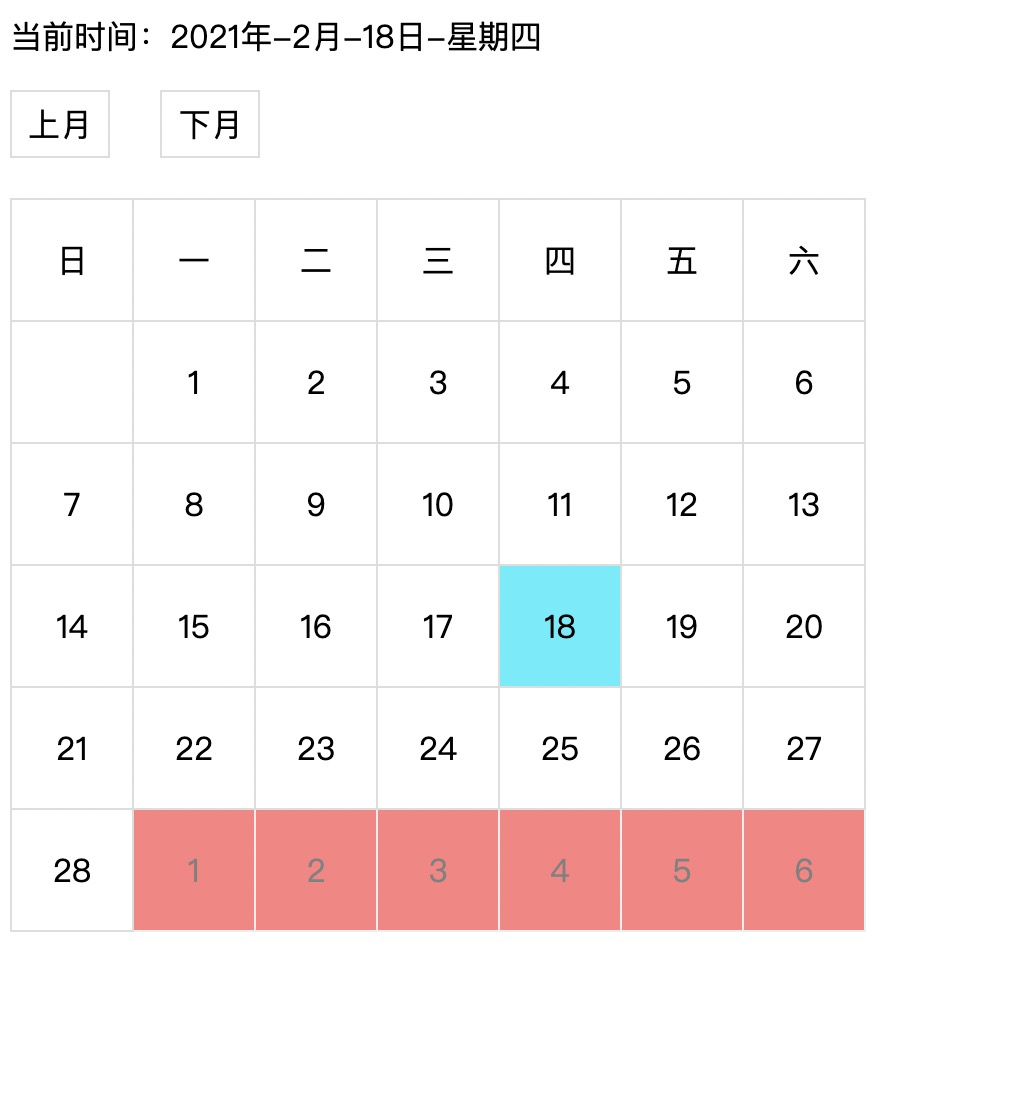
效果:
整体效果就是显示当天,下个月的日期半透明,上月下月切换,
评论
登录后参与技术讨论,分享你的经验与见解。
登录 / 注册暂无评论