npm+babel+webpack解决不能import问题

文章目录
引言
当自己从土里搭建起来一个网站,即使是最原始的那种网站,菜鸟如我也会遇到有许许多多琐碎又细小的问题。本篇幅记录关于代码转换和代码打包相关工作。
这两个问题主要的矛盾在于,之前我一直是用<script>来加载各类css,js,ico等文件的:
本地资源:
<link="icon" href="http://www.xxxxxxxxx.top/icon/icon.ico">
<link="stylesheet" href="http://www.xxxxxxxxx.top/css/globalStyle.css type="text/css">
<script src="http://www.xxxxxxxxx.top/node_modules/socket.io-client/dist/socket.io.js"></script>
各类cdn:
<script src="https://unpkg.com/react@16/umd/react.development.js" crossorigin></script>
<script src="https://unpkg.com/react-dom@16/umd/react-dom.development.js" crossorigin></script>

<script src="https://cdn.bootcss.com/react-router/5.0.1/react-router.min.js"></script>
<script src="https://cdn.bootcss.com/react-router-dom/5.0.1/react-router-dom.min.js"></script>

<script src="//cdn.jsdelivr.net/npm/leancloud-storage@3.15.0/dist/av-live-query-min.js"></script>有一天,有一些cdn崩了,导致网站没法用。我就想npm install到本地吧,然后用import加载各类文件。然后就遇到了各类问题,虽然最后解决方法看起来很简单,但过程很艰辛、费时间,要是不写一篇文章总感觉时间花的太不值了。一方面给未来的自己查看起来方便,一方面希望能给有幸看到这篇文章的小伙伴们节约点时间。
babel
因为网站用的React搭建的,React的jsx语法用起来很开心,但jsx需要翻译成js官方语法&浏览器认识的语法才能使用。React官网推荐使用Babel对jsx进行翻译。所以,那就Babel咯~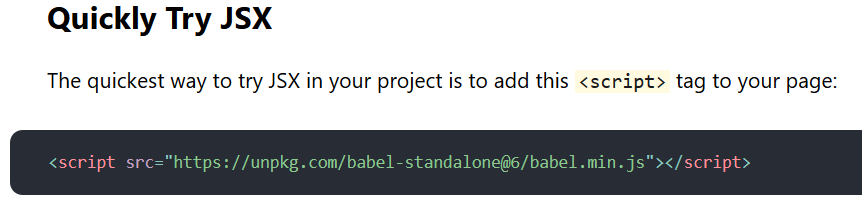

babel是什么
babel是一个JavaScript 编译器,它将各类不同版本的javascript语言标准翻译成你想要的版本。意思就是,最新版本的javascript语法,部分版本的浏览器不支持,需要转换成低版本的javascript语法,才能实现兼容。引用Babel官网的话:

Babel有这么几个主要的概念:Presets、Plugins、Config Files、Cli
Babel:Plugins
Plugins,插件,是Babel实现功能的主要模块。通过安装不同的插件,Babel可以实现不同的功能。
例如:
-
@babel/plugin-transform-arrow-functions:这个插件将
箭头函数:() => {}(ES6)转换成低版本的函数申明 -
@babel/plugin-transform-classes:这个插件将
class申明:class Heng extends Ha(){}(ES6)转换为低版本的函数申明和原型链 -
@babel/plugin-transform-modules-commonjs:这个插件将
import/export语法转换成commonjs标准的require/export -
@babel/plugin-transform-react-jsx:这个插件将
jsx语法转换成React.createElement()
Plugins的使用,你只需要通过npm install 插件名称安装一下,再通过配置文件+cli或者cli使用就ok了
Babel:Presets
Presets,预设,就是Babel将各类插件整合在一起,来提供一系列功能。
官方Presets:
-
@babel/preset-env:这个是最新
Babel-7版本出的预设,抛弃老版本繁乱的插件,这个预设通过配置能根据浏览器版本,将代码自动翻译成最适合的版本。 - @babel/preset-flow:这个我看不太懂
-
@babel/preset-react:这个是专为
React做的预设,能很好的将React简便写法翻译成React正经语法 -
@babel/preset-typescript:这个是转为
TypeScript做的预设,只包含一个插件
你也可以自己做一个Presets:
-
把插件用数组组起来,文件取名myPreset.js
module.exports = function() { return { plugins: [ "pluginA", "pluginB", "pluginC", ] }; } -
也可以引用其它Presets
module.exports = () => ({ presets: [ require("@babel/preset-env"), ], plugins: [ [require("@babel/plugin-proposal-class-properties"), { loose: true }], require("@babel/plugin-proposal-object-rest-spread"), ], }); -
在配置Config Files中引用,npm模块名或者相对路径
{
  "presets": ["babel-preset-myPreset"]
}
{ "presets": ["./myProject/myPreset"] }
Presets的使用,你只需要通过npm install 预设名称安装一下,再通过配置文件+cli或者cli使用就ok了
Babel:Usage
有很多方式使用Babel,这里就只介绍两种,因为我就会这两种😜
Babel:Usage:Config Files+Cli
通过配置文件可以配置Babel用什么插件、用哪种预设、设置环境变量、忽略某一文件夹等。菜鸟如我简单用用就设定用什么插件和用哪种环境变量就行了~
- 在
npm init的地方,手动新建文件babel.config.jsonorbabel.config.js或者.babelrc.json。关于两种区别,Babel官网相关部分是这样描述的: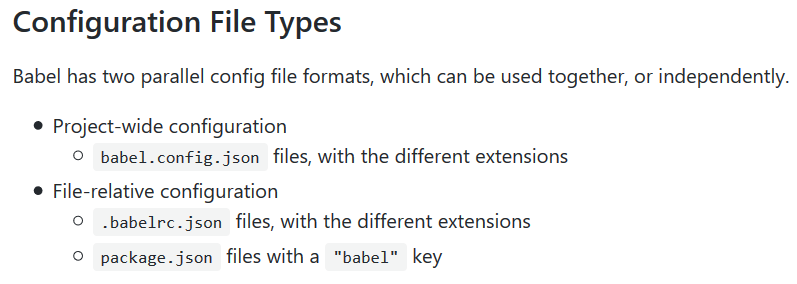
-
配置文件内容:
babel.config.json和.babelrc.json{ "presets": ["presetName1","presetName2"], "plugins": ["pluginName1","pluginName2"] }babel.config.jsmodule.exports = function (api) { api.cache(true); const presets = [ ... ]; const plugins = [ ... ]; return { presets, plugins }; } -
接下来是Cli部分,命令行中输入:
npx babel -w 原始文件地址/原始文件名 --out-file 输出文件地址/输出文件名-w表示监听,--out-file表示后面跟的是输出文件信息。命令执行后,会自动调用配置文件中的相关配置。
Babel:Usage:Cli
纯命令行模式使用
-
命令行中输入:
npx babel script.js --out-dir lib --watch --out-file script-compiled.js --source-maps --ignore "src/**/*.spec.js","src/**/*.test.js" --presets=@babel/preset-env,@babel/flow --plugins=@babel/proposal-class-properties,@babel/transform-modules-amd
其实就是将配置文件中的配置全移到命令行内实现,利用--watch、--presets、--plugins、--ignore、--source-maps等这样的命令行参数。参数具体含义可参考Babel官网相关内容。
webpack
为什么会用到webpack呢?是这样的。当我使用import加载模块名的时候,浏览器会报错
加载模块名:
import {HashRouter,Switch,Link,NavLink,Route,BrowserRouter} from "react-router-dom";报错:
Uncaught TypeError: Failed to resolve module specifier "react-router-dom". Relative references must start with either "/", "./", or "../"
当我使用import加载路径/文件名的时候,浏览器会报错
加载路径/文件名:
import React from "./node_module/react/index.js";报错:
Uncaught TypeError: Failed to resolve module specifier: "react"export 'default' was not found in "./node_module/react/index.js"
嘛~具体的报错内容不记得了,反正就是这个意思,浏览器总是会报错。如果使用Babel的智能翻译预设@babel/preset-env进行翻译后,Babel会将import都翻译成require,这样导致的结果还是浏览器报错:
翻译前:
import React from "react";翻译后:
var React = require("react");报错:
ReferenceError: require is not defined
经过费时的寻找解决方案,我只能通过打包工具对import和require进行处理。webpack那么火,那就用webpack吧~
webpack是什么
webpack就是JavaScript静态模块打包器(static module bundler)。它可以将各类资源import到一起,包括.css、.png、.xml、.js等文件,然后“打包”生成一个新的js文件。新文件仅包含依赖的文件,并且可文件压缩,还能代码压缩。
webpack有这么几个主要的概念:Entry、Output、Loaders、Plugins、Mode
Webpack: Usage
webpack的使用很简单。首先,创建一个配置文件webpack.config.js,然后,执行打包命令npx webpack。这样就会在你指定的目录下生成新的js文件,在你的html内引用这个js文件就ok了~
-
安装
npm install webpack webpack-cli --save-dev -
创建配置文件
const path = require('path'); module.exports = { entry: 入口文件, output: { path: 出口文件目录, filename: 出口文件名 }, module: { rules: [ 各类loader配置项 ] }, plugins: [各类插件名], }; -
使用
npx webpack
Webpack:Entry
Entry用于在配置文件中配置打包入口。意思就是从Entry开始,查找所有它的依赖,进行打包。常用格式如下:
module.exports = {
  entry: './path/to/my/entry/file.js'
};
Webpack:Output
Output用于在配置文件中配置打包后新文件的位置。常用格式如下:
const path = require('path');

module.exports = {
  entry: './path/to/my/entry/file.js',
  output: {
    path: path.resolve(__dirname, 'dist'),
    filename: 'my-first-webpack.bundle.js'
  }
};path表示输出文件的绝对路径,__dirname表示该配置文件所在的绝对路径,filename表示输出的新文件名,path.resolve()会将括号内的参数解析成一个完整的路径、当然用之前需要引入nodejs模块:const path = require('path');。如上述例子会打包输出到__dirname/dist/my-first-webpack.bundle.js
Webpack:Loaders
Loaders用以使webpack能够加载打包非js文件。所有的Loaders可以查看官网。常用格式如下:
const path = require('path');

module.exports = {
    entry: './path/to/my/entry/file.js',
    output: {
        path: path.resolve(__dirname, 'dist'),
        filename: 'my-first-webpack.bundle.js'
    },
    module: {
        rules: [
            {
                test: 文件名正则,
                use: [
                    "loader-name"
                ]
            }
        ]
    }
};
Webpack:Loaders:css
-
安装
npm install --save-dev style-loader css-loader -
修改配置文件
module: { rules: [ { test: /\.css$/, use: [ 'style-loader', 'css-loader' ] } ] } -
使用
import './style.css';
Webpack:Loaders:file
file-loader可用来加载图片或者文字或者其它文件类型。
-
安装
npm install --save-dev file-loader -
修改配置文件
module: { rules: [ { test: /\.css$/, use: [ 'style-loader', 'css-loader' ] }, { test: /\.(png|svg|jpg|gif)$/, use: [ 'file-loader' ] }, { test: /\.(woff|woff2|eot|ttf|otf)$/, use: [ 'file-loader' ] } ] } -
使用
入口文件:import './style.css';style.css:
@font-face {
    font-family: 'MyFont';
    src:  url('./my-font.woff2') format('woff2'),
          url('./my-font.woff') format('woff');
}

.hello {
    font-family: 'MyFont';
    background: url('./icon.png');
}
Webpack:Plugins
Plugins,插件,用于帮助webpack实现各种各样的功能。如下例子clean-webpack-plugin插件帮助清理文件夹,删除不需要的依赖文件。
-
安装
npm install clean-webpack-plugin --save-dev -
修改配置文件
const path = require('path'); const CleanWebpackPlugin = require('clean-webpack-plugin'); module.exports = { entry: './path/to/my/entry/file.js', plugins: [ new CleanWebpackPlugin(['dist']), ], output: { path: path.resolve(__dirname, 'dist'), filename: '[name].bundle.js', } }; - 进行打包命令
Webpack:Mode
mode用来在配置文件中指定环境:development&production。webpack在不同环境下会加载不同的插件和处理方式。
-
修改配置文件
module.exports = {
   mode: "production",
}
module.exports = { mode: "development", }
总结
我的目标是将<script>标签尽可能多的转换成代码内import。一方面减少加载各类<script>资源的时间,import资源都安装在服务器上,就只需要加载一个文件就ok了;一方面减少cdn不确定的因素。
曾经的资源加载方式:
<script src="https://cdn.bootcss.com/react/16.8.6/umd/react.production.min.js"></script>
<script src="https://cdn.bootcss.com/react-dom/16.8.6/umd/react-dom.production.min.js"></script> -->
<script src="https://cdn.bootcss.com/react-router/5.0.1/react-router.min.js"></script>
<script src="https://cdn.bootcss.com/react-router-dom/5.0.1/react-router-dom.min.js"></script>
<script src="http://www.dogcatpig.top/js_rely/babel_min_6.26.0.js"></script>上面babel不需要import,安装预设@babel/preset-react、新建配置文件babel.config.json后、用命令npx babel -w 原始文件地址/原始文件名 --out-file 输出文件地址/输出文件名输出翻译后文件。
但是,其它的资源虽然import/export已经是javascript语言标准了,但用起来还是不行。所以需要webpack,webpack不仅能处理import/export & require/export,还能将各种资源打包到一个js文件中,极大的减少网站加载时间。亲测如果没缓存,至少减少一半时间,有缓存2毫秒左右。用法也很简单,安装你想要的loaders & plugins,新建配置文件webpack.config.js,用命令npx webpack输出。

😊文中配置文件均放置在package.json同目录😊
评论
登录后参与技术讨论,分享你的经验与见解。
登录 / 注册暂无评论