原来DOM还有toggleAttribute这样的JS API

文章目录
一、悄无声息新API
DOM元素的属性设置API包括:setAttribute(name, value)、getAttribute(name)、hasAttribute(name)、removeAttribute(name)。
都是非常常用的API,然后我一直以为设置属性的DOM API就这几个。
然而,偶然间,我突然发现,不知道什么时候起,各大现代浏览器均支持了一个全新的与DOM属性相关的API toggleAttribute(name [, force])。
我去caniuse上搜了下,无论是Edge,Chrome,Firefox还是Safari浏览器,均是2018年第4季度开始支持的,像是约好了一样。
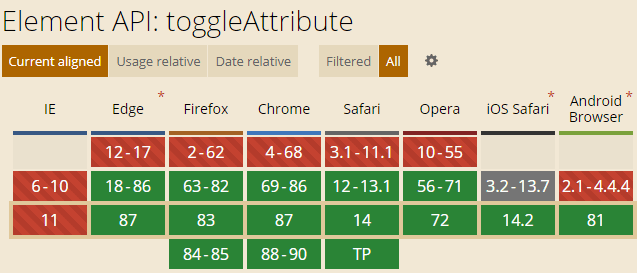
真的就是悄无声息就出现的,想想,DOM API还真是可悲,浏览器支持了无人问津,在前端圈子里没有荡起一丝涟漪;而JS新的语法糖浏览器支持了,圈子里欢呼雀跃,文章飞起。用一幅图表示就像是这样:

二、HTML逻辑属性设置专家
toggleAttribute()是HTML元素中控制逻辑属性的不二之选。
HTML中常见的逻辑属性有:disabled、readonly、selected、checked、open(<dialog>、<details>元素使用)、novalidate(<form>元素使用)、required、reversed(<ul>、<ol>元素使用)等。
在过去,添加一个布尔属性,我们都是使用类似下面的JS代码:
dialog.setAttribute('open', '');
删除一个布尔属性值则是使用:
dialog.removeAttribute('open');
而toggle切换一个布尔属性值,则需要JS先判断当前属性的布尔状态,然后再选择是setAttribute还是removeAttribute,还是很啰嗦的。
现在,有了toggleAttribute()方法,所有的布尔属性的操作全部都只需要1个API就搞定了。
举例说明
例如,添加一个布尔属性,可以这样设置:
dialog.toggleAttribute('open', true);
删除一个布尔属性,也可以直接使用toggleAttribute方法:
dialog.toggleAttribute('open', false);
而切换一个布尔属性值,则更像是toggleAttribute()方的本职工作了:
// 如果原来有open属性,则移除;没有open属性则添加
dialog.toggleAttribute('open');
一个API方法通杀,代码大大简化,实用至极。
三、语法、参数和实例
toggleAttribute()方法的语法如下所示:
Element.toggleAttribute(name [, force]);
其中:
name
需要切换显示的布尔属性名称,可以是自定义的规范中没有的属性。例如:
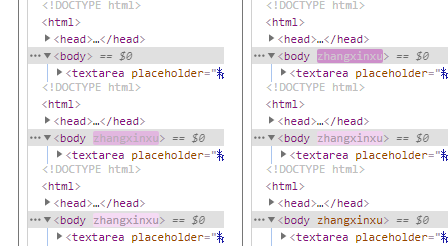
document.body.toggleAttribute('zhangxinxu');
就会有如下截图所示的效果,会看到<body>元素上多了个'zhangxinxu'的属性。
force
布尔值。true的话就是强制设置该属性为true,也就是添加该属性;false的话则表示移除该布尔属性。
当我们希望知道执行toggleAttribute()方法后,元素到底有没有该属性,则可以使用toggleAttribute()方法的返回值。
返回值
let isHasAttribute = Element.toggleAttribute(name);
如果toggleAttribute()方法执行是添加属性,则isHasAttribute值是true,否则就是false。
实例
简单的实例示意下toggleAttribute的使用,相关代码如下所示:
<input id="input"> <button id="button" value="启用">禁用</button>
button.addEventListener('click', _ => {
input.toggleAttribute('disabled');});
实现的效果如下所示:
其中,点击按钮的文字变化是通过CSS选择器控制的:
/ 按钮文字变化 /
:disabled ~ button {
-webkit-text-fill-color: transparent;}
:disabled ~ button::before {
position: absolute;
content: attr(value);
-webkit-text-fill-color: currentColor;
}
四、Polyfill与结束语
由于toggleAttribute还算比较新,出道到现在才2年时间,还算新人,因此,目前在对外的大型项目中直接使用还不太合适,不过,不要担心,引入一段小小的Polyfill代码就可以万事大吉了。
下面这段Polyfill代码源自MDN文档:
if (!Element.prototype.toggleAttribute) {
Element.prototype.toggleAttribute = function(name, force) {
if(force !== void 0) force = !!force

if (this.hasAttribute(name)) {
  if (force) return true;

  this.removeAttribute(name);
  return false;
}
if (force === false) return false;

this.setAttribute(name, "");
return true;
};
}
这段代码放在业务代码前面任意位置都可以。
—
评论
登录后参与技术讨论,分享你的经验与见解。
登录 / 注册暂无评论