springboot+mysql实现登录次数限制

文章目录
需求
实现登录限制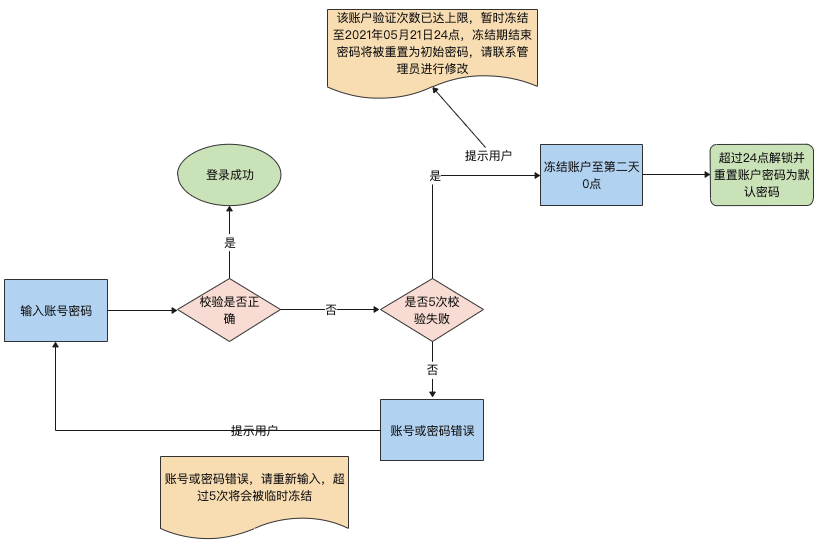
实现
后端新手,借助数据库实现了这么一个功能。具体实现思路如下:
1.思路
1.1 锁定账户
验证用户输错密码次数,记录错误次数,当次数超过规定数字后,给该账户设置锁定状态,并设置锁定时间(当天的24点)
这样当用户每次登陆的时候先验证下是否锁定,再处理其他业务
1.2 解锁账户
解锁的方法比较简单,当用户再次登录时,用当前时间去和锁定状态下的锁定时间进行比对,大于锁定时间就进行解锁,并重置锁定时间为null,锁定状态
2.改造表
在原有的user表新增字段
lock_status: 账户锁定状态 默认0未锁定 1已锁定lock_time: 记录锁定截止时间 默认nullerror_num: 记录密码验证错误次数 默认0lock_num: 允许的错误次数(默认5),这里写在数据库里是为了后期方便修改,而没有写在代码里
3. UserDO
@Data
public class UserDO {
    private int id;
    private String username;
    @JSONField(serialize = false)
    private String password;
    private int lock_status;
    private Timestamp lock_time;
}
4.LoginMapper
@Mapper
public interface LoginMapper {

    UserDO login(Map params);
    void setLockNum(Map params);
    void setLockTime(Map params);
    UserDO getLockStatus(Map params);
    void resetLockStatus(Map params);
}
5.LoginService
public interface LoginService {
    Result login(Map params);
}
6.LoginServiceImpl
public class LoginServiceImpl implements LoginService {
    @Autowired
    LoginMapper loginMapper;

    @Override
    public Result login(Map params) {
        UserDO res = loginMapper.login(params);
        UserDO lockStatus = loginMapper.getLockStatus(params);
        if(lockStatus!=null && lockStatus.getLock_status()==1){
            Date date = new Date();
            if(lockStatus.getLock_time() == null){
                System.out.println("--------⏰⏰⏰⏰⏰----------");
                System.out.println("锁定时间为空,设置锁定时间");
                System.out.println("--------⏰⏰⏰⏰⏰----------");
                loginMapper.setLockTime(params);
            }else{
                if(date.getTime() > lockStatus.getLock_time().getTime()){
                    System.out.println("-------🔑🔑🔑🔑🔑-----------");
                    System.out.println("锁定时间失效,清空锁定状态");
                    System.out.println("-------🔑🔑🔑🔑🔑-----------");
                    loginMapper.resetLockStatus(params);
                    UserDO freshmen = loginMapper.login(params);
                    return allResult(params, freshmen);
                } else {
                    System.out.println("-------🔓🔓🔓🔓🔓-----------");
                    System.out.println("锁定状态中");
                    System.out.println("-------🔓🔓🔓🔓🔓-----------");
                }
            }
            String time = UtilFun.formatTime("yyyy年MM月dd日").format(date);
            return new Result(false, 40001, "失败", "该账户验证次数已达上限,暂时冻结至" + time + "24点,冻结期结束密码将被重置为初始密码,请联系管理员进行修改");
        }else return allResult(params, res);
    }

    private Result allResult(Map params, UserDO res) {
        if(res == null){
            System.out.println("--------❌❌❌❌----------");
            System.out.println("用户名或密码错误");
            System.out.println("--------❌❌❌❌----------");
            loginMapper.setLockNum(params);
            return new Result(false, 40001, "失败", "账号或密码错误,请重新输入,超过5次将会被临时冻结");
        }else{
            System.out.println("-------✅✅✅✅✅-----------");
            System.out.println("用户名或密码");
            System.out.println("-------✅✅✅✅✅-----------");
            return new Result(true, 20000, "成功", res);
        }
    }
}
7.sql
<select id="login" resultType="com.zdxf.domain.UserDO">
select *
from fenghuang_cmda.sys_user
<where>
username = #{username}
and
password = #{password}
and
lock_status = 0
</where>
</select>
<select id="getLockStatus" resultType="com.zdxf.domain.UserDO">
select *
from fenghuang_cmda.sys_user
<where>
username = #{username}
</where>
</select>
<update id="setLockNum">
update fenghuang_cmda.sys_user
set lock_status = (case when error_num = lock_num + 1 then 1 else 0 end),
error_num =(case when error_num < lock_num then error_num + 1 else 5 end)
<where>
username = #{username}
</where>
</update>
<update id="setLockTime">
update fenghuang_cmda.sys_user
set lock_time = DATE_FORMAT(now(),'%Y-%m-%d 23:59:59')/*date_add(now(), interval + 5 minute)*/
<where>
username = #{username}
</where>
</update>
<update id="resetLockStatus">
update fenghuang_cmda.sys_user
set lock_time = null,error_num=0,lock_status=0,password = 'af14a24b93d61df48ee08514cf92c4c5'
<where>
username = #{username}
</where>
</update>
评论
登录后参与技术讨论,分享你的经验与见解。
登录 / 注册暂无评论