Vue项目添加ElementUI
文章目录
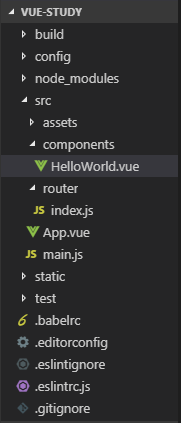
1. 在上一篇,搭建环境,创建vue项目目录结构如下:
编写工具,本人推荐:Visual Studio Code
)
2. 进入到项目文件夹,执行加载element-ui组件命令:
npm i element-ui -S
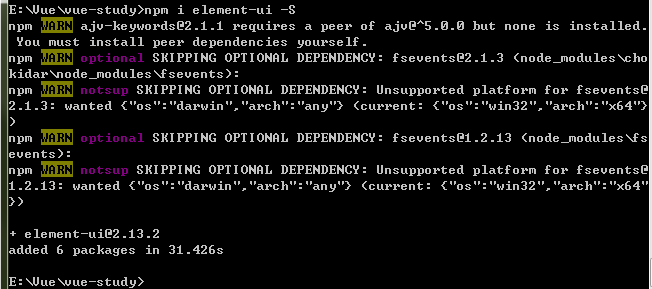
3. 在main.js代码里添加对element-ui的引用:
import ElementUI from 'element-ui' import 'element-ui/lib/theme-chalk/index.css' Vue.use(ElementUI);)
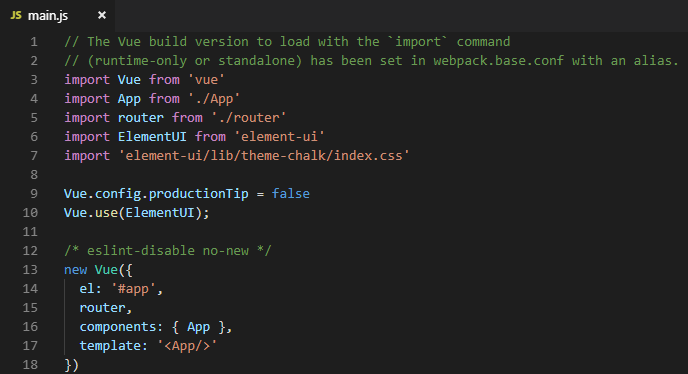
4. 在项目里使用element-ui控件
components/HelloWorld.vue文件(注意:vue模板只能有一个根对象)
<template>
  <div>
    <el-row>
      <el-button>默认按钮</el-button>
      <el-button type="primary"\>主要按钮</el-button>
      <el-button type="success"\>成功按钮</el-button>
      <el-button type="info"\>信息按钮</el-button>
      <el-button type="warning"\>警告按钮</el-button>
      <el-button type="danger"\>危险按钮</el-button>
    </el-row>
  </div>
</template>
效果如下(main.js 默认的图片及文字我已去掉):
)
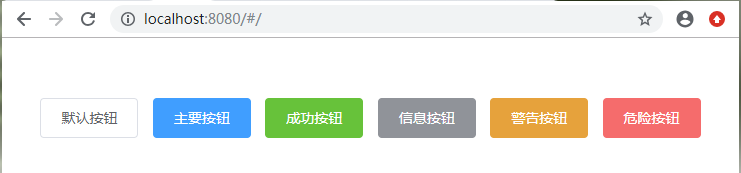
至此,element-ui已经成功引入vue项目,vue组件的使用详细操作,请参考vue官方使用文档:
https://element.eleme.cn/#/zh-CN/component/installationVue系统文章会持续更新,欢迎大家继续关注!!!
本文转自 https://www.cnblogs.com/zmoneyz/p/12993006.html,如有侵权,请联系删除。
评论
登录后参与技术讨论,分享你的经验与见解。
登录 / 注册⭐️ Admin快速开发: https://show.cool-admin.com/
赞 0⭐️ 官方文档: https://cool-js.com
赞 0⭐️ chatgpt在线体验: https://cool-js.com/ai/chat-vip/index.html?r=helloworld
赞 0