函数计算如何访问 SQL Server 数据库

文章目录
函数计算(Function Compute):函数计算是事件驱动的全托管计算服务。使用函数计算,您无需采购与管理服务器等基础设施,只需编写并上传代码。函数计算为您准备好计算资源,弹性地可靠地运行任务,并提供日志查询、性能监控和报警等功能。借助函数计算,您可以快速构建任何类型的应用和服务,并且只需为任务实际消耗的资源付费。
访问 SQL Server 数据库是指在函数计算中通过编写代码调用数据库驱动库通过 TCP 协议实现对数据库进行的插入、查询等操作。通常函数计算中运行的不同函数实例之间是不共享状态的,对于结构化的数据可以通过数据库的形式进行持久化以实现状态共享。由于用户函数运行在函数计算的 VPC 中,而用户的数据库运行在用户所属的 VPC 中,所以在函数计算平台访问数据库会涉及到跨 VPC 访问的场景,下面我们先来介绍一下其工作机制。
工作机制
访问 SQL Server 的原理、工作机制与访问 Mysql 数据库完全相同,本文不再重复阐述,更详细的内容请参考访问 Mysql 数据库中的工作机制章节。
配置与函数编写
公共配置
创建专有网络VPC
创建安全组
在安全组控制台新建安全组,点击创建安全组,设置安全组名称,网络类型选择专有网络,并选择刚才创建的专有网络。
创建与配置 SQL Server 实例
- 创建适合业务需求的云数据库 SQL Server 版实例可以参考云数据库 SQL Server 版。
注意:创建云数据库 SQL Server 版实例需要选择和函数计算配置相同的 VPC 实例,可以配置和函数计算不同的可用区的交换机,因为相同的 VPC 实例下不同可用区交换机内网是互通的。
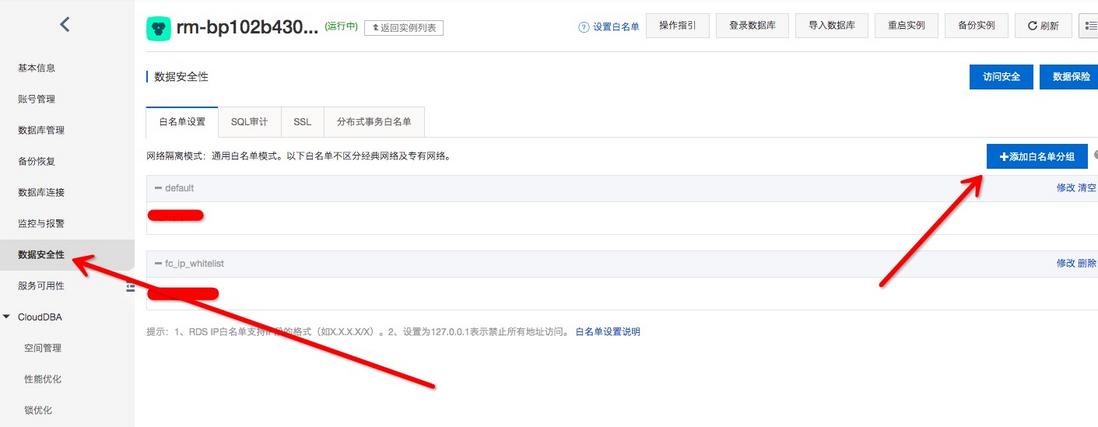
- 创建成功后,在实例信息页面左侧的导航栏中单击数据安全性。
- 单击添加白名单分组。
-
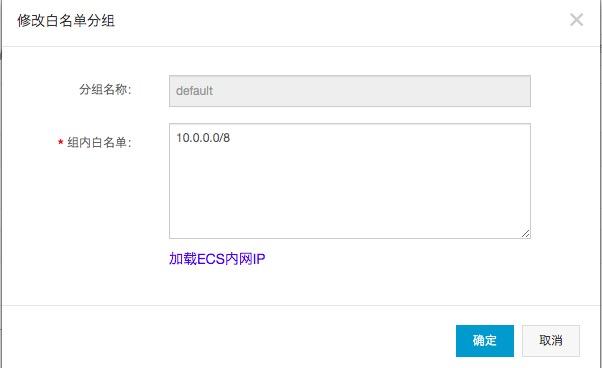
在弹出的对话框中,将函数计算所在的 VPC 网络的网段地址配置在白名单输入框中。
- 登录VPC 控制台,在专有网络列表中找到应用所在的 VPC,单击该 VPC 的名称进入专有网络详情页面。
- 复制应用所在的 VPC 的IPv4 网段。

- 在组内白名单设置框中粘贴该 VPC 的IPv4 网段地址,然后单击确定。
- 最后访问 SQL Server 数据库 host 为实例的内网地址,可以登录阿里云控制台查看:

函数计算配置 VPC
注意:函数计算服务所在区域与公共配置中创建的资源所在区域一致。
-
在函数计算控制台创建服务。
- 创建服务步骤请参考文章服务的增删改查
- 【专有网络配置】选项中,选择您在步骤一中创建的 VPC 网络,交换机、安全组。
-
【权限配置】选项中,选择【新建角色】,点击【点击授权】,在角色快速创建页面,点击【同意授权】。
- 这步的操作是授予函数计算对 ENI 的操作权限,函数计算访问 VPC 中资源需要的权限请参考文章配置函数计算访问 VPC 内的资源
- 点击确定,新建服务完毕。
函数编写与调试
下面演示 Python3 与 php7.2 开发语言访问 SQL Server 数据库函数示例创建:
使用Fun工具在建立存放代码和依赖模块目录下安装依赖和项目部署。
Python3
-
建立一个目录,用于存放代码和依赖模块,在该目录下新建 template.yml 文件,例如 /tmp/code/template.yml,内容为:
ROSTemplateFormatVersion: '2015-09-01'
Transform: 'Aliyun::Serverless-2018-04-03'
Resources:
SQL-Server-test:
Type: 'Aliyun::Serverless::Service'
Properties:
  Description: This is SQL-Server service
  Role: 'acs:ram::xxxxx:role/fc-public-test'
  LogConfig:
    Project: xxx
    Logstore: xxx
  VpcConfig:
    VpcId: vpc-xxx
    VSwitchIds:
SecurityGroupId: sg-xxx
InternetAccess: true
python-test:
Type: 'Aliyun::Serverless::Function'
Properties:
Handler: 'index.handler'
Runtime: python3
Timeout: 10
MemorySize: 128
CodeUri: './'
```

-
在该目录下创建 Funfile 文件内容为:
RUNTIME python3 RUN fun-install pip install pymssql -
执行
fun install命令安装依赖:$ fun install using template: template.yml start installing function dependencies without docker 安装过程。。。。 Install Success -
在函数根目录下新建代码文件,例如 /tmp/code/index.py:
# -*- coding: utf-8 -*- import pymssql def handler(event, context): conn = pymssql.connect(host='rm-xxx.sqlserver.rds.aliyuncs.com', user='xxx, password='xxx', database='xxx', charset='utf8') cursor = conn.cursor() cursor.execute('SELECT * FROM inventory WHERE quantity > 152') result = '' for row in cursor: result += 'row = %r\n' % (row,) conn.close() return result -
使用 fun 工具部署:
$ fun deploy
using template: template.yml
using region: cn-hangzhou
using accountId: ***********3743
using accessKeyId: ***********Ptgk
using timeout: 60

部署过程。。。
        function python-test deploy success
service SQL-Server-test deploy success
登录控制台,即可看到相关的服务、函数被创建成功,且触发执行可以返回正确的结果。
PHP7.2
-
建立一个目录,用于存放代码和依赖模块,在该目录下新建 template.yml 文件,例如 /tmp/code/template.yml,内容为:
ROSTemplateFormatVersion: '2015-09-01'
Transform: 'Aliyun::Serverless-2018-04-03'
Resources:
  SQL-Server-test:
    Type: 'Aliyun::Serverless::Service'
    Properties:
      Description: This is SQL-Server service
      Role: 'acs:ram::xxx:role/fc-public-test'
      LogConfig:
        Project: xxx
        Logstore: xxx
      VpcConfig:
        VpcId: vpc-xxx
        VSwitchIds:
SecurityGroupId: sg-xxx
InternetAccess: true
php-test:
Type: 'Aliyun::Serverless::Function'
Properties:
Handler: 'index.handler'
Runtime: php7.2
Timeout: 10
MemorySize: 128
CodeUri: './'
EnvironmentVariables:
ODBCINI: /code/.fun/root/etc/odbc.ini
ODBCSYSINI: /code/.fun/root/opt/microsoft/msodbcsql17/etc
```

-
在该目录下创建 Funfile 文件内容为:
RUNTIME php7.2 RUN apt-get update && apt-get install -y apt-transport-https apt-utils RUN curl https://packages.microsoft.com/keys/microsoft.asc | apt-key add - RUN curl https://packages.microsoft.com/config/debian/8/prod.list > /etc/apt/sources.list.d/mssql-release.list RUN fun-install apt-get install unixodbc-dev RUN fun-install apt-get install msodbcsql17 -
执行
fun install命令安装依赖:$ fun install using template: template.yml start installing function dependencies without docker 安装过程。。。。 Install Success -
在函数根目录下新建代码文件,例如 /tmp/code/index.php:
<?php function handler($event, $context) { try { $conn = new PDO("sqlsrv:Server=rm-xxx.sqlserver.rds.aliyuncs.com;Database=xxx","xxx","xxx"); // set the PDO error mode to exception $conn->setAttribute(PDO::ATTR_ERRMODE, PDO::ERRMODE_EXCEPTION); $conn->query("set names utf-8"); $sql="SELECT * FROM inventory WHERE quantity > 152"; $result = $conn->prepare($sql); $result->execute(); print($result); return ("Connection successed."); } catch (PDOException $e) { return ("Connection failed: " . $e->getMessage()); } } -
使用 fun 工具部署:
$ fun deploy
using template: template.yml
using region: cn-hangzhou
using accountId: ***********3743
using accessKeyId: ***********Ptgk
using timeout: 60

部署过程。。。
        function php-test deploy success
service SQL-Server-test deploy success
登录控制台,即可看到相关的服务、函数被创建成功,且触发执行可以返回正确的结果。
-
注意事项
- 创建的函数需要设置两个环境变量:
ODBCINI: /code/.fun/root/etc/odbc.ini
- 创建的函数需要设置两个环境变量:
ODBCSYSINI: /code/.fun/root/opt/microsoft/msodbcsql17/etc
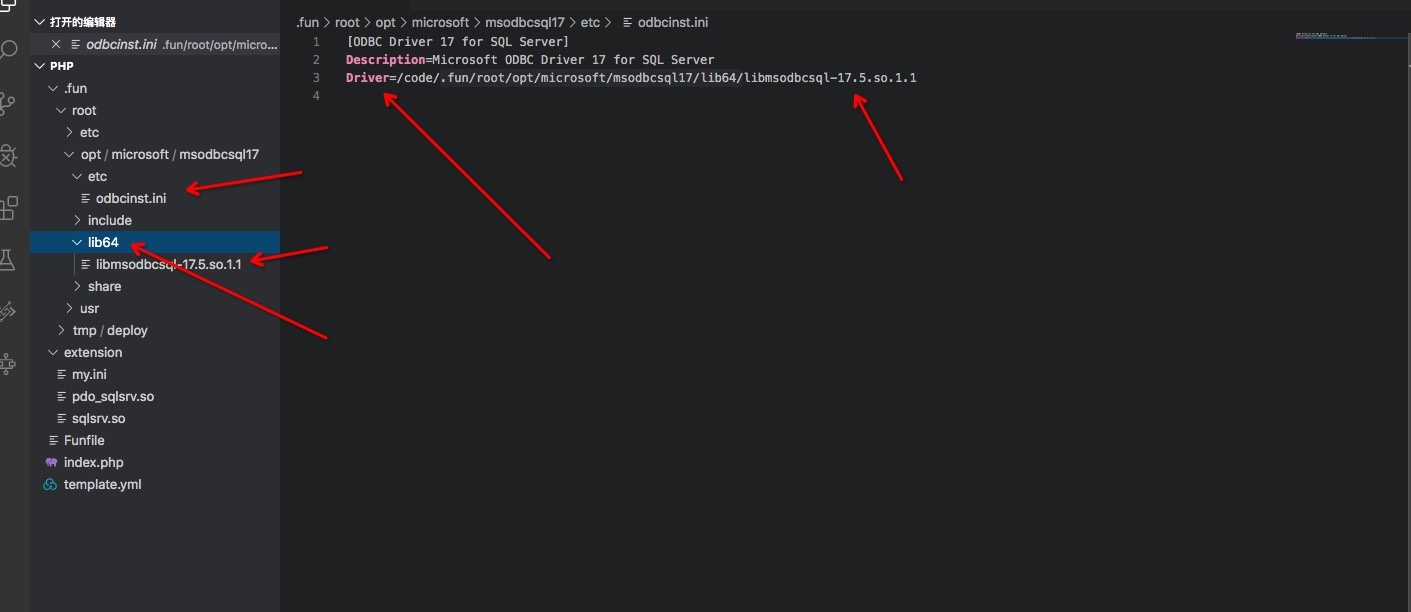
1. 执行`fun install`命令安装依赖后,修改 .fun/root/etc/odbc.ini 文件中 Driver 值指向.fun/root/opt/microsoft/msodbcsql17/lib64/目录下的文件,如图!
2. php环境中需要使用 pdo\_sqlsrv 扩展编译可以参考[函数计算 php runtime 编译非内置的扩展](https://statistics.functioncompute.com/?title=Serverless%20%E8%A7%A3%E6%83%91%E2%80%94%E2%80%94%E5%87%BD%E6%95%B0%E8%AE%A1%E7%AE%97%E5%A6%82%E4%BD%95%E8%AE%BF%E9%97%AE%20SQL%20Server%20%E6%95%B0%E6%8D%AE%E5%BA%93&author=%E7%94%B0%E5%B0%8F%E5%8D%95&src=&url=https%3A%2F%2Fyq.aliyun.com%2Farticles%2F686367)文档最后可以下载已经编译好的 pdo\_sqlsrv 扩展。
总结
通过本文介绍可以快速实现函数计算访问 SQL Server 数据库。
使用函数计算带来的优势:
- 无需采购和管理服务器等基础设施,只需专注业务逻辑的开发,可以大幅缩短项目交付时间和人力成本;
- 提供日志查询、性能监控、报警等功能快速排查故障;
- 免运维,毫秒级别弹性伸缩,快速实现底层扩容以应对峰值压力,性能优异;
- 成本极具竞争力;
查看更多:https://yqh.aliyun.com/detail..._content=g_1000106110
上云就看云栖号:更多云资讯,上云案例,最佳实践,产品入门,访问:https://yqh.aliyun.com/
评论
登录后参与技术讨论,分享你的经验与见解。
登录 / 注册暂无评论