JeecgBoot集成宝兰德CacheDB

文章目录
BES CacheDB介绍
BES CacheDB (简称BCD)是一款宝兰德自研的分布式高性能KV存储数据库,可完全兼
容Redis协议标准,支持基于内存和文件的持久化存储,保证数据的安全可靠。主要解决高并发、
大数据量场景下的数据访问性能问题,具有高性价比、高可靠、弹性伸缩、高可用等特点。
BCD部署(单机)
本文采用单节点部署模式,生产环境请使用集群部署方式。
单节点部署
- 1、获取
BCD发行版打包文件以及license文件,并上传至服务器。 2、解压部署包,进入
bin目录。# cd /opt/cacheServer/master/ # tar -zxvf CACHESERVER-3.1.0-RHEL6-X64.tar.gz # CACHESERVER-3.1.0-RHEL6-X64/bin/3、执行命令:
./initstore初始化存储。# ./initstore4、执行命令
./startManagement启动管理中心。# ./startManagement Starting BES Cache Server... More information refer to server log (default:/opt/cacheServer/master/CACHESERVER-3.1.0-RHEL6-X64/logs/server.log) [root@VM-16-8-opencloudos bin]# tail -f ../logs/server.log ##|2023-12-25 16:42:08.793|INFO|server|_ThreadID=42;_ThreadName=DeploymentService-deployment-on-startup|Creating Resource(id=comp/DefaultContextService)|## ##|2023-12-25 16:42:09.088|INFO|deployment|_ThreadID=42;_ThreadName=DeploymentService-deployment-on-startup|Assembling app: /opt/cacheServer/master/CACHESERVER-3.1.0-RHEL6-X64/server/lib/system/apps/sysapp|## ##|2023-12-25 16:42:09.822|INFO|com.bes.enterprise.appserver.snapshot.auto.AutoSnapshotFactory|_ThreadID=42;_ThreadName=DeploymentService-deployment-on-startup|The auto snapshot service configuration was not found, it will be ignored.|## ##|2023-12-25 16:42:09.861|INFO|web|_ThreadID=42;_ThreadName=DeploymentService-deployment-on-startup|Loading application sysapp at [/sysapp].|## ##|2023-12-25 16:42:09.862|INFO|deployment|_ThreadID=42;_ThreadName=DeploymentService-deployment-on-startup|Started Application(path=sysapp)|## ##|2023-12-25 16:42:10.118|INFO|configuration|_ThreadID=42;_ThreadName=DeploymentService-deployment-on-startup|Configuring enterprise application: /opt/cacheServer/master/CACHESERVER-3.1.0-RHEL6-X64/system/console|## ##|2023-12-25 16:42:13.617|INFO|deployment|_ThreadID=42;_ThreadName=DeploymentService-deployment-on-startup|Assembling app: /opt/cacheServer/master/CACHESERVER-3.1.0-RHEL6-X64/system/console|## ##|2023-12-25 16:42:14.140|INFO|web|_ThreadID=42;_ThreadName=DeploymentService-deployment-on-startup|1 Spring WebApplicationInitializers detected on classpath|## ##|2023-12-25 16:42:14.535|INFO|web|_ThreadID=42;_ThreadName=DeploymentService-deployment-on-startup|At least one JAR was scanned for TLDs yet contained no TLDs. Enable debug logging for this logger for a complete list of JARs that were scanned but no TLDs were found in them. Skipping unneeded JARs during scanning can improve startup time and JSP compilation time.|## ##|2023-12-25 16:42:14.546|INFO|web|_ThreadID=42;_ThreadName=DeploymentService-deployment-on-startup|Initializing Spring root WebApplicationContext|## ##|2023-12-25 16:42:25.847|INFO|web|_ThreadID=42;_ThreadName=DeploymentService-deployment-on-startup|Loading application console at [/console].|## ##|2023-12-25 16:42:25.847|INFO|deployment|_ThreadID=42;_ThreadName=DeploymentService-deployment-on-startup|Started Application(path=console)|## ##|2023-12-25 16:42:26.531|INFO|web|_ThreadID=1;_ThreadName=main|Started compress log service.|## ##|2023-12-25 16:42:26.531|INFO|web|_ThreadID=1;_ThreadName=main|Server startup in 18584 ms|## ##|2023-12-25 16:42:26.676|INFO|web|_ThreadID=17;_ThreadName=Thread-3|Using a shared selector for servlet write/read|##- 5、 打开浏览器,通过
http://ip:4900/console访问管理中心控制台。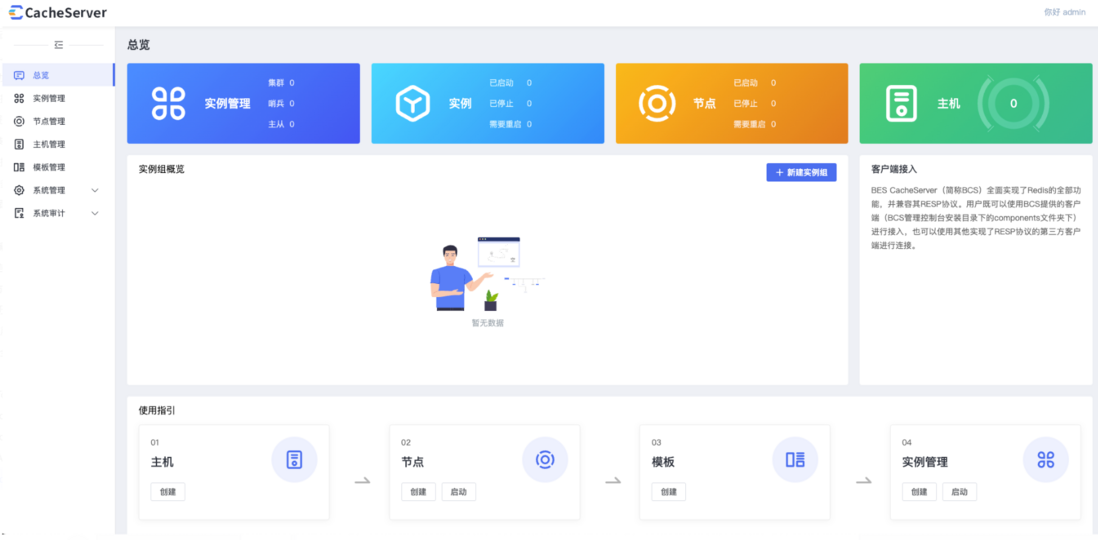
- 6、点击节点管理,新建节点

- 7、点击实例管理,新增实例组
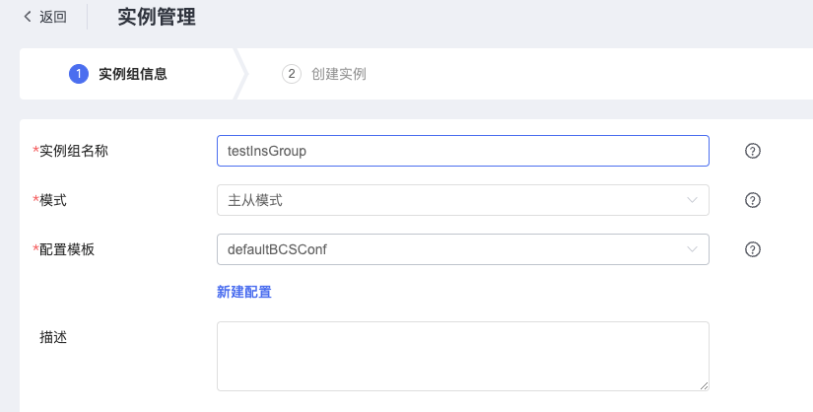
- 8、配置实例端口和访问密码

- 9、返回实例管理,点击启动,启动实例组
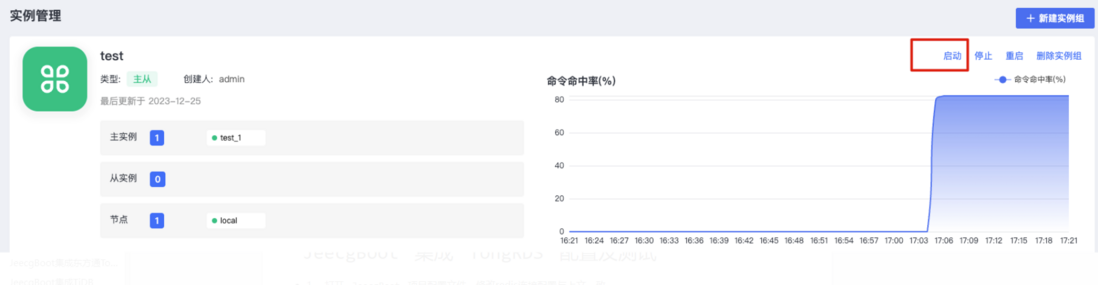
JeecgBoot集成TongRDS配置及测试
- 1、 打开
JeecgBoot项目配置文件,修改redis连接配置与上文一致。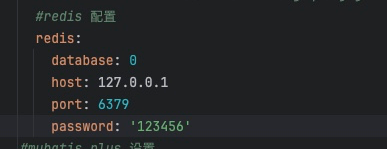
- 2、启动项目,项目成功启动未报错。
- 3、启动前端项目,并访问登录,未见异常。
- 4、使用
Redis客户端工具连接BCD查看。缓存数据已正常存入BCD中。
至此JeecgBoot集成BES CacheDB完成。
评论
登录后参与技术讨论,分享你的经验与见解。
登录 / 注册暂无评论