mysql安装在指定目录

文章目录
mysql安装在指定目录
1、版本:mysql-5.7.20-1.el7.x86_64.rpm-bundle.tar
安装依赖
\# yum remove mariadb-libs //删除 mariadb相关内容\# yum install perl
\# yum install numactl
\# yum install libaio
\# yum install net-tools
解压mysql安装包
\# tar -xvf mysql-5.7.20-1.el7.x86_64.rpm-bundle.tar
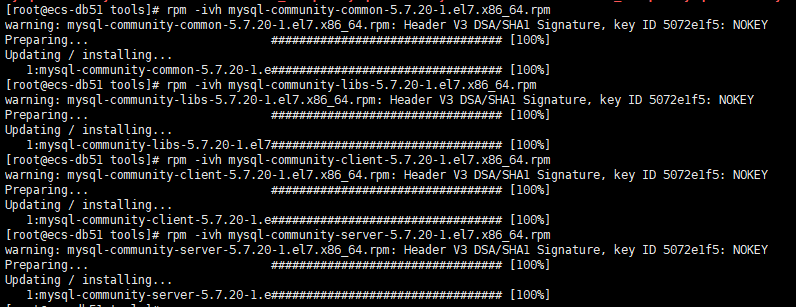
安装
\# rpm -ivh commom ---- lib ------- client-------server
按顺序逐一安装完成
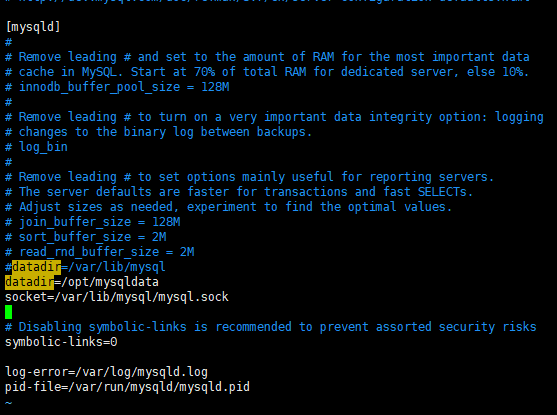
修改数据地址
\# vim /etc/my.cnf
SELINUX设置
\# vim /etc/selinux/config
把SELINUX的参数修改成disabled即可:

创建数据存放目录
\# mkdir /opt/mysqldata
目录授权
\# chown -R mysql:mysq /opt/mysqldata
启动数据库
\# systemctl start mysqld.service
查看临时密码
\# grep 'temporary password' /var/log/mysqld.log
登录修改密码
\# mysql -uroot -p

alter user root@localhost identified by ‘root123’use mysql
create user 'root'@'%' identified by 'root123';
flush privileges;
grant all on . to 'root'@'%' identified by 'root123';
flush privileges;
评论
登录后参与技术讨论,分享你的经验与见解。
登录 / 注册暂无评论