git-Delete `␍` eslint(prettier/prettier)问题解决

文章目录
问题描述
Delete ␍ eslint(prettier/prettier),问题如下图所示: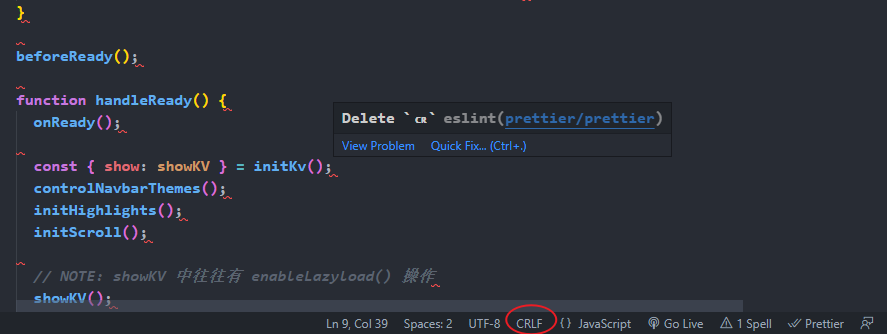
同事用的mac(系统换行符为LF),本人用的windows系统(换行符为CRLF),代码仓库中的换行符为LF。在 git clone 过程,git将所有文件换行符(LF)更换成本地换行符(CRLF)了,而 eslint 检查工具要求换行符为 LF ,因此有了上图的报错。
解决方法
在任意位置的命令行窗口中输入以下命令:
git config --global core.autocrlf false
git config --global core.eol lf
将 git 的 autocrlf 功能设置为 false,并把 eol(end of line)设置为lf,再重新clone一下代码就可以啦
拓展
git config的官网介绍: https://git-scm.com/docs/git-...
我们主要看这么几段内容就行了:
core.eol
Sets the line ending type to use in the working directory for files that are marked as text (either by having the text attribute set, or by having text=auto and Git auto-detecting the contents as text). Alternatives are lf, crlf and native, which uses the platform’s native line ending. The default value is native. See gitattributes[5] for more information on end-of-line conversion. Note that this value is ignored if core.autocrlf is set to true or input.
core.autocrlf
Setting this variable to "true" is the same as setting the text attribute to "auto" on all files and core.eol to "crlf". Set to true if you want to have CRLF line endings in your working directory and the repository has LF line endings. This variable can be set to input, in which case no output conversion is performed.
大概意思是:
1) core.eol 有三个选项:lf,crlf,native(默认),特别要注意,当core.autocrlf设置为true或input情况下,core.eol配置会被忽略;
2) core.autocrl 有三个选项:true,false,input;至于这三个选项的准确含义,官网上并没有明确写出,我这里引用 Stack Overflow 上的一个高赞回答作为参考:(https://stackoverflow.com/que...)
core.autocrlf=true:      core.autocrlf=input:     core.autocrlf=false:

        repo                     repo                     repo
      ^      V                 ^      V                 ^      V
     /        \               /        \               /        \
crlf->lf    lf->crlf     crlf->lf       \             /          \
/ \ / \ / \true:git clone过程中 git 会自动将所有文件的lf转换为crlf;git push过程中,将所有crlf转换为lf;input:git clone过程中不做任何转换,git push过程中将所有crlf转换为lf;false:git clone和git push两个过程中都不转换;
评论
登录后参与技术讨论,分享你的经验与见解。
登录 / 注册暂无评论