【修炼内功】[spring-framework][1]Resource

文章目录
本文已收录【修炼内功】跃迁之路

阅读源码是一件极其枯燥无比的事情,对于使用频率较高的组件,如果能做到知其然且知其所以然,这对日常工作中不论是问题排查、代码优化、功能扩展等都是利大于弊的,如同老司机开车(对,就是开车),会让你有一种参与感,而不仅仅把它当成一种工具,若能习之精髓、学以致用,那便再好不过!
从工作之初便开始接触Spring框架,时至今日也没有认真地正视过它的实现细节,今日开拔,希望能够坚持下来~
对于Spring如此“庞大”(至少与我而言)的框架,不想一上来就将level提的很高,以上帝的视角将整个Spring框架的架构图或者类图之类抛出来,对于并不特别了解的人来说,除了膜拜Spring的“宏伟”之外别无他法,依然不清楚应该如何下手
这里,希望能够循序渐进,将Spring的几个核心组件各个击破,再将各组件串联起来,以点至面
Spring系列文章
- 默认您对Spring框架有一定的了解及使用经验
- 既然是源码分析便不可避免地会贴一些源码,会尽量以精简代码、伪代码、额外注释等方式呈现,以减少源码所占的篇幅
言归正传,本篇就Spring的资源Resource聊起
Resource
Resource(资源)是进入Spring生态的第一道门,不敢说它是Spring的基石,但绝对是Spring的核心组件之一
Resource主要负责资源的(读写)操作,最为常见地出现在系统各初始化阶段,如
- 指定配置文件,手动创建
ApplicationContext
new ClassPathXmlApplicationContext("classpath:spring/application.xml");- 在web.xml中指定配置文件,用于Spring初始化时加载
<context-param>
    <param-name>contextConfigLocation</param-name>
    <param-value>classpath:spring/application.xml</param-value>
</context-param>- 指定package,在扫描过程中查找指定package下class文件
@Configuration
@ComponentScan("com.manerfan")
public class AppConfiguration {}
<context:component-scan base-package="com.manerfan"></context:component-scan>- (Spring Boot中)指定mybatis配置,用于mybatis初始化时加载
mybatis.config-location=classpath:/mybatis/mybatis-config.xml- 依赖注入时加载指定资源文件
@Component
public class SomeComponent {
    @Value("classpath:in18/zh-cn.properties")
    private Resource in18ZhCn;
}
<bean id="someComponent" class="...SomeComponent">
<property name="in18ZhCn" value="classpath:in18/zh-cn.properties"/>
</bean>- Spring Boot加载启动配置文件
application[-env].propertiesapplication[-env].yml,加载META-INF配置文件等
Java中的URL通过不同的前缀(协议)已经实现了一套资源的读取,如磁盘文件file:///var/log/system.log、网络文件https://some.host/some.file.txt甚至jar中的classjar:file:///spring-core.jar!/org/springframework/core/io/Resource.class,然而Spring并没有采用URL的方案,其官方文档给出了一定的解释
https://docs.spring.io/spring...Java’s standard
java.net.URLclass and standard handlers for various URL prefixes, unfortunately, are not quite adequate enough for all access to low-level resources. For example, there is no standardizedURLimplementation that may be used to access a resource that needs to be obtained from the classpath or relative to aServletContext. While it is possible to register new handlers for specializedURLprefixes (similar to existing handlers for prefixes such ashttp:), this is generally quite complicated, and theURLinterface still lacks some desirable functionality, such as a method to check for the existence of the resource being pointed to.
其一,URL扩展复杂;其二,URL功能有限
Spring将不同类型的资源统一抽象成了Resource,这有点类似Linux系统的“一切皆文件”(磁盘文件、目录、硬件设备、套接字、网络等),资源的抽象屏蔽了不同类型资源的差异性,统一了操作接口
⇪Resource的定义非常简洁明了,方法的命名已经足够清晰,不再统一解释
public interface Resource extends InputStreamSource {
    boolean exists();
    boolean isReadable();
    boolean isOpen();
    boolean isFile()
    URL getURL() throws IOException;
    URI getURI() throws IOException;
    File getFile() throws IOException;
    ReadableByteChannel readableChannel() throws IOException;
    long contentLength() throws IOException;
    long lastModified() throws IOException;
    Resource createRelative(String relativePath) throws IOException;
    String getFilename();
    String getDescription();
    // ...
}Resource继承自更为抽象的⇪InputStreamSource
public interface InputStreamSource {
    String CLASSPATH_URL_PREFIX = "classpath:";
    InputStream getInputStream() throws IOException;
}其只有一个方法getInputStream,用于获取资源的InputStream
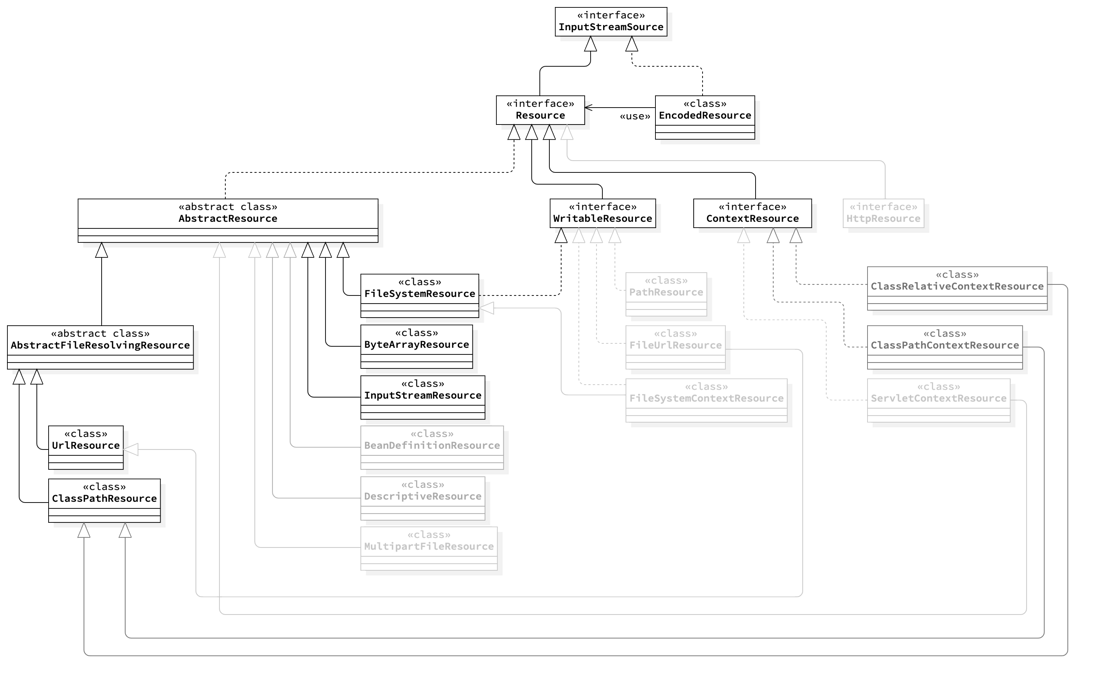
对于Resouce的具体实现可参考下图(莫被错综复杂的类关系扰乱了思路),一层层剥离解析
WritableResource
⇪WritableResource派生自Resource,其在Resource的基础上增加了'写'相关的能力
public interface WritableResource extends Resource {
    boolean isWritable();
    OutputStream getOutputStream() throws IOException;
    WritableByteChannel writableChannel() throws IOException;
}这里重点关注Resource'读'能力的实现
AbstractResource
⇪AbstractResource实现了大部分Resource中公共的、无底层差异的逻辑,实现较为简单,不再详述
AbstractResource的具体实现类则是封装了不同类型的资源类库,使用具体的类库函数实现Resource定义的一系列接口
⇪FileSystemResource封装了java.io.File(或java.io.Path)的能力实现了Resource的一些细节
public class FileSystemResource extends AbstractResource implements WritableResource {
    @Override
    public InputStream getInputStream() throws IOException {
        // ...
        // 将File/Path封装为InputStream
        return Files.newInputStream(this.filePath);
        // ...
    }

    @Override
    public OutputStream getOutputStream() throws IOException {
        // 将File/Path封装为OutputStream
        return Files.newOutputStream(this.filePath);
    }

    @Override
    public URL getURL() throws IOException {
        return (this.file != null ? this.file.toURI().toURL() : this.filePath.toUri().toURL());
    }

    @Override
    public URI getURI() throws IOException {
        return (this.file != null ? this.file.toURI() : this.filePath.toUri());
    }

    // ...
}同理,⇪ByteArrayResource封装了ByteArray的能力,⇪InputStreamResource封装了InputSream的能力,等等,不再一一介绍
AbstractFileResolvingResource
⇪AbstractFileResolvingResource则把中心放在java.net.URL上,其使用URL的能力重写了其父类AbstractResource的大部分实现
AbstractFileResolvingResource的实现类只有两个,⇪UrlResource及⇪ClassPathResource
UrlResource
UrlResource同样简单地封装了URL的能力来实现Resource中定义的接口
public class UrlResource extends AbstractFileResolvingResource {
    @Override
    public InputStream getInputStream() throws IOException {
        URLConnection con = this.url.openConnection();
        ResourceUtils.useCachesIfNecessary(con);
        try {
            return con.getInputStream();
        }
        catch (IOException ex) {
            // Close the HTTP connection (if applicable).
            if (con instanceof HttpURLConnection) {
                ((HttpURLConnection) con).disconnect();
            }
            throw ex;
        }
    }

    // ...
}
ClassPathResource
ClassPathResource则是借助ClassLoader的能力来实现Resource中定义的接口
public class ClassPathResource extends AbstractFileResolvingResource {
    @Override
    public InputStream getInputStream() throws IOException {
        InputStream is;
        if (this.clazz != null) {
            is = this.clazz.getResourceAsStream(this.path);
        }
        else if (this.classLoader != null) {
            is = this.classLoader.getResourceAsStream(this.path);
        }
        else {
            is = ClassLoader.getSystemResourceAsStream(this.path);
        }
        if (is *** null) {
            throw new FileNotFoundException(getDescription() + " cannot be opened because it does not exist");
        }
        return is;
    }
}
EncodedResource
细心的可能会发现,这里还有一个⇪EncodedResource,其在Resource的基础上加入了编码信息,并提供了额外的getReader接口
public class EncodedResource implements InputStreamSource {
    public Reader getReader() throws IOException {
        if (this.charset != null) {
            return new InputStreamReader(this.resource.getInputStream(), this.charset);
        }
        else if (this.encoding != null) {
            return new InputStreamReader(this.resource.getInputStream(), this.encoding);
        }
        else {
            return new InputStreamReader(this.resource.getInputStream());
        }
    }
}
这对于获取编码格式有要求的资源来讲十分受用
@Component
public class MyComponent {
    private final Properties properties;
    public MyComponent(@Value("classpath:/config/my-config.properties") Resource resource) {
        // Properties读取配置默认编码为ISO-8859-1
        this.properties = PropertiesLoaderUtils.loadProperties(new EncodedResource(resource, "utf-8"));
    }

    // ...
}
小结
-
⇪Resource将资源的操作抽象,屏蔽不同类型资源差异性,统一操作接口 -
⇪FileSystemResource、⇪ByteArrayResource、⇪InputStreamResource、⇪UrlResource及⇪ClassPathResource等,借助相应的资源类库能力,实现Resource中定义的接口-
FileSystemResource→FileorPath -
ByteArrayResource→ByteArray -
InputStreamResource→InputStream -
UrlResource→Url -
ClassPathResource→ClassLoader - ...
-
使用上,针对不同的资源类型创建不同的Resource即可
new FileSystemResource("/var/log/system.log"); // 文件系统中的文件
new ClassPathResource("/config/my-config.properties"); // classpath中的文件
new UrlResource("http://oss.manerfan.com/config/my-config.properties"); // 网络上的文件
ResourceLoader
“针对不同的资源类型创建不同的Resource”,如上例中的硬编码并不符合开闭原则,对于开发者来说其实并不那么友好,还好Spring提供了⇪ResourceLoader (接下来,你会发现Spring中提供了各种各样的Loader、Resolver、Aware等等)
public interface ResourceLoader {
    Resource getResource(String location);
}ResourceLoader中定义了getResource方法用于创建合适类型的Resource,至于应该创建哪种类型以及如何创建,则交由ResourceLoader处理
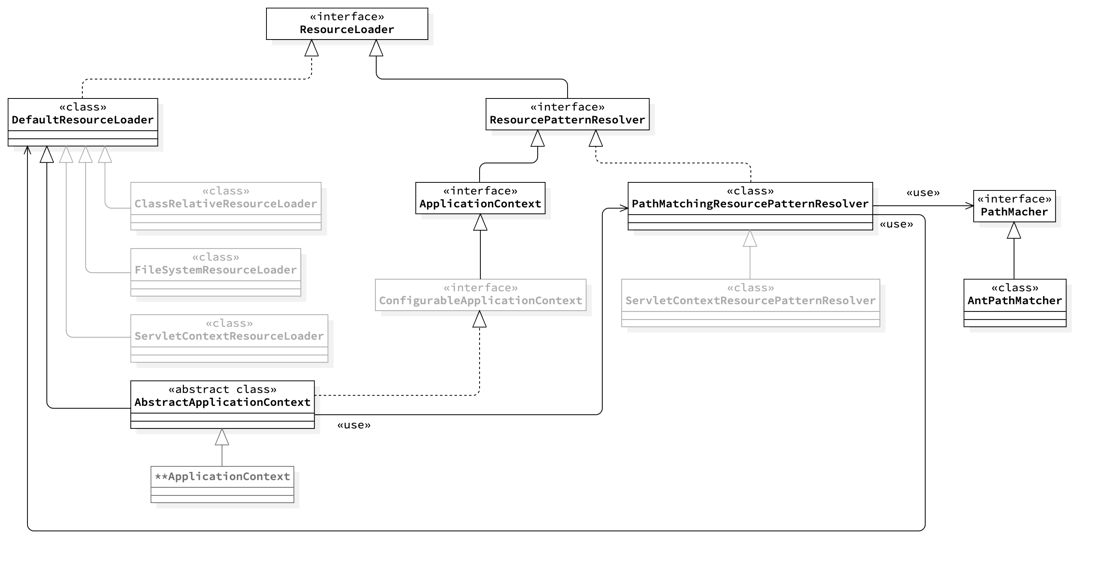
ResourceLoader的实现类主要有两种,其一为⇪DefaultResourceLoader,其二为⇪PathMatchingResourcePatternResolver
DefaultResourceLoader
⇪DefaultResourceLoader为ResourceLoader的默认实现,其实现极为简单
public class DefaultResourceLoader implements ResourceLoader {
    @Override
    public Resource getResource(String location) {
        Assert.notNull(location, "Location must not be null");

        // 1. 如果存在自定义的解析器,优先使用自定义解析器

        for (ProtocolResolver protocolResolver : getProtocolResolvers()) {
            Resource resource = protocolResolver.resolve(location, this);
            if (resource != null) {
                return resource;
            }
        }

        // 2. 如果没有自定义解析器,或者自定义解析器无法解析,则使用默认实现

        if (location.startsWith("/")) {
            // 构造ClassPathResource
            return getResourceByPath(location);
        }
        else if (location.startsWith(CLASSPATH_URL_PREFIX)) {
            // 取"classpath:"后的内容,构造ClassPathResource
            return new ClassPathResource(location.substring(CLASSPATH_URL_PREFIX.length()), getClassLoader());
        }
        else {
            try {
                // 尝试构造URLResource
                URL url = new URL(location);
                return (ResourceUtils.isFileURL(url) ? new FileUrlResource(url) : new UrlResource(url));
            }
            catch (MalformedURLException ex) {
                // 降级到ClassPathResource
                return getResourceByPath(location);
            }
        }
    }

    protected Resource getResourceByPath(String path) {
        return new ClassPathContextResource(path, getClassLoader());
    }
}首先会尝试使用自定义解析器解析(通过addProtocolResolver方法添加),如果没有或者解析失败才会使用默认实现
默认实现逻辑中,如果是以/或classpath:开头的,会直接构造ClassPathResource,否则会尝试构造为UrlResource
了解ClassPathResource实现的会注意到,如果在所有的classpath路径中同时存在多个文件匹配(如,同时在a.jar及b.jar中存在/config/my-config.properties文件),则只会返回首个匹配到的(取决于JVM加载顺序),这也是有别于PathMatchingResourcePatternResolver的一个地方
PathMatchingResourcePatternResolver
⇪PathMatchingResourcePatternResolver实现自⇪ResourcePatternResolver接口
public interface ResourcePatternResolver extends ResourceLoader {
    String CLASSPATH_ALL_URL_PREFIX = "classpath*:";
    Resource[] getResources(String locationPattern) throws IOException;
}ResourcePatternResolver在ResourceLoader的基础上,增加了批量获取的接口getResources
默认情况下,PathMatchingResourcePatternResolver的getResource实现其实是使用了DefaultResourceLoader(当然你也可以自己指定默认的ResourceLoader实现)
public class PathMatchingResourcePatternResolver implements ResourcePatternResolver {
    public PathMatchingResourcePatternResolver() {
        this.resourceLoader = new DefaultResourceLoader();
    }

    @Override
    public Resource getResource(String location) {
        return getResourceLoader().getResource(location);
    }
}PathMatchingResourcePatternResolver的一大特点在于PathMatching(默认使用AntPathMatcher,也可以指定),对于类似classpath:/config/my-*.properties或classpath*:/config/my-*.properties等Ant风格的资源进行匹配,其基本思路大致为
- 找到Ant风格资源的父目录 classpath:/config/或classpath*:/config/
- 在该目录下查找匹配my-*.properties的资源(具体实现集中在
⇪findPathMatchingResources方法)
classpath:与classpath*:的区别主要在于父目录的查找逻辑
classpath:
父目录的查找借助DefaultResourceLoader的能力(归根结底使用了ClassLoader.getResource),上文也有提到,这里只会返回首个匹配到的目录资源
@Override
public Resource[] getResources(String locationPattern) throws IOException {
    // ... 各种 if-else 之后
    // a single resource with the given name
    return new Resource[] {getResourceLoader().getResource(locationPattern)};
}
classpath*:
父目录的查找则直接使用ClassLoader.getResources,返回所有classpath中的目录资源
@Override
public Resource[] getResources(String locationPattern) throws IOException {
    // ... 各种 if-else 之后
    // all class path resources with the given name
    return findAllClassPathResources(locationPattern.substring(CLASSPATH_ALL_URL_PREFIX.length()));
}

protected Resource[] findAllClassPathResources(String location) throws IOException {
    // ...
    Set<Resource> result = doFindAllClassPathResources(path);
    // ...
}

protected Set<Resource> doFindAllClassPathResources(String path) throws IOException {
    // ...
    Enumeration<URL> resourceUrls = (cl != null ? cl.getResources(path) : ClassLoader.getSystemResources(path));
    // ...
}所以,classpath:/config/my-*.properties只会返回首个匹配到的/config/目录中所有的my-*.properties资源,而classpath*:/config/my-*.properties则会返回所有匹配到的/config/目录中所有的my-*.properties资源
AbstractApplicationContext
AbstractApplicationContext同时实现了ResourcePatternResolver接口并继承了DefaultResourceLoader,
public abstract class AbstractApplicationContext extends DefaultResourceLoader
        implements ConfigurableApplicationContext {
    public AbstractApplicationContext() {
        this.resourcePatternResolver = getResourcePatternResolver();
    }

    protected ResourcePatternResolver getResourcePatternResolver() {
        return new PathMatchingResourcePatternResolver(this);
    }
}所以,如开篇的几个例子里,在ApplicationContext中获取Resource资源,大多数情况下使用的都是PathMatchingResourcePatternResolver
小结
- Spring提供了
ResourceLoader根据不同的前缀(协议)生成相对应的Resource(Spring中提供了各种各样的Loader、Resolver、Aware等等) -
DefaultResourceLoader只能获取单个资源,且只能获取classpath中首次匹配到的资源(ClassLoader.getResource) -
PathMatchingResourcePatternResolver可以使用Ant风格匹配并返回多个资源-
classpath:前缀,只会返回首个匹配到的根目录中(
ClassLoader.getResource)所有的满足给定Ant规则的资源 -
classpath*:前缀,则会返回所有匹配到的根目录中(
ClassLoader.getResources)所有的满足给定Ant规则的资源
-
classpath:前缀,只会返回首个匹配到的根目录中(
-
ApplicationContext默认使用PathMatchingResourcePatternResolver获取Resource资源
总结
-
⇪Resource将资源的操作抽象,屏蔽不同类型资源差异性,统一操作接口 -
Resource的不同实现,均借助相应的资源类库能力,来实现Resource中定义的接口 -
ResourceLoader根据不同的前缀(协议)生成相对应的Resource-
DefaultResourceLoader只能获取单个资源,且只能获取classpath中首次匹配到的资源 -
PathMatchingResourcePatternResolver可以使用Ant风格匹配并返回多个资源,classpath:与classpath*:的区别在于如何获取根目录以在其中查找匹配Ant风格的资源
-
-
ApplicationContext默认使用PathMatchingResourcePatternResolver获取Resource资源

评论
登录后参与技术讨论,分享你的经验与见解。
登录 / 注册暂无评论