Unity ECS技术开发HelloWorld

文章目录
ECS三要素
组件、系统、管理器
在2018环境下的ECS环境配置
学习ECS项目,需要导入5个包
- Entities
- Mathematics 数学
- Hybrid Render 混合渲染
- Jobs
- Burst
简单的ECS项目只需要安装前三个插件(我使用的是2018.4.34f1)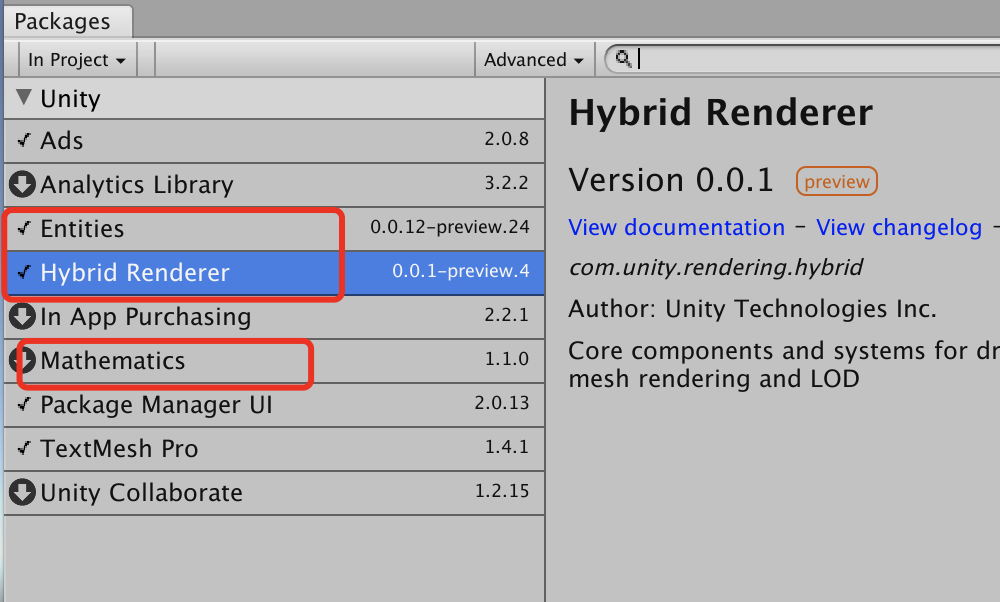
18版本HelloWorld
让一个cube在场景中旋转起来。
在场景中制作一个红色的Cube,并为它添加组件和系统两个脚本。RotationCubeComponent.cs和RotationCubeSystem.cs
RotationCubeComponent.cs
/***
 *  使用Unity2018.4版本 开发ECS的HelloWorld
 *
 *  定义ECS的"组件"  组件只有数据 没有方法
 */

using System.Collections;
using System.Collections.Generic;
using UnityEngine;

public class RotationCubeComponent : MonoBehaviour
{
    /// 旋转速度
    public float speed;
}
RotationCubeSystem.cs
/***
 *  使用Unity2018.4版本 开发ECS的HelloWorld
 *
 *  定义ECS的"系统" 只有方法没有数据
 */

using System.Collections;
using System.Collections.Generic;
using UnityEngine;
using Unity.Entities; // 引入命名空间

// 抽象方法
public class RotationCubeSystem : ComponentSystem
{
    struct Group
    {
        public RotationCubeComponent rotation;
        public Transform transform;
    }

    protected override void OnUpdate()
    {
        // GetEntities 2018所有 2019被废弃
        foreach (var en in GetEntities<Group>())
        {
            // 进行旋转
            en.transform.Rotate(Vector3.down, en.rotation.speed * Time.deltaTime);
        }
    }
}
RotationCubeComponent.cs继承MonoBehaviour可以直接拖拽到Cube上,但是系统无法添加到cube上。
此时需要添加Entities系统脚本Game Object Entity,可以把这个脚本当作管理脚本,把组件和系统关联起脸,放Cube可以运行起来。
在这个HelloWorld里,创建了两个脚本
RotationCubeComponent.cs
继承MonnoBehaviour,内部定义Cube的旋转速度。
RotationCubeSystem.cs
继承ComponetSystem,定义Group的结构体,然后再OnUpdate()中使用foreach循环让Cube旋转。
GameObjectEntity.cs
属于Entitys命名空间中的内置脚本,作用是吧“组件”和“系统”结合起来
通过Demo回看ECS
下图是Unity官方的关于ECS的整体架构核心示意图。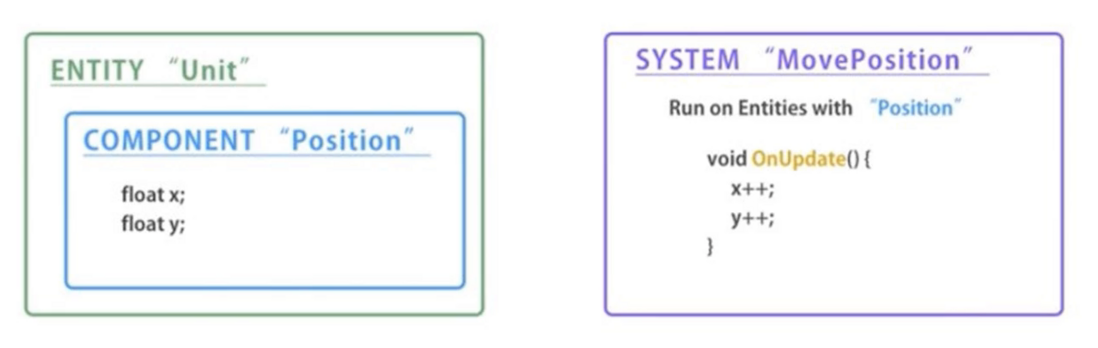
在开发的时候先开发组件,然后再开发一个系统,组件相当于把OOP编程当中一个类的变量们放在一起,系统则是把类中的方法放在一起。
ECS中实体与组件的关系是一个Entity可以包含多个组件,即一个实体可以包含多个组件,在上面的代码中定义了Struct Group不仅包含了自定义的rotation还有系统自带的transform组件。
实体管理器是有系统GameObjectEntity来代替的,结合定义的系统和组件。在2019版本中不是系统脚本代替,而是自己来写管理器脚本。
Entities与MonoBehaviour之间的对比
Entity是一个实体相当于OOP编程中的GameObject
实体中的组件相当于传统继承MonoBehaviour组件中的字段变量
系统则相当于Update方法
图片来源:http://www.coubai.com/ 页游
评论
登录后参与技术讨论,分享你的经验与见解。
登录 / 注册暂无评论