26.SpringSecurity-重构用户名密码登录

文章目录
前言
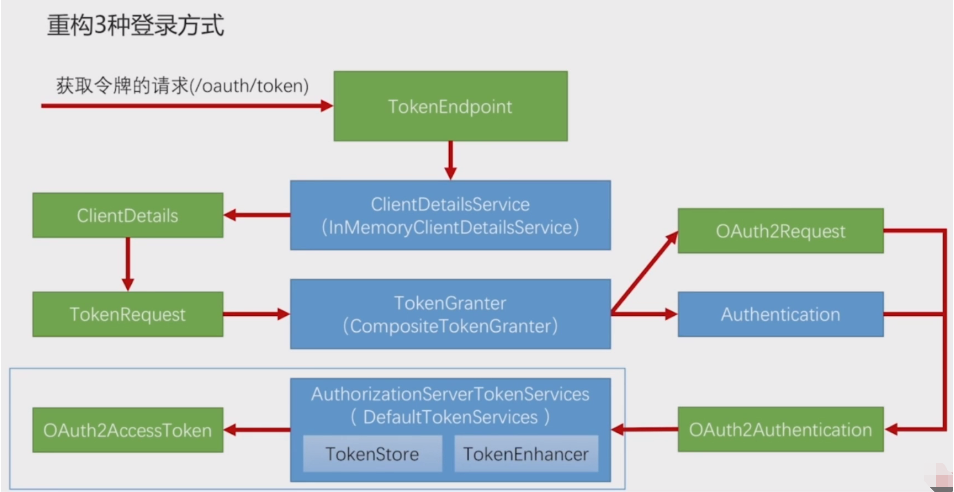
- 我们上一节对获取令牌最终产生令牌的流程有了一定了解。 那么在我们自己的业务场景,自己写的登录这个流程里面;我们借助于TokenEndPoint到TokenGranter是不能用的。因为上面发起的是获取令牌的请求,而我们是发起的登录请求。
- 我们要用我们自己的过滤器去处理登录请求,上面一直到TokenGranter这一步使用4种方式去去生成我们的令牌。我们都是不能用的,我们需要用的就是令牌的服务产生令牌;

3.那么在哪里去运用上面AuthorizationServerTokenServices呢?是在我们的:AuthenticationSuccessHandler里面。如下图: 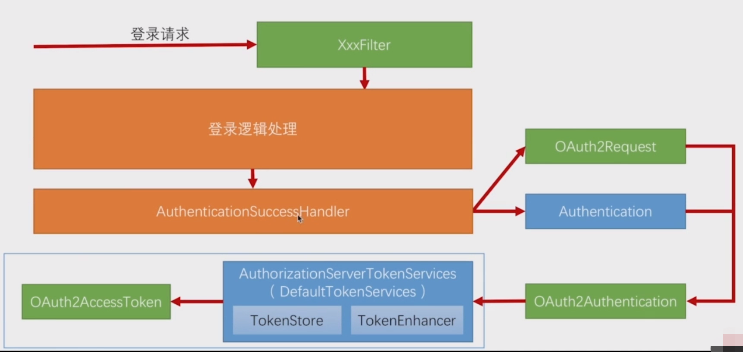
4.我们之前在spring-security-web项目里面写过AuthenticationSuccessHandler实现类的处理逻辑:如果是json登录,我们吧登录成功信息authentication直接以json形式返回
@Component("myAuthenticationSuccessHandler")
public class MyAuthenticationSuccessHandler extends SavedRequestAwareAuthenticationSuccessHandler {
    private Logger logger = LoggerFactory.getLogger(getClass());

    @Autowired
    private ObjectMapper objectMapper;

    @Autowired
    private SecurityProperties securityProperties;


    @Override
    public void onAuthenticationSuccess(HttpServletRequest request, HttpServletResponse response,
                                        Authentication authentication) throws IOException, ServletException {
        /**
         * 将Authentication转换成json返回给前端
         * 参数:authentication 使用不同登录方式,其值是不一样的,这是一个接口在实际运转中,他会传不同的实现对象过来
         */
        logger.info("登录成功");
        if(LoginType.JSON.equals(securityProperties.getBrowser().getLoginType())){//JSON异步登录
            response.setContentType("application/json;charset=UTF-8");
            response.getWriter().write(objectMapper.writeValueAsString(authentication));
        }else {
            //非json就是使用父类处理器---父类处理器就是跳转
            super.onAuthenticationSuccess(request,response,authentication);
        }
    }
}
在app端时候,我们在登录认证成功之后,我们返回的不再是用户的认证信息,而是:用TokenServices生成的OAuth2AccessToken;从上一节我们知道,我们如果要生成OAuth2AccessToken就需要OAuth2Authentication;生成OAuth2Authentication我们又需要OAuth2Request和Authentication。之前在Spring Security OAuth中是根据TokenGranter的不同实现模式(根据传递的grant_type)来构建生成OAuth2Authentication我们又需要OAuth2Request和Authentication。但是在我们登录成功处理器里面的方法参数上就有一个:Authentication authentication;所以在我们的代码逻辑里面是不需要创建Authentication的业务逻辑的(因其在登录时候就已经创建好了),我们只需要创建处理OAuth2Request。
- OAuth2Request的构建成了我们创建OAuth2AccessToken的关键。从上一节知道我们创建OAuth2Request需要参数:ClientDetails和TokenRequest。ClientDetails从ClientDetailsService根据ClientId获取。ClientId从哪里来?从我们请求参数里面Header的Authorization里面来。我们通过解析请求头中Authorization对应的字符串是可以拿到ClientId的。 TokenRequest是根据ClientDetails和请求paramaters来new出一个对象的。
内容
前言总结三点:
- 写代码的位置在哪?在我们的MyAuthenticationSuccessHandler的onAuthenticationSuccess里面。
- 最终目标是什么?最终目标是构建出:OAuth2Request进而构建出OAuth2AccessToken
- 入手源头在哪?入手源头是从:请求参数里面获取clientId。
1.解析请求头里面的clientId
我们参考Spring Security OAuth2我们知道,我们使用BasicAuthenticationFilter解析

MyAuthenticationSuccessHandler代码:
@Component("myAuthenticationSuccessHandler")
public class MyAuthenticationSuccessHandler extends SavedRequestAwareAuthenticationSuccessHandler {
    private Logger logger = LoggerFactory.getLogger(getClass());

    @Autowired
    private ObjectMapper objectMapper;

    @Autowired
    private ClientDetailsService clientDetailsService;

    @Autowired
    private AuthorizationServerTokenServices authorizationServerTokenServices;


    @Override
    public void onAuthenticationSuccess(HttpServletRequest request, HttpServletResponse response,
                                        Authentication authentication) throws IOException, ServletException {
        /**
         * 将Authentication转换成json返回给前端
         * 参数:authentication 使用不同登录方式,其值是不一样的,这是一个接口在实际运转中,他会传不同的实现对象过来
         */
        logger.info("登录成功");

        //1.解析clientId
        String header = request.getHeader("Authorization");
        if (header == null && !header.startsWith("Basic ")) {
            throw new UnapprovedClientAuthenticationException("请求头中无clientId信息");
        }
        String[] tokens = extractAndDecodeHeader(header, request);
        assert tokens.length == 2;
        String clientId = tokens[0];
        String clientSecret = tokens[1];


        //2.获取ClientDetails并作校验
        ClientDetails clientDetails = clientDetailsService.loadClientByClientId(clientId);
        if(null == clientDetails){//说明我们根据配置的yxm拿不到第三方ClientDetails信息。我们应该抛出异常
          throw new UnapprovedClientAuthenticationException("clientId对应的配置信息不存在:"+clientId);
        }else if(!StringUtils.equals(clientDetails.getClientSecret(),clientSecret)){//如果clientDetails存在,我们就应该校验clientSeret
            throw new UnapprovedClientAuthenticationException("clientSecret不匹配:"+clientSecret);
        }

        //3.获取TokenRequest:第一个参数map主要是为了创建Authentication;但是上面Authentication已经创建。我们可以将其设置为空
        //因为grantType为:授权类型 之前是:password、authentication_code、implit、Client Credential、我们这里为自定义模式
        /**
         * 类:ResourceOwnerPasswordTokenGranter
         *
         * protected OAuth2Authentication getOAuth2Authentication(ClientDetails client, TokenRequest tokenRequest) {
         *         Map<String, String> parameters = new LinkedHashMap(tokenRequest.getRequestParameters());
         *         String username = (String)parameters.get("username");
         *         String password = (String)parameters.get("password");
         *         parameters.remove("password");
         *         Authentication userAuth = new UsernamePasswordAuthenticationToken(username, password);
         * }
         */
        TokenRequest tokenRequest = new TokenRequest(MapUtils.EMPTY_MAP,clientId, clientDetails.getScope(), "custom");

        //4.创建OAuth2Request
        OAuth2Request oAuth2Request = tokenRequest.createOAuth2Request(clientDetails);
        //5.创建OAuth2Authentication
        OAuth2Authentication oAuth2Authentication = new OAuth2Authentication(oAuth2Request, authentication);
        OAuth2AccessToken accessToken = authorizationServerTokenServices.createAccessToken(oAuth2Authentication);

        //6.响应返回
        response.setContentType("application/json;charset=UTF-8");
        response.getWriter().write(objectMapper.writeValueAsString(accessToken));
    }

    private String[] extractAndDecodeHeader(String header, HttpServletRequest request) throws IOException {
        byte[] base64Token = header.substring(6).getBytes("UTF-8");
        byte[] decoded;
        try {
            decoded = Base64.decode(base64Token);
        } catch (IllegalArgumentException var7) {
            throw new BadCredentialsException("Failed to decode basic authentication token");
        }

        String token = new String(decoded, "UTF-8");
        int delim = token.indexOf(":");
        if (delim == -1) {
            throw new BadCredentialsException("Invalid basic authentication token");
        } else {
            return new String[]{token.substring(0, delim), token.substring(delim + 1)};
        }
    }
}
2.安全配置
有了上面其实还是不够的,资源服务器目前只是用了Spring Security Oauth2的默认配置。之前我们写spring-security-web项目的时候的安全配置:WebSecurityConfig主配置类中,所有的配置都是在configure里面的。现在同理我们也需要一个配置。也就是我们注解:@EnableResourceServer修饰的类。
@Configuration
@EnableResourceServer
public class MyResourceServerConfig extends ResourceServerConfigurerAdapter {
    @Autowired
    private MyAuthenticationSuccessHandler myAuthenticationSuccessHandler;
    @Autowired
    private MyAuthenticationFailureHandler myAuthenticationFailureHandler;
    @Autowired
    private SmsCodeAuthenticationSecurityConfig smsCodeAuthenticationSecurityConfig; //短信验证码授权配置
    @Autowired
    private SpringSocialConfigurer mySocialSecurityConfig;
    @Autowired
    private SecurityProperties securityProperties;


    @Override
    public void configure(HttpSecurity http) throws Exception {
        http.formLogin()
                .loginPage(SecurityConstants.DEFAULT_UNAUTHENTICATION_URL)
                .loginProcessingUrl(SecurityConstants.DEFAULT_LOGIN_PROCESSING_URL_FORM)
                .successHandler(myAuthenticationSuccessHandler)
                .failureHandler(myAuthenticationFailureHandler);

        http.apply(smsCodeAuthenticationSecurityConfig)
                .and()
                .apply(mySocialSecurityConfig)//配置第三方social
                .and()
                .authorizeRequests()
                .antMatchers(
                        SecurityConstants.DEFAULT_UNAUTHENTICATION_URL,
                        SecurityConstants.DEFAULT_LOGIN_PROCESSING_URL_MOBILE,
                        securityProperties.getBrowser().getLoginPage(),
                        SecurityConstants.DEFAULT_VALIDATE_CODE_URL_PREFIX+"/*",
                        securityProperties.getBrowser().getSignUpUrl())
                .permitAll()
                .anyRequest()
                .authenticated()
                .and()
                .csrf().disable();
    }
}
3.启动项目 测试验证
在spring-security-demo项目我们之前是访问:"/authentication/form"来访问登录的。我们专门写了页面,现在我们使用app端登录,我们使用:restlet_client提交请求。我们书写用户名和密码。
组织请求参数: 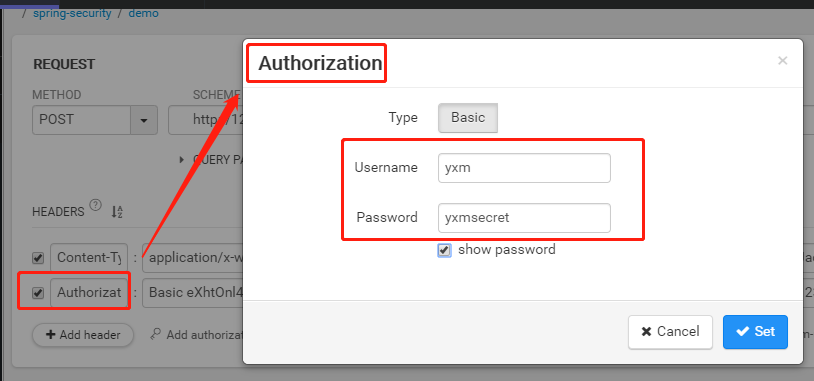

我们携带这个access_token去访问用户信息:
{
 "access_token": "4f04305c-a956-4546-95ba-20ff8d9ed2e3",
 "token_type": "bearer",
 "refresh_token": "76abf98d-dbe5-4f2e-8f18-cf83c6f3a2c5",
 "expires_in": 43199
}
4.总结
其实我们现在已经达到我们的要求了。app去调用我们自个表单登录的服务请求。然后给他返回一个OAuth2AccessToken。然后他拿着这个Access_Token再去请求相应的资源。
评论
登录后参与技术讨论,分享你的经验与见解。
登录 / 注册暂无评论