el-table使用append属性,底部加入一个新表格,总高度已经超出外层height, 最外层table不显示滚动条问题

文章目录
1、 组件二次封装高度问题
默认类型为number或string,如果不传值,设置为'',页面渲染正常,高度为内容撑开的高度。但是控制台报错:TypeError: Cannot read properties of undefined (reading 'style')

解决:可以通过后台返回数据长度,即行数*行高,动态设置,实现高度自适应。
2、el-table使用append属性,底部加入一个新表格,外部表格高度小于设置的height时,但外层table+append的内容已经超过设置的height,页面不显示滚动条,无法看到append的所有内容。页面如下图所示:此图为已修改后的正常显示滚动条,若不修改无法看到垂直滚动条。
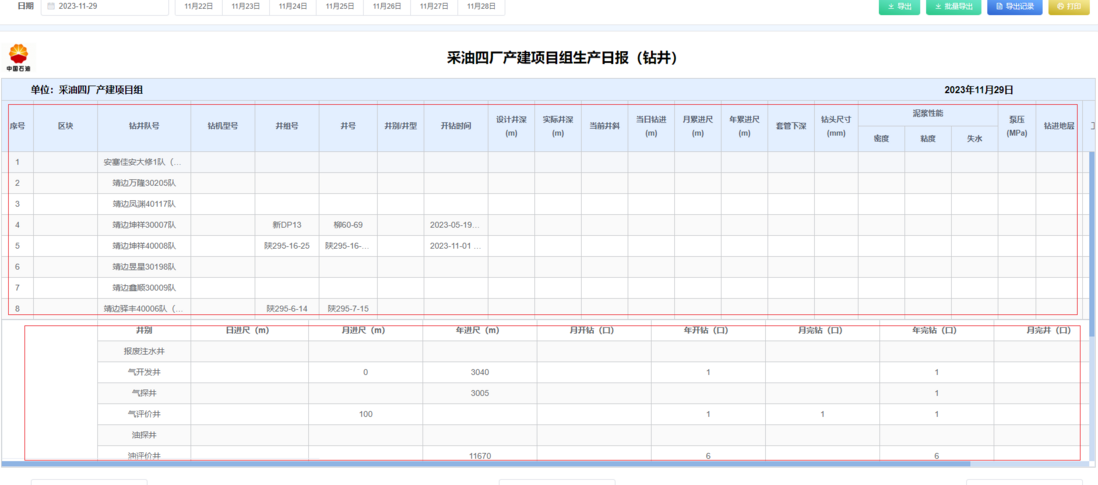
代码如下:
    <div class="four-factory-table" style="">
         <el-table
            ref="baobiaoTable"
            class="custom-table table-border-black"
            :data="sttdayreportList"
            v-loading="loading"
            :span-method="arraySpanMethod"
            :height="'100%'"
            stripe
            border
          >
            <el-table-column
              label="序号"
              align="center"
              prop="xh"
              width="55"
              :fixed="is_close"
              :show-overflow-tooltip="is_close"
            />
             <el-table-column
              label="正钻井"
              align="center"
              prop="zjj"
              width="80"
              :show-overflow-tooltip="is_close"
            />
             <div slot="append">
              <my-table
                ref="jczjTable"
                :columns="columnsBottom"
                :tableData="tableData"
                :height="tableData.length * 36 + 3"
                :showHeader="false"
                class="table-border-black bottom-table jczj-table"
              ></my-table>
          </div>
      </el-table>
</div>
style:
::v-deep.four-factory-table {
  // border: 1px solid red;
  height: calc(100vh - 300px) !important;
  // overflow: auto;
  overflow: hidden;
  .el-table__body-wrapper{
    overflow: auto !important;
  }
}
解决: 通过修改css,设置.el-table__body-wrapper{
overflow: auto !important;
}
显示滚动条,即可解决。。。
评论
登录后参与技术讨论,分享你的经验与见解。
登录 / 注册暂无评论