GitHub访问速度太慢,终极解决方案

文章目录

在使用github下载开源项目的时候,由于Github的站点在国外,访问起来会超级卡,卡成狗。所以通过ssr设置代理访问,速度就会超级快。
需要准备的东西
- git命令行
- ShadowsocksR可以访问外网
步骤
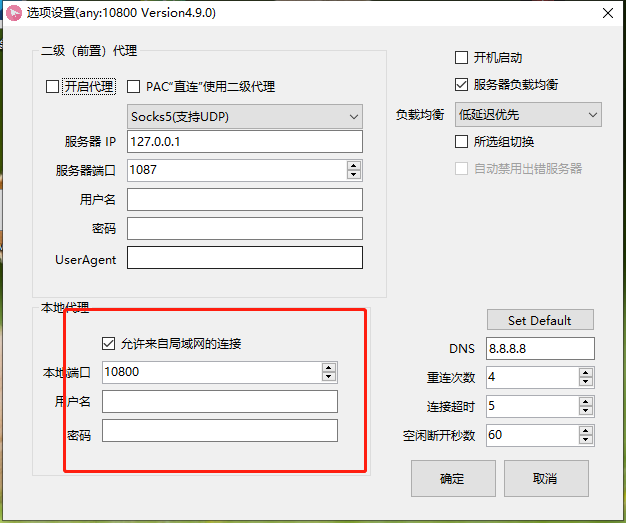
1.针对github地址设置代理
git config --global http.https://github.com.proxy http://127.0.0.1:10800
git config --global https.https://github.com.proxy https://127.0.0.1:10800
# 查看配置
git config -l
2.设置ShadowsocksR代理
3.去克隆喜欢的Github项目
注意:这里使用https开头的连接,不要使用git开头的。
git clone https://github.com/88250/solo.git4.如果不需要的时候将代理还原
git config --global --unset http.proxy
git config --global --unset https.proxy
评论
登录后参与技术讨论,分享你的经验与见解。
登录 / 注册暂无评论