SpringCloud第十二篇:Spring Cloud Gateway初探

文章目录
1. Zuul和Gateway的恩怨情仇
1.1 背景
Zuul是Netflix开源的一个项目,Spring只是将Zuul集成在了Spring Cloud中。而Spring Cloud Gateway是Spring Cloud的一个子项目。
还有一个版本的说法是Zuul2的连续跳票和Zuul1的性能并不是很理想,从而催生了Spring Cloud Gateway。(了解源码可+求求: 1791743380)
1.2 性能比较
网上很多地方都说Zuul是阻塞的,Gateway是非阻塞的,这么说是不严谨的,准确的讲Zuul1.x是阻塞的,而在2.x的版本中,Zuul也是基于Netty,也是非阻塞的,如果一定要说性能,其实这个真没多大差距。
而官方出过一个测试项目,创建了一个benchmark的测试项目:spring-cloud-gateway-bench,其中对比了:
- Spring Cloud Gateway
- Zuul1.x
- Linkerd
组件
RPS(request per second)
Spring Cloud Gateway
Requests/sec: 32213.38
Zuul
Requests/sec: 20800.13
Linkerd
Requests/sec: 28050.76
从结果可知,Spring Cloud Gateway的RPS是Zuul1.x的1.6倍。
下面,我们进入正题,开始聊聊Spring Cloud Gateway的一些事情。
2. Spring Cloud Gateway
Spring Cloud Gateway 是 Spring Cloud 的一个全新项目,该项目是基于 Spring 5.0,Spring Boot 2.0 和 Project Reactor 等技术开发的网关,它旨在为微服务架构提供一种简单有效的统一的 API 路由管理方式。
Spring Cloud Gateway 作为 Spring Cloud 生态系统中的网关,目标是替代 Netflix Zuul,其不仅提供统一的路由方式,并且基于 Filter 链的方式提供了网关基本的功能,例如:安全,监控/指标,和限流。
2.1 特征
- 基于 Spring Framework 5,Project Reactor 和 Spring Boot 2.0
- 动态路由
- Predicates 和 Filters 作用于特定路由
- 集成 Hystrix 断路器
- 集成 Spring Cloud DiscoveryClient
- 易于编写的 Predicates 和 Filters
- 限流
- 路径重写
2.2 术语
- Route(路由):这是网关的基本构建块。它由一个 ID,一个目标 URI,一组断言和一组过滤器定义。如果断言为真,则路由匹配。
- Predicate(断言):这是一个 Java 8 的 Predicate。输入类型是一个 ServerWebExchange。我们可以使用它来匹配来自 HTTP 请求的任何内容,例如 headers 或参数。
- Filter(过滤器):这是org.springframework.cloud.gateway.filter.GatewayFilter的实例,我们可以使用它修改请求和响应。
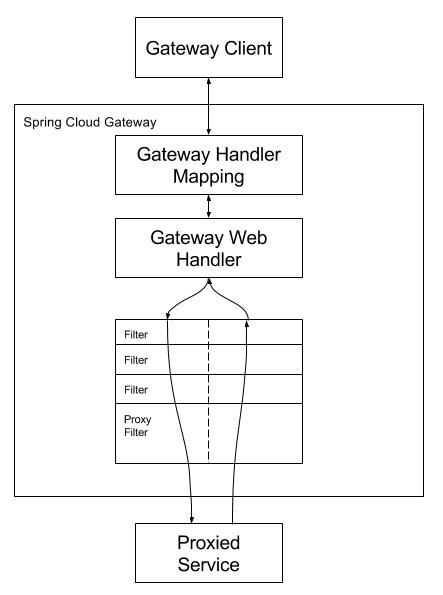
2.3 流程
[
](https://springcloud-oss.oss-c...
客户端向 Spring Cloud Gateway 发出请求。然后在 Gateway Handler Mapping 中找到与请求相匹配的路由,将其发送到 Gateway Web Handler。Handler 再通过指定的过滤器链来将请求发送到我们实际的服务执行业务逻辑,然后返回。过滤器之间用虚线分开是因为过滤器可能会在发送代理请求之前(“pre”)或之后(“post”)执行业务逻辑。
3.快速上手
Spring Cloud Gateway 网关路由有两种配置方式:
- 在配置文件 yml 中配置
- 通过@Bean自定义 RouteLocator,在启动主类 Application 中配置
这两种方式是等价的,建议使用 yml 方式进配置。
3.1 项目依赖
<?xml version="1.0" encoding="UTF-8"?>
<project xmlns="http://maven.apache.org/POM/4.0.0" xmlns:xsi="http://www.w3.org/2001/XMLSchema-instance"
    xsi:schemaLocation="http://maven.apache.org/POM/4.0.0 http://maven.apache.org/xsd/maven-4.0.0.xsd">
    <modelVersion>4.0.0</modelVersion>
    <parent>
        <groupId>org.springframework.boot</groupId>
        <artifactId>spring-boot-starter-parent</artifactId>
        <version>2.1.6.RELEASE</version>
        <relativePath/> <!-- lookup parent from repository -->
    </parent>
    <groupId>com.springcloud</groupId>
    <artifactId>gateway</artifactId>
    <version>0.0.1-SNAPSHOT</version>
    <name>gateway</name>
    <description>Demo project for Spring Boot</description>

    <properties>
        <java.version>1.8</java.version>
        <spring-cloud.version>Greenwich.SR1</spring-cloud.version>
    </properties>

    <dependencies>
        <dependency>
            <groupId>org.springframework.cloud</groupId>
            <artifactId>spring-cloud-starter-gateway</artifactId>
        </dependency>

        <dependency>
            <groupId>org.springframework.boot</groupId>
            <artifactId>spring-boot-starter-test</artifactId>
            <scope>test</scope>
        </dependency>
    </dependencies>

    <dependencyManagement>
        <dependencies>
            <dependency>
                <groupId>org.springframework.cloud</groupId>
                <artifactId>spring-cloud-dependencies</artifactId>
                <version>${spring-cloud.version}</version>
                <type>pom</type>
                <scope>import</scope>
            </dependency>
        </dependencies>
    </dependencyManagement>

    <build>
        <plugins>
            <plugin>
                <groupId>org.springframework.boot</groupId>
                <artifactId>spring-boot-maven-plugin</artifactId>
            </plugin>
        </plugins>
    </build>
Spring Cloud Gateway 是使用 netty+webflux 实现因此不需要再引入 web 模块。

### 3.2 配置文件

> ```yaml
> server:
>   port: 8080
> spring:
>   application:
>     name: api-gateway
>   cloud:
>     gateway:
>       routes:
>         - id: gateway-service
>           uri: https://blog.csdn.net
>           predicates:
>             - Path=/meteor_93
各字段含义如下:
- id:我们自定义的路由 ID,保持唯一
- uri:目标服务地址
- predicates:路由条件,Predicate 接受一个输入参数,返回一个布尔值结果。该接口包含多种默认方法来将 Predicate 组合成其他复杂的逻辑(比如:与,或,非)。
上面这段配置的意思是,配置了一个 id 为 gateway-service 的路由规则,当访问地址 http://localhost:8080/meteor_93时会自动转发到地址:http://localhost:8080/meteor_93。
3.3 测试
现在我们启动服务,在浏览器中访问地址http://localhost:8080/meteor_93 时会展示页面展示如下:
[
](https://springcloud-oss.oss-c...
证明页面转发成功。
3.4 另一种路由配置方式
转发功能同样可以通过代码来实现,我们可以在启动类 GateWayApplication 中添加方法 customRouteLocator() 来定制转发规则。
package com.springcloud.gateway;

import org.springframework.boot.SpringApplication;
import org.springframework.boot.autoconfigure.SpringBootApplication;
import org.springframework.cloud.gateway.route.RouteLocator;
import org.springframework.cloud.gateway.route.builder.RouteLocatorBuilder;
import org.springframework.context.annotation.Bean;

@SpringBootApplication
public class GatewayApplication {

    public static void main(String[] args) {
        SpringApplication.run(GatewayApplication.class, args);
    }

    @Bean
    public RouteLocator customRouteLocator(RouteLocatorBuilder builder) {
        return builder.routes()
                .route("path_route", r -> r.path("/meteor_93")
                        .uri("https://blog.csdn.net"))
                .build();
    }
我们在yaml配置文件中注销掉相关路由的配置,重启服务,访问链接:[http://localhost:8080/meteor\_93](http://localhost:8080/meteor_93), 可以看到和上面一样的页面,证明我们测试成功。
上面两个示例中 uri 都是指向了我的CSDN博客,在实际项目使用中可以将 uri 指向对外提供服务的项目地址,统一对外输出接口。
以上便是 Spring Cloud Gateway 最简单的两个请求示例,Spring Cloud Gateway 还有更多实用的功能接下来我们一一介绍。
4\. 路由规则
--------
Spring Cloud Gateway 的功能很强大,我们仅仅通过 Predicates 的设计就可以看出来,前面我们只是使用了 predicates 进行了简单的条件匹配,其实 Spring Cloud Gataway 帮我们内置了很多 Predicates 功能。
Spring Cloud Gateway 是通过 Spring WebFlux 的 HandlerMapping 做为底层支持来匹配到转发路由,Spring Cloud Gateway 内置了很多 Predicates 工厂,这些 Predicates 工厂通过不同的 HTTP 请求参数来匹配,多个 Predicates 工厂可以组合使用。
### 4.1 Predicate 介绍
Predicate 来源于 Java 8,是 Java 8 中引入的一个函数,Predicate 接受一个输入参数,返回一个布尔值结果。该接口包含多种默认方法来将 Predicate 组合成其他复杂的逻辑(比如:与,或,非)。可以用于接口请求参数校验、判断新老数据是否有变化需要进行更新操作。
在 Spring Cloud Gateway 中 Spring 利用 Predicate 的特性实现了各种路由匹配规则,有通过 Header、请求参数等不同的条件来进行作为条件匹配到对应的路由。网上有一张图总结了 Spring Cloud 内置的几种 Predicate 的实现。
[
](https://springcloud-oss.oss-cn-shanghai.aliyuncs.com/chapter12/spring-cloud-gateway3.png)
说白了 Predicate 就是为了实现一组匹配规则,方便让请求过来找到对应的 Route 进行处理,接下来我们接下 Spring Cloud GateWay 内置几种 Predicate 的使用。
### 4.2 通过时间匹配
Predicate 支持设置一个时间,在请求进行转发的时候,可以通过判断在这个时间之前或者之后进行转发。比如我们现在设置只有在2019年1月1日才会转发到我的博客,在这之前不进行转发,我就可以这样配置:
> ```yaml
> server:
> port: 8080
> spring:
> application:
> name: api-gateway
> cloud:
> gateway:
> routes:
> - id: gateway-service
> uri: https://www.baidu.com
> order: 0
> predicates:
> - After=2019-01-01T00:00:00+08:00[Asia/Shanghai]Spring 是通过 ZonedDateTime 来对时间进行的对比,ZonedDateTime 是 Java 8 中日期时间功能里,用于表示带时区的日期与时间信息的类,ZonedDateTime 支持通过时区来设置时间,中国的时区是:Asia/Shanghai。
After Route Predicate 是指在这个时间之后的请求都转发到目标地址。上面的示例是指,请求时间在 2019年1月1日0点0分0秒之后的所有请求都转发到地址https://blog.csdn.net。+08:00是指时间和UTC时间相差八个小时,时间地区为Asia/Shanghai。
添加完路由规则之后,访问地址http://localhost:8080会自动转发到https://www.baidu.com。
Before Route Predicate 刚好相反,在某个时间之前的请求的请求都进行转发。我们把上面路由规则中的 After 改为 Before,如下:
server:
  port: 8080
spring:
  application:
    name: api-gateway
  cloud:
    gateway:
      routes:
        - id: gateway-service
          uri: https://www.baidu.com
          order: 0
          predicates:
就表示在这个时间之前可以进行路由,在这时间之后停止路由,修改完之后重启项目再次访问地址http://localhost:8080,页面会报 404 没有找到地址。

除过在时间之前或者之后外,Gateway 还支持限制路由请求在某一个时间段范围内,可以使用 Between Route Predicate 来实现。

> ```yaml
> server:
>   port: 8080
> spring:
>   application:
>     name: api-gateway
>   cloud:
>     gateway:
>       routes:
>         - id: gateway-service
>           uri: https://www.baidu.com
>           order: 0
>           predicates:
>             - Between=2019-01-01T00:00:00+08:00[Asia/Shanghai], 2019-07-01T00:00:00+08:00[Asia/Shanghai]
这样设置就意味着在这个时间段内可以匹配到此路由,超过这个时间段范围则不会进行匹配。通过时间匹配路由的功能很酷,可以用在限时活动的一些场景中。
4.3 通过 Cookie 匹配
Cookie Route Predicate 可以接收两个参数,一个是 Cookie name ,一个是正则表达式,路由规则会通过获取对应的 Cookie name 值和正则表达式去匹配,如果匹配上就会执行路由,如果没有匹配上则不执行。
server:
  port: 8080
spring:
  application:
    name: api-gateway
  cloud:
    gateway:
      routes:
        - id: gateway-service
          uri: https://www.baidu.com
          order: 0
          predicates:
使用 curl 测试,命令行输入:
curl http://localhost:8080 --cookie "sessionId=test"
则会返回页面代码,如果去掉–cookie "sessionId=test",后台汇报 404 错误。

### 4.4 通过 Header 属性匹配

Header Route Predicate 和 Cookie Route Predicate 一样,也是接收 2 个参数,一个 header 中属性名称和一个正则表达式,这个属性值和正则表达式匹配则执行。

> ```yaml
> server:
>   port: 8080
> spring:
>   application:
>     name: api-gateway
>   cloud:
>     gateway:
>       routes:
>         - id: gateway-service
>           uri: https://www.baidu.com
>           order: 0
>           predicates:
>             - Header=X-Request-Id, \d+
使用 curl 测试,命令行输入:
curl http://localhost:8080 -H "X-Request-Id:88"
则返回页面代码证明匹配成功。将参数-H "X-Request-Id:88"改为-H "X-Request-Id:spring"再次执行时返回404证明没有匹配。
4.5 通过 Host 匹配
Host Route Predicate 接收一组参数,一组匹配的域名列表,这个模板是一个 ant 分隔的模板,用.号作为分隔符。它通过参数中的主机地址作为匹配规则。
server:
  port: 8080
spring:
  application:
    name: api-gateway
  cloud:
    gateway:
      routes:
        - id: gateway-service
          uri: https://www.baidu.com
          order: 0
          predicates:
使用 curl 测试,命令行输入:

> ```shell
> curl http://localhost:8080  -H "Host: www.baidu.com"
> curl http://localhost:8080  -H "Host: md.baidu.com"
经测试以上两种 host 均可匹配到 host_route 路由,去掉 host 参数则会报 404 错误。
4.6 通过请求方式匹配
可以通过是 POST、GET、PUT、DELETE 等不同的请求方式来进行路由。
server:
  port: 8080
spring:
  application:
    name: api-gateway
  cloud:
    gateway:
      routes:
        - id: gateway-service
          uri: https://www.baidu.com
          order: 0
          predicates:
            - Method=GET
使用 curl 测试,命令行输入:
# curl 默认是以 GET 的方式去请求
curl http://localhost:8080
测试返回页面代码,证明匹配到路由,我们再以 POST 的方式请求测试。
# curl 默认是以 GET 的方式去请求
curl -X POST http://localhost:8080
返回 404 没有找到,证明没有匹配上路由
4.7 通过请求路径匹配
Path Route Predicate 接收一个匹配路径的参数来判断是否走路由。
server:
  port: 8080
spring:
  application:
    name: api-gateway
  cloud:
    gateway:
      routes:
        - id: gateway-service
          uri: http://ityouknow.com
          order: 0
          predicates:
如果请求路径符合要求,则此路由将匹配,例如:/foo/1 或者 /foo/bar。

使用 curl 测试,命令行输入:

> ```shell
> curl http://localhost:8080/foo/1
> curl http://localhost:8080/foo/xx
> curl http://localhost:8080/boo/xx
> ```

经过测试第一和第二条命令可以正常获取到页面返回值,最后一个命令报404,证明路由是通过指定路由来匹配。

### 4.8 通过请求参数匹配

Query Route Predicate 支持传入两个参数,一个是属性名一个为属性值,属性值可以是正则表达式。

> ```yaml
> server:
>   port: 8080
> spring:
>   application:
>     name: api-gateway
>   cloud:
>     gateway:
>       routes:
>         - id: gateway-service
>           uri: https://www.baidu.com
>           order: 0
>           predicates:
>             - Query=smile
> ```

这样配置,只要请求中包含 smile 属性的参数即可匹配路由。

使用 curl 测试,命令行输入:
curl localhost:8080?smile=x&id=2
经过测试发现只要请求汇总带有 smile 参数即会匹配路由,不带 smile 参数则不会匹配。

还可以将 Query 的值以键值对的方式进行配置,这样在请求过来时会对属性值和正则进行匹配,匹配上才会走路由。

> ```yaml
> server:
>   port: 8080
> spring:
>   application:
>     name: api-gateway
>   cloud:
>     gateway:
>       routes:
>         - id: gateway-service
>           uri: https://www.baidu.com
>           order: 0
>           predicates:
>             - Query=keep, pu.
> ```

这样只要当请求中包含 keep 属性并且参数值是以 pu 开头的长度为三位的字符串才会进行匹配和路由。

使用 curl 测试,命令行输入:

> ```shell
> curl localhost:8080?keep=pub
> ```

测试可以返回页面代码,将 keep 的属性值改为 pubx 再次访问就会报 404,证明路由需要匹配正则表达式才会进行路由。

### 4.9 通过请求 ip 地址进行匹配

Predicate 也支持通过设置某个 ip 区间号段的请求才会路由,RemoteAddr Route Predicate 接受 cidr 符号(IPv4 或 IPv6 )字符串的列表(最小大小为1),例如 192.168.0.1/16 (其中 192.168.0.1 是 IP 地址,16 是子网掩码)。

> ```yaml
> server:
>   port: 8080
> spring:
>   application:
>     name: api-gateway
>   cloud:
>     gateway:
>       routes:
>         - id: gateway-service
>           uri: https://www.baidu.com
>           order: 0
>           predicates:
>             - RemoteAddr=192.168.1.1/24
> ```

可以将此地址设置为本机的 ip 地址进行测试。

> ```shell
> curl localhost:8080
> ```

如果请求的远程地址是 192.168.1.10,则此路由将匹配。

### 4.10 组合使用

> ```yaml
> server:
>   port: 8080
> spring:
>   application:
>     name: api-gateway
>   cloud:
>     gateway:
>       routes:
>         - id: gateway-service
>           uri: https://www.baidu.com
>           order: 0
>           predicates:
>             - Host=**.foo.org
>             - Path=/headers
>             - Method=GET
>             - Header=X-Request-Id, \d+
>             - Query=foo, ba.
>             - Query=baz
>             - Cookie=chocolate, ch.p
>             - After=2018-01-20T06:06:06+08:00[Asia/Shanghai]
各种 Predicates 同时存在于同一个路由时,请求必须同时满足所有的条件才被这个路由匹配。
一个请求满足多个路由的谓词条件时,请求只会被首个成功匹配的路由转发
以上就是今天的内容,我们主要聊了Gateway的基础路由规则,后面的章节我们接着聊更多的高级内容,比如:Filter、熔断和限流等。
评论
登录后参与技术讨论,分享你的经验与见解。
登录 / 注册暂无评论