SpringCloud的十倍性能优化与SmartBuf编码

文章目录
smartbuf-springcloud是一个基于smartbuf的spring-cloud序列化插件。
SmartBuf介绍
smartbuf是一种新颖、高效、智能、易用的跨语言序列化框架,它既拥有不亚于protobuf的高性能,也拥有与json相仿的通用性、可扩展性、可调试性等。
在Java语言生态中,它通过以下插件支持多种RPC框架:
-
smartbuf-dubbo: 为dubbo提供了stream模式的序列化扩展插件 -
smartbuf-springcloud: 为spring-cloud提供了packet模式的序列化扩展插件
以下为smartbuf-springcloud插件的具体介绍。
smartbuf-springcloud介绍
此插件内部封装了smartbuf序列化框架的packet模式,通过自定义的SmartbufMessageConverter向spring容器中暴露了一个名为application/x-smartbuf的HTTP消息编码解码器。
这个新增的application/x-smartbuf编码器在复杂对象的数据传输过程中,可以提供优于protobuf的高性能。
application/x-smartbuf编码
此插件在配置文件META-INFO/spring.factories中声明了一个名为SmartbufAutoConfiguration的自动注解配置,即自定义Auto-Configuration。
spring-boot初始化时会主动扫描并注册它,因此不需要你做额外的配置。更多资料请参考SpringBoot文档。
SmartbufAutoConfiguration会向spring容器中增加一个新的SmartbufMessageConverter对象,它是一个自定义的HttpMessageConverter,其MediaType为application/x-smartbuf。
spring-mvc启动后会把这个新增的HttpMessageConverter加入messageConverters中,如果后续http请求的头信息中包括accept: application/x-smartbuf或content-type: application/x-smartbuf,则spring-mvc会将该请求的OutputStream编码或InputStream解码委托给SmartbufMessageConverter处理。
整个过程和application/json的实现原理类似,不同之处在于application/x-smartbuf底层采用了另外一种序列化方案:SmartBuf
总结:你不需要做任何额外的配置,此插件会自动向spring-mvc中注册一个名为application/x-smartbuf的数据编码解码器,它对于正常的http请求没有任何影响,只有头信息中的accept或content-type匹配到它时才会被激活。
实例演示
本章节通过一个简单的实例,介绍如何将smartbuf-springcloud引入自己的工程中,以及如何在代码中使用它。
增加Maven依赖
你可以通过以下maven坐标添加smartbuf-springcloud的依赖:
<dependency>
  <groupId>com.github.smartbuf</groupId>
  <artifactId>smartbuf-springcloud</artifactId>
  <version>1.0.0</version>
</dependency>使用application/json
spring-cloud底层使用http与服务端的spring-mvc进行通信。例如服务端的Controller可能类似这样:
@RestController
public class DemoController {
    @PostMapping("/hello")
    public String sayHello(String name) { return "hello " + name; }
}调用方可以声明这样的FeignClient与服务端通信:
@FeignClient(name = "demo")
public interface DemoClient {
    @PostMapping(value = "/hello", consumes = "application/json", produces = "application/json")
    String hello(@RequestParam("name") String name);
}调用方通过DemoClient请求服务端的DemoController时,feign会根据接口中声明的consumes和produces,向服务端发送类似于这样的请求:
=== MimeHeaders ===
accept = application/json
content-type = application/json
user-agent = Java/1.8.0_191
connection = keep-alive
服务端的spring-mvc会根据头信息中的accept和content-type,确定使用application/json来执行input的解码和output的编码。
使用application/x-smartbuf
如前文所言,smartbuf-springcloud会自动向spring-mvc中注册一个名为application/x-smartbuf的编码解码器,因此在引入maven依赖之后,不需要做任何额外的配置。
你只需要将DemoClient修改为这样,注意consumes和produces的变化:
@FeignClient(name = "demo")
public interface DemoClient {
    @PostMapping(value = "/hello", consumes = "application/x-smartbuf", produces = "application/x-smartbuf")
    String hello(@RequestParam("name") String name);
}之后feign就会使用application/x-smartbuf与服务端spring-mvc进行通信,此时头信息就类似这样:
=== MimeHeaders ===
accept = application/x-smartbuf
content-type = application/x-smartbuf
user-agent = Java/1.8.0_191
connection = keep-alive
更妙的是,你可以同时创建两个接口,让application/json与application/x-smartbuf共存:
@FeignClient(name = "demo")
public interface DemoClient {
    @PostMapping(value = "/hello", consumes = "application/json", produces = "application/json")
    String helloJSON(@RequestParam("name") String name);

    @PostMapping(value = "/hello", consumes = "application/x-smartbuf", produces = "application/x-smartbuf")
    String helloSmartbuf(@RequestParam("name") String name);
}客户端可以通过helloJSON使用application/json编码方式,通过helloSmartbuf使用application/x-smartbuf编码方式,而服务端会根据请求方指定的编码类型自动进行切换。
具体演示代码在此工程的demo子模块中,你可以直接checkout到本地执行。
性能对比
smartbuf的优点在于其分区序列化所带来的高压缩率,尤其是面对复杂对象、数组时,它的空间利用率远超其他序列化方案。
对于RPC而言,序列化耗时往往是纳秒级,而逻辑处理、数据传输往往是毫秒级的,因此以下测试将采用单线程测试相同接口、相同次数的调用下,json与smartbuf的数据传输量和总耗时的差别。
下面我们通过三个不同类型的接口测试一下json与smartbuf的区别。
hello测试
hello即前文提到的helloJson和helloSmartbuf接口,输入输出参数都是String,接口内部代码逻辑非常简单。单线程循环调用400,000次总耗时分别为:
-
JSON: 169秒 -
SmartBuf: 170秒
网络输入(bytes_input)输出(bytes_output)总量分别为:

由于smartbuf编码中需要额外几个字节来描述完整的数据信息,因此在处理String这种简单数据时,它的空间利用率并不如json。
getUser测试
getUser接口的实现方式如下:
@RestController
public class DemoController {
    private UserModel user = xxx; // initialized at somewhere else

    @PostMapping("/getUser")
    public UserModel getUser(Integer userId) { return user; }
}其中user是一个专门用于测试的、随机分配的对象,其具体模型可以查阅demo源码中的UserModel类。
调用方的FeignClient定义如下:
@FeignClient(name = "demo")
public interface DemoClient {
    @PostMapping(value = "/getUser", consumes = "application/json", produces = "application/json")
    UserModel getUserJSON(@RequestParam("userId") Integer userId);

    @PostMapping(value = "/getUser", consumes = "application/x-smartbuf", produces = "application/x-smartbuf")
    UserModel getUserSmartbuf(@RequestParam("userId") Integer userId);
}单线程循环调用300,000次的总耗时分别为:
-
JSON: 162秒 -
SmartBuf: 149秒
网络输入(bytes_input)输出(bytes_output)总量分别为:
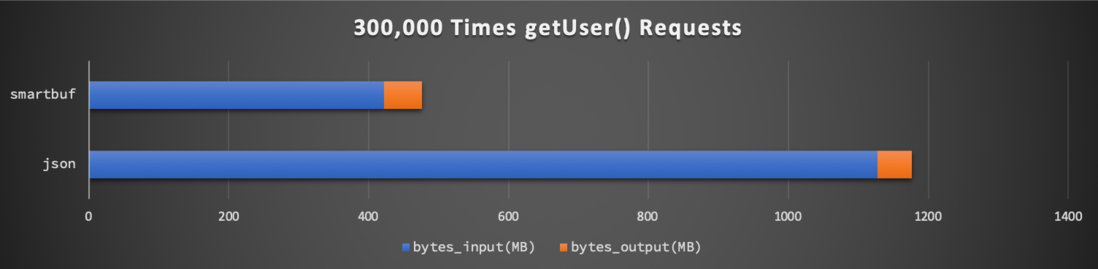
可以看到请求参数userId数据类型单一,因此json和smartbuf所使用的网络流量几乎一样。而返回结果UserModel是一个比较复杂的对象,因此json网络资源消耗量是smartbuf的将近三倍。
因为测试环境为localhost,网络传输耗时对接口的总耗时没有太大影响。
queryPost测试
queryPost接口的实现方式如下:
@RestController
public class DemoController {
    private List<PostModel> posts = xxx; // initialized at somewhere else

    @PostMapping("/queryPost")
    public List<PostModel> queryPost(String keyword) { return posts; }
}此接口返回值posts是一个预先分配的、用于测试的PostModel数组,此数组长度为固定的100,其具体模型及初始化可以查阅demo源码。
客户端、调用方的FeignClient定义如下:
@FeignClient(name = "demo")
public interface DemoClient {
    @PostMapping(value = "/queryPost", consumes = "application/json", produces = "application/json")
    List<PostModel> queryPostJSON(@RequestParam("keyword") String keyword);

    @PostMapping(value = "/queryPost", consumes = "application/x-smartbuf", produces = "application/x-smartbuf")
    List<PostModel> queryPostSmartbuf(@RequestParam("keyword") String keyword);
}单线程循环调用100,000次的总耗时分别为:
-
JSON: 195秒 -
SmartBuf: 155秒
网络输入(bytes_input)输出(bytes_output)总量分别为:
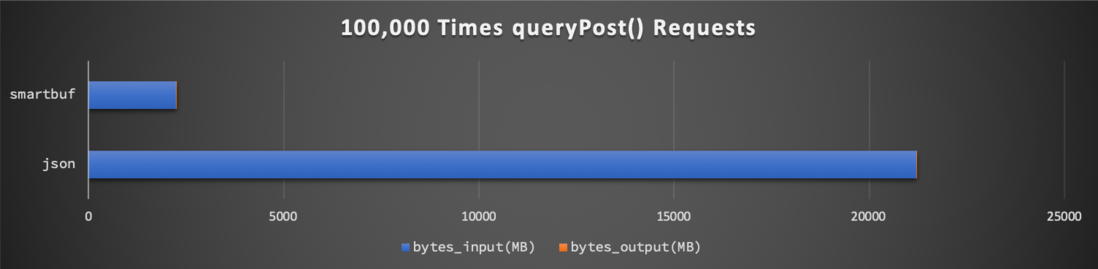
可以看到请求参数keyword数据类型单一,因此json和smartbuf所使用的网络流量几乎一样。而返回结果List<PostModel>是一个复杂对象的大数组,因此json网络资源消耗量是smartbuf的将近十倍。
因为测试环境为localhost,网络传输耗时对接口的总耗时没有太大影响。
总结
在输入输出数据格式都非常简单的RPC接口调用中,此插件所提供的application/x-smartbuf编码没有任何性能优势。
当接口数据中存在复杂对象、数组、集合等较大数据时,使用application/x-smartbuf可以大幅降低net输入输出的字节流大小,比如在上文queryPost测试中,使用application/x-smartbuf时网络输入输出字节总量仅为application/json的十分之一。
难能可贵的是,实际应用中application/x-smartbuf与application/json即可以共存,也可以无缝切换。
比如对于某些简单接口,可以直接采用简单的application/json编码,而对于数据量比较大的复杂接口,可以采用高效率的application/x-smartbuf编码进行性能优化。
比如开发测试时直接使用application/json编码,上线时再切换为application/x-smartbuf编码。
本文同步发布于GitHub、个人主页等
评论
登录后参与技术讨论,分享你的经验与见解。
登录 / 注册暂无评论