findDOMNode与ref的区别?

文章目录
ref添加到组件上获取的是组件(只能是类组件,因为函数组件没有实例)的实例,添加到原生HTML元素上获取的是DOM
fondDOMNode当参数是DOM时得到的也是DOM,这个没有什么作用,使用ref就可以了。当参数时组件实例时获取的是组件render返回的DOM
下面举些例子验证findDOMNode功能是否如上面所说,ref的介绍可以参考react如何使用ref
1、参数是DOM
import React, { useEffect } from 'react';
import { findDOMNode } from 'react-dom';


const FindDOMNode = () => {

  const inputRef = React.createRef<HTMLInputElement>();

  useEffect(() => {
    if (inputRef.current) {
      const inputDOM = findDOMNode(inputRef.current);
      console.log(inputDOM, inputRef.current)
    }
  })

  return <input type="text" ref={inputRef}/>
}

export default FindDOMNode;
控制台打印发现findDOMNode参数是DOM返回还是参数DOM,这种使用没有什么意义,一般也不推荐这样使用,直接使用ref即可
我们加上一行代码使input聚焦,发现findDOMNode返回的Element类型的DOM
export function findDOMNode(instance: ReactInstance | null | undefined): Element | null | Text;input的focus方法在HTMLInputElement类型的DOM对象上,而HTMLInputElement类型继承了Element,我们只需要使用as断言成实际类型即可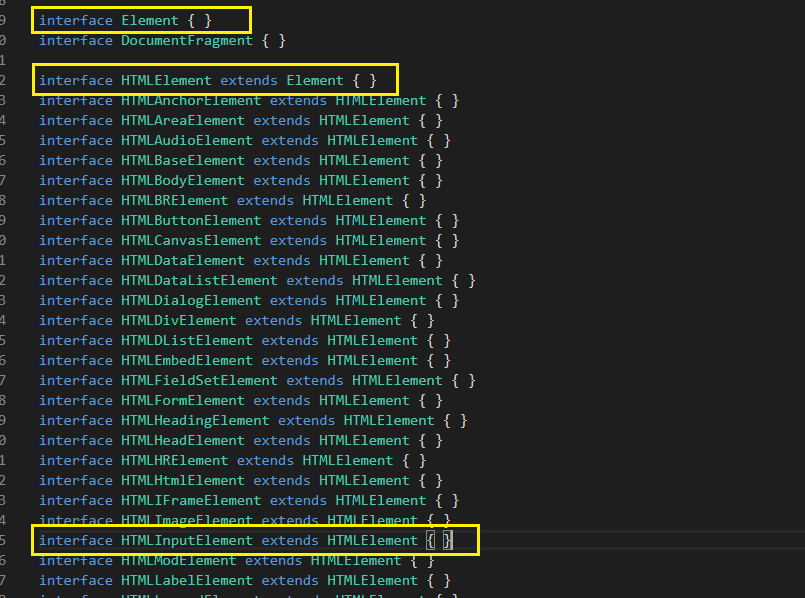
const inputDOM = findDOMNode(inputRef.current) as HTMLInputElement;
inputDOM.focus()ref.current返回的就是我们 React.createRef<HTMLInputElement>()定义好的泛型类型
2、参数是Component
// 父组件
import React, { useEffect } from 'react';
import { findDOMNode } from 'react-dom';
import InputComp from './inputComp';


const FindDOMNode = () => {

  // InputComp指明组件实例的类型
  const inputRef = React.createRef<InputComp>();

  useEffect(() => {
    if (inputRef.current) {
      const inputDOM = findDOMNode(inputRef.current);
      console.log(inputDOM, inputRef.current)
    }
  })

  return <InputComp ref={inputRef}></InputComp>
}

export default FindDOMNode;

// 子组件
import React from 'react';


class InputComp extends React.Component<{}, {}> {

  render() {
    return <div>
      <input type="text"/>
    </div>
  }
}

export default InputComp;
控制台打印情况恰好验证了开头说的
评论
登录后参与技术讨论,分享你的经验与见解。
登录 / 注册暂无评论