单人RPG小游戏开发

文章目录
标题页面的设计
第一个页面是标题页面,用一个TextView控件显示游戏的名称quanet的世界,然后两个Button控件,一个是continue,一个是exit。
打开Android Studio 4.1.3,选择Create New Project,选择Empty Activity,项目名称为My Game。
首先设计页面的布局,在layout/activity_main.xml中输入
<?xml version="1.0" encoding="utf-8"?>
<LinearLayout xmlns:android="http://schemas.android.com/apk/res/android"
    android:layout_width="match_parent"
    android:layout_height="match_parent"
    android:orientation="vertical">
    <TextView
        android:id="@+id/tv_display"
        android:layout_width="match_parent"
        android:layout_height="400dp"
        android:scrollbars="vertical"
        android:gravity="center"
        android:background="#90ee90"
        android:textSize="30sp"/>
    <LinearLayout
        android:layout_width="match_parent"
        android:layout_height="80dp"
        android:orientation="horizontal">
        <Button
            android:id="@+id/btn_continue"
            android:layout_width="180dp"
            android:layout_height="80dp"
            android:layout_gravity="center"
            android:text="continue" />
        <Button
            android:id="@+id/btn_exit"
            android:layout_width="180dp"
            android:layout_height="80dp"
            android:layout_gravity="center"
            android:text="exit" />
    </LinearLayout>
</LinearLayout>
然后书写页面的代码,在com/example/mygame/MainActivity.java中输入
package com.example.mygame;

import androidx.appcompat.app.AppCompatActivity;
import android.content.Intent;
import android.os.Bundle;
import android.text.method.ScrollingMovementMethod;
import android.view.View;
import android.widget.Button;
import android.widget.TextView;

public class MainActivity extends AppCompatActivity {
    private TextView tv_display;
    private Button btn_continue, btn_exit;
    private final String version = "2021-04-10 v2.1";
    private final String game_name = "quanet的世界";
    @Override
    protected void onCreate(Bundle savedInstanceState) {
        super.onCreate(savedInstanceState);
        setContentView(R.layout.activity_main);
        tv_display = (TextView) findViewById(R.id.tv_display);
        tv_display.setMovementMethod(new ScrollingMovementMethod());
        btn_continue = (Button) findViewById(R.id.btn_continue);
        btn_exit = (Button) findViewById(R.id.btn_exit);
        btn_continue.setOnClickListener(new ClickCAction());
        btn_exit.setOnClickListener(new ClickCAction());

        String r = "Welcome to\n" + game_name + "\n(" + version + ")\n";
        r += "To continue, or exit:\n\n";
        tv_display.setText(r);
    }
    private class ClickCAction implements View.OnClickListener {
        @Override
        public void onClick(View v) {
            if (v.getId() == R.id.btn_continue) {
                Intent intent = new Intent();
                intent.setClass(MainActivity.this, Introduction.class);
                startActivity(intent);
            }
            if (v.getId() == R.id.btn_exit) {
                System.exit(0);
            }
        }
    }
}
代码的意思是建立1个TextView对象tv_display,在打开页面时显示欢迎和显示标题。2个Button对象btn_continue和btn_exit,分别绑定点击监听器,点击btn_continue跳转到ActivityIntroduction页面,点击btn_exit退出。
介绍页面的设计
这个页面包括一个TextView控件,用于显示一段简短的剧情,两个Button控件continue和exit用于选择继续和退出。在Android Studio的菜单选择File - New - Activity - Empty Activity,名字为ActivityIntroduction。
接着设计页面的布局,在layout/activity_main.xml中输入
<?xml version="1.0" encoding="utf-8"?>
<LinearLayout xmlns:android="http://schemas.android.com/apk/res/android"
    android:layout_width="match_parent"
    android:layout_height="match_parent"
    android:orientation="vertical">
    <TextView
        android:id="@+id/tv_intro_display"
        android:layout_width="match_parent"
        android:layout_height="600dp"
        android:scrollbars="vertical"
        android:gravity="left|top"
        android:background="#90ee90"
        android:textSize="20sp"/>
    <LinearLayout
        android:layout_width="match_parent"
        android:layout_height="80dp"
        android:orientation="horizontal">
        <Button
            android:id="@+id/btn_intro_continue"
            android:layout_width="180dp"
            android:layout_height="80dp"
            android:layout_gravity="center"
            android:text="continue" />
        <Button
            android:id="@+id/btn_intro_exit"
            android:layout_width="180dp"
            android:layout_height="80dp"
            android:layout_gravity="center"
            android:text="exit" />
    </LinearLayout>
</LinearLayout>
接着编写代码,在com/example/mygame/ActivityIntroduction.java中输入
package com.example.mygame;
import androidx.appcompat.app.AppCompatActivity;

import android.content.Intent;
import android.os.Bundle;
import android.text.method.ScrollingMovementMethod;
import android.view.View;
import android.widget.Button;
import android.widget.TextView;

public class Introduction extends AppCompatActivity {
    private TextView tv_intro_display;
    private Button btn_intro_continue, btn_intro_exit;
    private String game_process;
    private StringBuilder b = new StringBuilder( "" );
    @Override
    protected void onCreate(Bundle savedInstanceState) {
        super.onCreate(savedInstanceState);
        setContentView(R.layout.activity_introduction);
        tv_intro_display = (TextView) findViewById(R.id.tv_intro_display);
        tv_intro_display.setMovementMethod(new ScrollingMovementMethod());
        btn_intro_continue = (Button) findViewById(R.id.btn_intro_continue);
        btn_intro_exit = (Button) findViewById(R.id.btn_intro_exit);
        btn_intro_continue.setOnClickListener(new ClickCAction());
        btn_intro_exit.setOnClickListener(new ClickCAction());
        String r = "【quanet】我...我在哪?\n";
        tv_intro_display.setText(r);
        game_process = "1";
    }

    private class ClickCAction implements View.OnClickListener {
        @Override
        public void onClick(View v) {
            if (v.getId() == R.id.btn_intro_continue) {
                if (game_process == "1") {
                    b.delete(0, b.length());
                    b.append("【老地精】来我这里接任务...\n");
                    b.append("【quanet】......\n");
                    b.append("2. To continue: \n\n");
                    tv_intro_display.setText(b);
                    game_process = "2";
                } else if (game_process == "2") {
                    b.delete(0, b.length());
                    b.append( "【老地精】去山洞里面的最尽头寻找【狼皮】...\n" );
                    b.append( "【quanet】...\n" );
                    b.append( "【quanet】好吧...\n" );
                    b.append( "提示(到达山洞尽头方法):先down至(0, -10),然后right至(10, -10),最后up至(10, 0)。\n" );
                    b.append("3. To continue: \n\n");
                    tv_intro_display.setText(b);
                    game_process = "3";
                } else if (game_process == "3") {
                    Intent intent = new Intent();
                    intent.setClass(Introduction.this, C01_cave.class);
                    startActivity(intent);
                }
            }
            if (v.getId() == R.id.btn_intro_exit) {
                System.exit(0);
            }
        }
    }
}
山洞页面的设计
这个页面包括4个TextView控件,分别显示标题、地图、坐标、消息。10个Button控件,用于执行不同的功能。在Android Studio的菜单选择File - New - Activity - Empty Activity,名字为Activity01Cave。
首先设计TextView控件的显示样式,背景和边框使用不同的颜色。在drawable/textview_border.xml中输入
<?xml version="1.0" encoding="utf-8"?>
<shape xmlns:android="http://schemas.android.com/apk/res/android" android:shape="rectangle">
    <solid android:color="#a9a9a9" />
    <stroke android:width="1dp" android:color="#98fb98"/>
</shape>
接着编写这个页面的布局代码,在layout/activity_activity01_cave.xml中输入
<?xml version="1.0" encoding="utf-8"?>
<LinearLayout xmlns:android="http://schemas.android.com/apk/res/android"
    android:layout_width="match_parent"
    android:layout_height="match_parent"
    android:orientation="vertical">
    <TextView
        android:id="@+id/tv_header"
        android:layout_width="match_parent"
        android:layout_height="40dp"
        android:scrollbars="vertical"
        android:gravity="left|top"
        android:background="@drawable/textview_border"
        android:textSize="24dp" />
    <TextView
        android:id="@+id/tv_map"
        android:layout_width="match_parent"
        android:layout_height="150dp"
        android:scrollbars="vertical"
        android:gravity="left|top"
        android:textSize="14dp"
        android:background="@drawable/textview_border"/>
    <TextView
        android:id="@+id/tv_coordinates"
        android:layout_width="match_parent"
        android:layout_height="50dp"
        android:gravity="left|top"
        android:background="@drawable/textview_border"
        android:textSize="14dp" />
    <TextView
        android:id="@+id/tv_messages"
        android:layout_width="match_parent"
        android:layout_height="300dp"
        android:scrollbars="vertical"
        android:gravity="left|top"
        android:background="@drawable/textview_border"
        android:textSize="14dp" />
    <LinearLayout
        android:layout_width="match_parent"
        android:layout_height="80dp"
        android:orientation="vertical">
        <LinearLayout
            android:layout_width="match_parent"
            android:layout_height="40dp"
            android:orientation="horizontal">
            <Button
                android:id="@+id/btn_q"
                android:layout_width="70dp"
                android:layout_height="40dp"
                android:layout_gravity="center"
                android:text="Q" />
            <Button
                android:id="@+id/btn_w"
                android:layout_width="70dp"
                android:layout_height="40dp"
                android:layout_gravity="center"
                android:text="W" />
            <Button
                android:id="@+id/btn_e"
                android:layout_width="70dp"
                android:layout_height="40dp"
                android:layout_gravity="center"
                android:text="E" />
            <Button
                android:id="@+id/btn_r"
                android:layout_width="70dp"
                android:layout_height="40dp"
                android:layout_gravity="center"
                android:text="R" />
            <Button
                android:id="@+id/btn_F1"
                android:layout_width="80dp"
                android:layout_height="40dp"
                android:layout_gravity="center"
                android:text="F1" />
        </LinearLayout>
        <LinearLayout
            android:layout_width="match_parent"
            android:layout_height="40dp"
            android:orientation="horizontal">
            <Button
                android:id="@+id/btn_a"
                android:layout_width="70dp"
                android:layout_height="40dp"
                android:layout_gravity="center"
                android:text="A" />
            <Button
                android:id="@+id/btn_s"
                android:layout_width="70dp"
                android:layout_height="40dp"
                android:layout_gravity="center"
                android:text="S" />
            <Button
                android:id="@+id/btn_d"
                android:layout_width="70dp"
                android:layout_height="40dp"
                android:layout_gravity="center"
                android:text="D" />
            <Button
                android:id="@+id/btn_f"
                android:layout_width="70dp"
                android:layout_height="40dp"
                android:layout_gravity="center"
                android:text="F" />
            <Button
                android:id="@+id/btn_F2"
                android:layout_width="80dp"
                android:layout_height="40dp"
                android:layout_gravity="center"
                android:text="F2" />
        </LinearLayout>
    </LinearLayout>
</LinearLayout>
接着编写代码文件,在com/example/mygame/Activity01Cave.java中输入
package com.example.mygame;

import androidx.appcompat.app.AppCompatActivity;

import android.content.Intent;
import android.os.Bundle;
import android.text.method.ScrollingMovementMethod;
import android.view.View;
import android.widget.TextView;

public class Activity01Cave extends AppCompatActivity {
    private TextView tv_header, tv_map, tv_coordinates, tv_messages;
    private Basic hero;

    @Override
    protected void onCreate(Bundle savedInstanceState) {
        super.onCreate(savedInstanceState);
        setContentView(R.layout.activity_activity01_cave);
        tv_header = (TextView) findViewById(R.id.tv_header);
        tv_map = (TextView) findViewById(R.id.tv_map);
        tv_map.setMovementMethod(new ScrollingMovementMethod());
        tv_coordinates = (TextView) findViewById(R.id.tv_coordinates);
        tv_messages = (TextView) findViewById(R.id.tv_messages);
        tv_messages.setMovementMethod(new ScrollingMovementMethod());
        findViewById(R.id.btn_q).setOnClickListener(new ClickCAction());
        findViewById(R.id.btn_w).setOnClickListener(new ClickCAction());
        findViewById(R.id.btn_e).setOnClickListener(new ClickCAction());
        findViewById(R.id.btn_r).setOnClickListener(new ClickCAction());
        findViewById(R.id.btn_F1).setOnClickListener(new ClickCAction());
        findViewById(R.id.btn_a).setOnClickListener(new ClickCAction());
        findViewById(R.id.btn_s).setOnClickListener(new ClickCAction());
        findViewById(R.id.btn_d).setOnClickListener(new ClickCAction());
        findViewById(R.id.btn_f).setOnClickListener(new ClickCAction());
        findViewById(R.id.btn_F2).setOnClickListener(new ClickCAction());

        tv_header.setText("第一幕 山洞");
        setMap();
        setHint();
        hero = new Basic();
        hero.setStatus("before_introduction");
        hero.display_coordinates(tv_coordinates);

    }
    private class ClickCAction implements View.OnClickListener {
        @Override
        public void onClick(View v) {
            if (v.getId() == R.id.btn_F1) {
                setHint();
            }
            if (v.getId() == R.id.btn_F2) {
                System.exit( 0 );
            }
            if (v.getId() == R.id.btn_w) {
                hero.change_y_coordinate(1, tv_coordinates);
                hero.make_event(tv_messages);
            }
            if (v.getId() == R.id.btn_s) {
                hero.change_y_coordinate(-1, tv_coordinates);
                hero.make_event(tv_messages);
            }
            if (v.getId() == R.id.btn_a) {
                hero.change_x_coordinate(-1, tv_coordinates);
                hero.make_event(tv_messages);
            }
            if (v.getId() == R.id.btn_d) {
                hero.change_x_coordinate(1, tv_coordinates);
                hero.make_event(tv_messages);
            }
            if (v.getId() == R.id.btn_q) {
                //hero.display_full_attribution(tv_messages);
                Intent intent = new Intent();
                intent.setClass(C01_cave.this, Activity_Character.class);
                intent.putExtra("name", hero.getName());
                intent.putExtra("profession", hero.getProfession());
                intent.putExtra("lv", hero.getLv());
                intent.putExtra("potential", hero.getPotential());
                intent.putExtra("HP", hero.getHP());
                intent.putExtra("HP_max", hero.getHP_max());
                intent.putExtra("MP", hero.getMP());
                intent.putExtra("MP_max", hero.getMP_max());
                intent.putExtra("attack", hero.getAttack());
                intent.putExtra("defence", hero.getDefence());
                intent.putExtra("strength", hero.getStrength());
                intent.putExtra("quickness", hero.getQuickness());
                intent.putExtra("intelligence", hero.getIntelligence());
                intent.putExtra("luck", hero.getLuck());
                intent.putExtra("Exp", hero.getExp());
                intent.putExtra("Exp_max", hero.getExp_max());
                intent.putExtra("coin", hero.getCoin());
                startActivity(intent);
            }
            if (v.getId() == R.id.btn_e) {
                //hero.display_equipments(tv_messages);
                Intent intent = new Intent();
                intent.setClass(C01_cave.this, Activity_Equipment.class);
                intent.putExtra("shirt", hero.getEquipment("shirt"));
                intent.putExtra("long_underwear", hero.getEquipment("long_underwear"));
                intent.putExtra("helmet", hero.getEquipment("helmet"));
                intent.putExtra("breastplate", hero.getEquipment("breastplate"));
                intent.putExtra("cloak", hero.getEquipment("cloak"));
                intent.putExtra("gloves", hero.getEquipment("gloves"));
                intent.putExtra("belt", hero.getEquipment("belt"));
                intent.putExtra("shoes", hero.getEquipment("shoes"));
                intent.putExtra("lefthand_item", hero.getEquipment("lefthand_item"));
                intent.putExtra("righthand_item", hero.getEquipment("righthand_item"));
                startActivity(intent);
            }
            if (v.getId() == R.id.btn_r) {
                //hero.print_backpack(tv_messages);
                Intent intent = new Intent();
                intent.setClass(C01_cave.this, Activity_BackPack.class);
                intent.putExtra("names", hero.getBackPackItemNames());
                intent.putExtra("nums", hero.getBackPackItemNums());
                startActivity(intent);
            }
        }
    }
    public void setMessage(String b) {
        tv_messages.setText(b);
    }
    public void setMap() {
        String s = "地图:\n";
        s += "1. 草药(-5 < x < 15, -15 < y < 5)\n";
        s += "2. 史莱姆(x = 0, -10 < y < 0),术士、蝙蝠(0< x < 10, y = -10),骷髅(x=10, -10 < y < 0)\n";
        s += "3. 药店(x = 0, y = 0)\n";
        tv_map.setText(s);
    }
    public void setHint() {
        tv_messages.setText("提示:\n" + "移动:上W左A下S右D,攻击F,人物状态Q,装备E,背包R,提示F1,退出F2。");
    }
}
这里用到了一个自编的Basic类,里面包含了英雄角色的基本信息,以及对于角色各种动作的响应。
运行结果
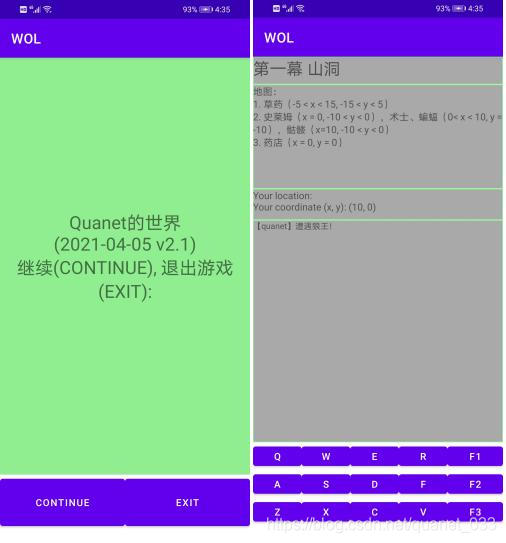
图片来源:http://www.cungun.com/ 页游
评论
登录后参与技术讨论,分享你的经验与见解。
登录 / 注册暂无评论