Linux 编程相关命令

文章目录
陆续补充,未完待续...
一、编译环境
1. 查看当前编译根目录(特别是交叉编译)
操作命令
cpp -print-sysroot执行效果
/
2. 查看可执行程序默认搜索路径
操作命令
echo $PATH执行效果
/usr/local/bin:/usr/bin:/bin:/usr/local/games:/usr/games:/sbin:/usr/sbin
3. 查看当前头文件默认搜索路径
操作命令
cpp -v执行效果
Using built-in specs.
COLLECT_GCC=cpp
Target: x86_64-linux-gnu
Thread model: posix
gcc version 6.3.0 20170516 (Debian 6.3.0-18+deb9u1)
COLLECT_GCC_OPTIONS='-E' '-v' '-mtune=generic' '-march=x86-64'
...
#include "..." search starts here:
#include <...> search starts here:
/usr/lib/gcc/x86_64-linux-gnu/6/include
/usr/local/include
/usr/lib/gcc/x86_64-linux-gnu/6/include-fixed
/usr/include/x86_64-linux-gnu
/usr/include
End of search list.
4. 查看共享库程序默认搜索路径
背景知识
# 查看 LD_DEBUG 选项
export LD_DEBUG=help
ls(任意指令都可以)

# 设置查看libs选项
export LD_DEBUG=libs

# 取消设置LD_DEBUG
export LD_DEBUG=
操作命令
# libs 或 all
export LD_DEBUG=libs

# 执行可执行程序(搜索不到 libMath.so 的情况)
./AppProject
执行效果
find library=libMath.so [0]; searching
search cache=/etc/ld.so.cache
    trying file=/usr/local/lib/libMath.so
search path=/lib/x86_64-linux-gnu/tls/x86_64:/lib/x86_64-linux-gnu/tls:/lib/x86_64-linux-gnu/x86_64:/lib/x86_64-linux-gnu:/usr/lib/x86_64-linux-gnu/tls/x86_64:/usr/lib/x86_64-linux-gnu/tls:/usr/lib/x86_64-linux-gnu/x86_64:/usr/lib/x86_64-linux-gnu:/lib/tls/x86_64:/lib/tls:/lib/x86_64:/lib:/usr/lib/tls/x86_64:/usr/lib/tls:/usr/lib/x86_64:/usr/lib (system search path)
    trying file=/lib/x86_64-linux-gnu/tls/x86_64/libMath.so
    trying file=/lib/x86_64-linux-gnu/tls/libMath.so
    trying file=/lib/x86_64-linux-gnu/x86_64/libMath.so
    trying file=/lib/x86_64-linux-gnu/libMath.so
    trying file=/usr/lib/x86_64-linux-gnu/tls/x86_64/libMath.so
    trying file=/usr/lib/x86_64-linux-gnu/tls/libMath.so
    trying file=/usr/lib/x86_64-linux-gnu/x86_64/libMath.so
    trying file=/usr/lib/x86_64-linux-gnu/libMath.so
    trying file=/lib/tls/x86_64/libMath.so
    trying file=/lib/tls/libMath.so
    trying file=/lib/x86_64/libMath.so
    trying file=/lib/libMath.so
    trying file=/usr/lib/tls/x86_64/libMath.so
    trying file=/usr/lib/tls/libMath.so
    trying file=/usr/lib/x86_64/libMath.so
    trying file=/usr/lib/libMath.so
./AppProject: error while loading shared libraries: libMath.so: cannot open shared object file: No such file or directory
二、文件分析
1. 查看文件交叉编译信息
操作命令
readelf -h xxx- 执行效果
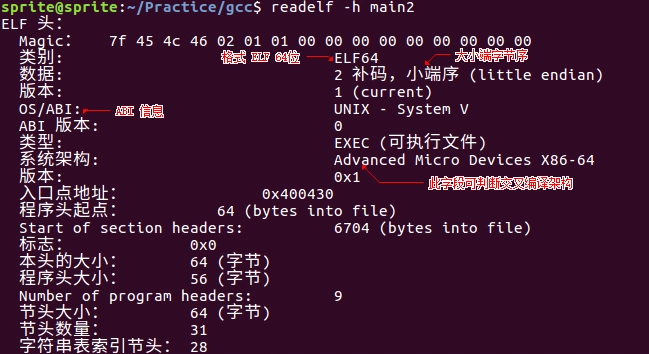
三、动态库分析
1. 查看依赖动态库
操作命令
ldd xxx- 执行效果
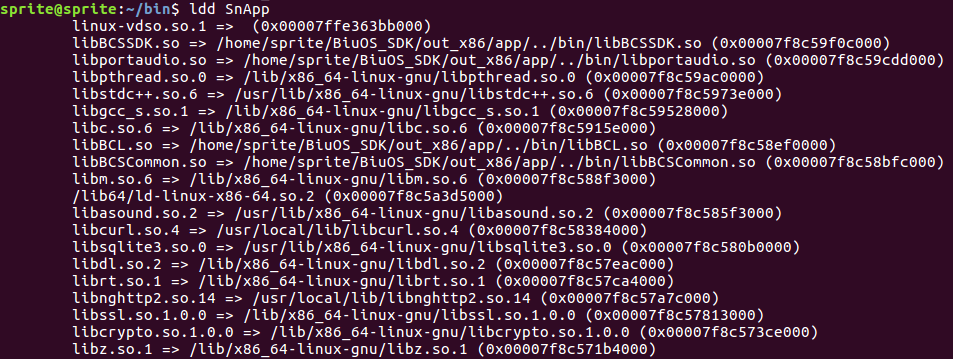
2. 查看缺少动态库
操作命令
ldd xxx- 执行效果
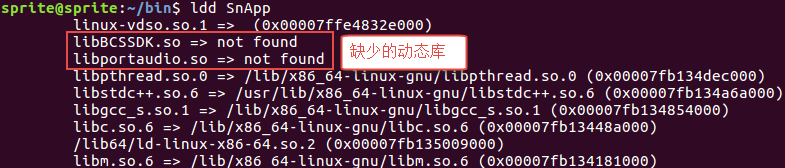
3. 查看 rpath
操作命令
readelf -d xxx- 执行效果

4. 修改 rpath
操作命令
patchelf --set-rpath new_path xxx- 执行效果

5. 删除 rpath
操作命令
patchelf --remove-rpath filename- 执行效果
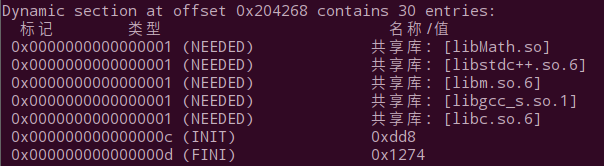
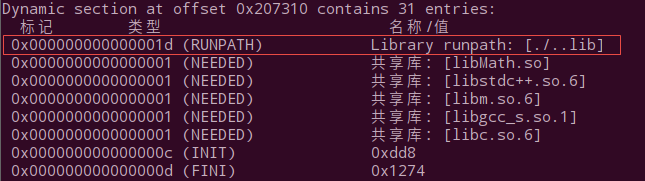
6. 添加 rpath
操作命令
patchelf --set-rpath ./..lib filename- 执行效果
四、参考链接
- Where do executables look for shared objects at runtime?
- Shared Libraries
评论
登录后参与技术讨论,分享你的经验与见解。
登录 / 注册暂无评论