解决 Xcode12+swift 5 使用 pod 出现警告的问题

文章目录
起因
在新建项目后,使用 pod 安装一些组件,结果出现了如下错误
Pod installation complete! There is 1 dependency from the Podfile and 1 total pod installed.

[!] The `bestWhiteNoise [Debug]` target overrides the `ALWAYS_EMBED_SWIFT_STANDARD_LIBRARIES` build setting defined in `Pods/Target Support Files/Pods-bestWhiteNoise/Pods-bestWhiteNoise.debug.xcconfig'. This can lead to problems with the CocoaPods installation
    - Use the `$(inherited)` flag, or
    - Remove the build settings from the target.

[!] The `bestWhiteNoise [Release]` target overrides the `ALWAYS_EMBED_SWIFT_STANDARD_LIBRARIES` build setting defined in `Pods/Target Support Files/Pods-bestWhiteNoise/Pods-bestWhiteNoise.release.xcconfig'. This can lead to problems with the CocoaPods installation
    - Use the `$(inherited)` flag, or
    - Remove the build settings from the target.

[!] The `bestWhiteNoiseUITests [Debug]` target overrides the `ALWAYS_EMBED_SWIFT_STANDARD_LIBRARIES` build setting defined in `Pods/Target Support Files/Pods-bestWhiteNoise-bestWhiteNoiseUITests/Pods-bestWhiteNoise-bestWhiteNoiseUITests.debug.xcconfig'. This can lead to problems with the CocoaPods installation
    - Use the `$(inherited)` flag, or
    - Remove the build settings from the target.

[!] The `bestWhiteNoiseUITests [Release]` target overrides the `ALWAYS_EMBED_SWIFT_STANDARD_LIBRARIES` build setting defined in `Pods/Target Support Files/Pods-bestWhiteNoise-bestWhiteNoiseUITests/Pods-bestWhiteNoise-bestWhiteNoiseUITests.release.xcconfig'. This can lead to problems with the CocoaPods installation
    - Use the `$(inherited)` flag, or
    - Remove the build settings from the target.
查询了一些文档后,发现是我们项目中的设置 和 Pods 中的设置不一致,并且显示的是警告,实际上是错误,可能会导致你的第三方组件安装不成功等问题
解决方案
看了很多文章,都是搜索 ALWAYS_EMBED_SWIFT_STANDARD_LIBRARIES 设置成 $(inherited),但是没有细说需要设置哪几个地方,可能对于我这种新手来说就是一个坑,实际上我们需要设置每一个 TARGETS 中的 ALWAYS_EMBED_SWIFT_STANDARD_LIBRARIES 为 $(inherited)
如图:
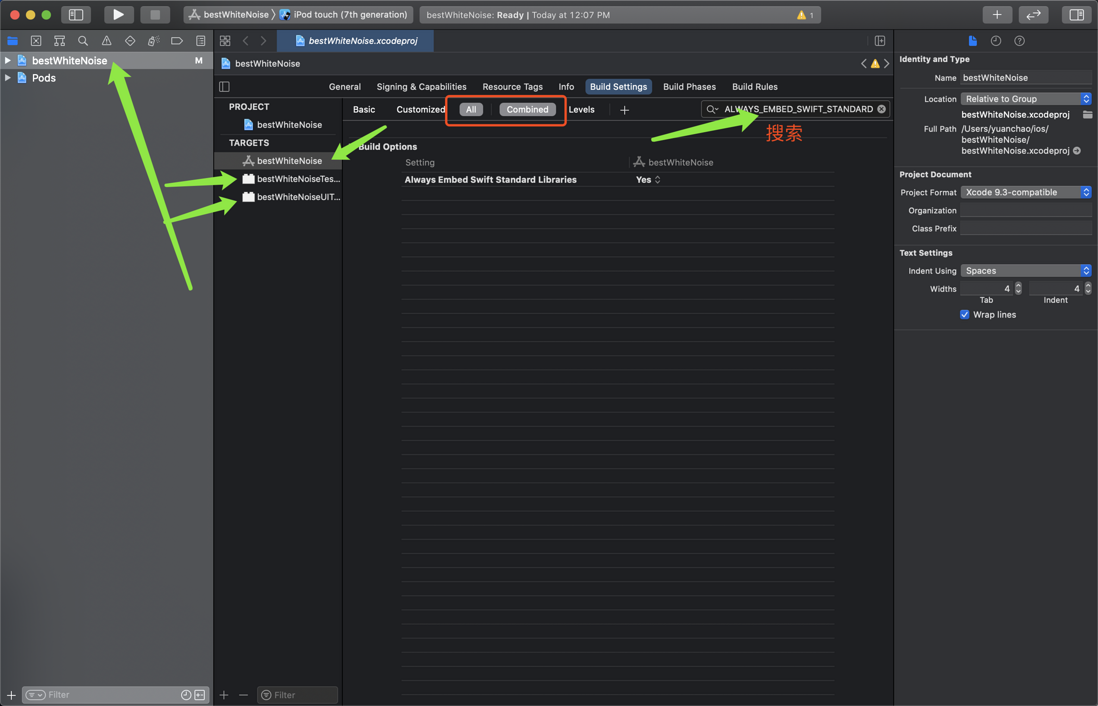


保存,然后 TARGETS 中的每一个,比如我图片中的三个,那么这三个我都需要设置
设置完后,再次运行 pod install 就好了
评论
登录后参与技术讨论,分享你的经验与见解。
登录 / 注册暂无评论