vue项目vue-puzzle-verification实现拖拽拼图校验

文章目录
1.npm安装
npm i vue-puzzle-verification
2.在main.js中引入组件
import puzzleVerification from 'vue-puzzle-verification'
Vue.use(puzzleVerification)
3.在vue页面中直接使用
<div class="puzzle-box" style="width: 295px;height: 500px">
  <puzzleVerification
    :verificationShow="true"
    blockType="puzzle"
    :onSuccess="handleSuccess"
    :onError="handleError"
    :puzzleImgList="puzzleImgList"
    style="display: block"
  ></puzzleVerification>
</div>
data(){
return{
puzzleImgList:[
'图片1',
'图片2',
'图片3'
]
}
},这样就可以正常运行了,刷新后puzzleImgList中图片会随机切换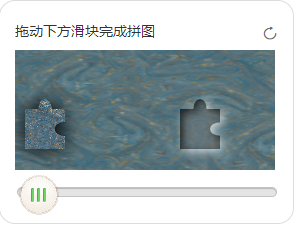
3.运行发现后台会报错,但不影响组件使用
解决报错信息:
beforeDestroy(){
    document.removeEventListener("mousemove",this.moving);
    document.removeEventListener("touchmove",this.moving);
    document.removeEventListener("mouseup",this.moveEnd);
    document.removeEventListener("touchend",this.moveEnd)
}
评论
登录后参与技术讨论,分享你的经验与见解。
登录 / 注册暂无评论