JAVA 使用钉钉机器人推送信息

文章目录
一 添加机器人
在钉钉群依次打开群设置-》智能群助手-》添加机器人
选择最后一个自定义一个机器人
设置一个名字,安全模式这里以自定义关键词为例,输入一个关键词,后续会用到。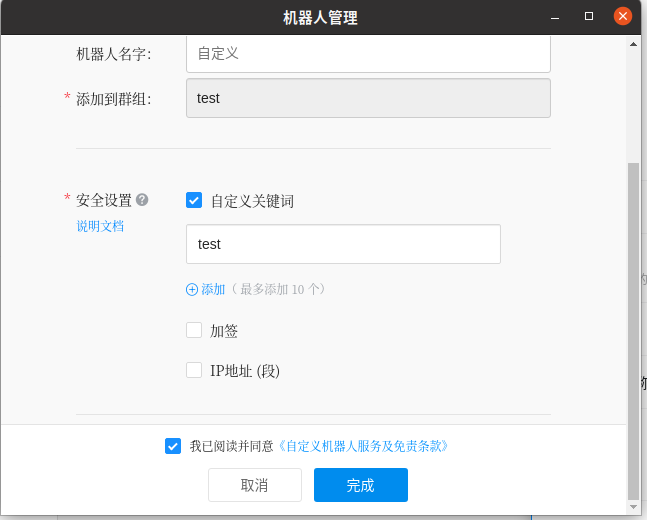
完成后会生成一个webhook,用于推送消息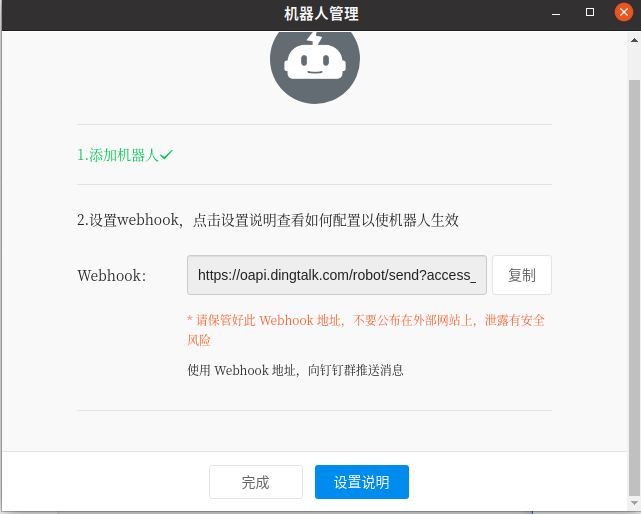
至此机器人添加完成
二 消息推送
在上述文档中有如下描述
也就是说向在第一步中得到的webhook地址发送POST请求就可以实现发送消息,而且消息支持不同类型,下面以最简单的test为例,有其他需求请查看官方文档。
到此思路就很清晰了,我们只需要通过JAVA发送一个http POST请求就可以实现消息推送了。
官方文档给出了测试示例,我们可以以此为模板构建http请求
curl 'https://oapi.dingtalk.com/robot/send?access_token=xxxxxxxx' \
 -H 'Content-Type: application/json' \
 -d '{"msgtype": "text","text": {"content":"我就是我, 是不一样的烟火"}}'
JAVA 发起 http请求
关于JAVA如何发起http请求方法有很多,不做一一介绍,本文只以Apache的HttpClient为例讲解。
第一步要首先引入Apache httpclient的包
<dependency>
            <groupId>org.apache.httpcomponents</groupId>
            <artifactId>httpclient</artifactId>
            <version>4.5.13</version>
</dependency>
同时需要引入fastjson包用于在构造http请求时用
<dependency>
            <groupId>com.alibaba</groupId>
            <artifactId>fastjson</artifactId>
            <version>2.0.14</version>
        </dependency>
下面开始代码编写
推送的message中必须包含在创建时添加的关键词,否则将无法完成推送
public static void dingRequest(String message) {
        CloseableHttpClient httpClient = HttpClientBuilder.create().build();
        String url = null;
        try {
            url = 你的webhook;
        } catch (Exception e) {
            e.printStackTrace();
        }

        HttpPost httpPost = new HttpPost(url);
        //设置http的请求头,发送json字符串,编码UTF-8
        httpPost.setHeader("Content-Type", "application/json;charset=utf8");
        //生成json对象传入字符,根据需求创建请求的json字符串
        JSONObject result = new JSONObject();
        JSONObject text = new JSONObject();
        text.put("content", message);
        result.put("msgtype", "text");
        result.put("text", text);
        String jsonString = JSON.toJSONString(result);
        StringEntity entity = new StringEntity(jsonString, "UTF-8");

        //设置http请求的内容
        httpPost.setEntity(entity);
        // 响应模型
        CloseableHttpResponse response = null;
        try {
            // 由客户端执行(发送)Post请求
            response = httpClient.execute(httpPost);
            // 从响应模型中获取响应实体
            HttpEntity responseEntity = response.getEntity();
            if (responseEntity != null) {
                System.out.println("响应内容长度为:" + responseEntity.getContentLength());
                System.out.println("响应内容为:" + EntityUtils.toString(responseEntity));
            }
        } catch (Exception e) {
            e.printStackTrace();
        } finally {
            try {
                // 释放资源
                if (httpClient != null) {
                    httpClient.close();
                }
                if (response != null) {
                    response.close();
                }
            } catch (Exception e) {
                e.printStackTrace();
            }
        }
    }
注意:上述代码中引入的JSON和 JSONObject对象一定是fastjson中的
import com.alibaba.fastjson2.JSON;
import com.alibaba.fastjson2.JSONObject;
到此就可以使用机器人进行消息推送了
总结
向webhook发送POST请求,在请求的参数中加入需要推送的信息
评论
登录后参与技术讨论,分享你的经验与见解。
登录 / 注册暂无评论