Cocos2D

文章目录
在Cocos2d-x的开发中,如果你使用的xcode4.6,有时候希望使用C++11标准库的东西,比如 std::array,如果直接,
# include <array>
将会出现无法找到array的问题。
这个时候我们就要对我们的xcode进行一下简单的配置。
在Building Settings里面,首先点击All, 然后在"Apple LLVM Compiler 4.2 - Language"区域:
- 设置 "C++ Language Dialect" 选项为 "c11"
- 设置 "C++ Standard Library" 选项为 "libc++ (LLVM standard C++ library with C++11 support)"
更多详细,请参见screenshot. 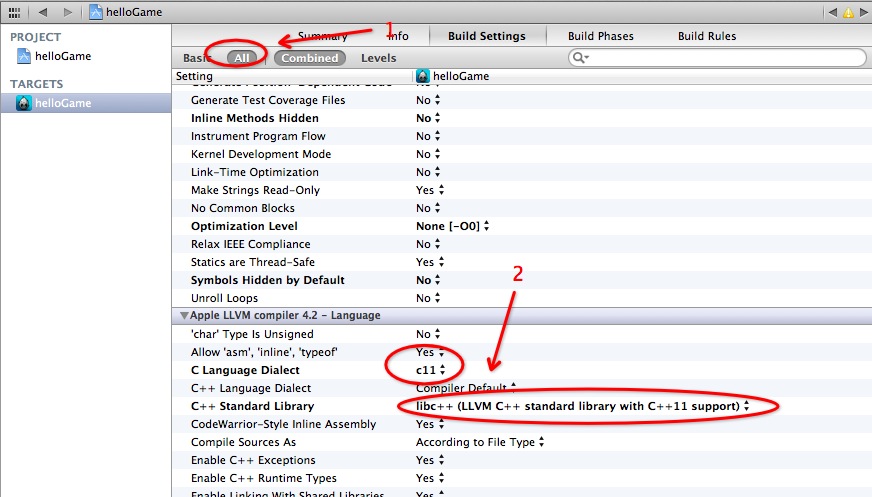
引用自stackoverflow
Howard Hinnant's answer (with corrections) is the correct answer for the command line. To use the new C++11 standard library inside of Xcode:
- In the Build Settings tab for your project, scroll down to "Apple LLVM Compiler 4.1 >- Language"
- Set the setting "C++ Language Dialect" to "C++11 [-std=c++11]"
- Set the setting "C++ Standard Library" to "libc++ (LLVM standard C++ library with C++11 support)"
评论
登录后参与技术讨论,分享你的经验与见解。
登录 / 注册暂无评论