WGCLOUD用nginx做集群负载的配置说明

文章目录
以WGCLOUD v3.2版本为例子:
1.nginx所在主机172.17.188.29,端口为8888
2.在172.17.188.27和172.17.188.28的server/application.yml里配置,nodeType: slave
3.在172.17.188.29的server/application.yml里配置,nodeType: master
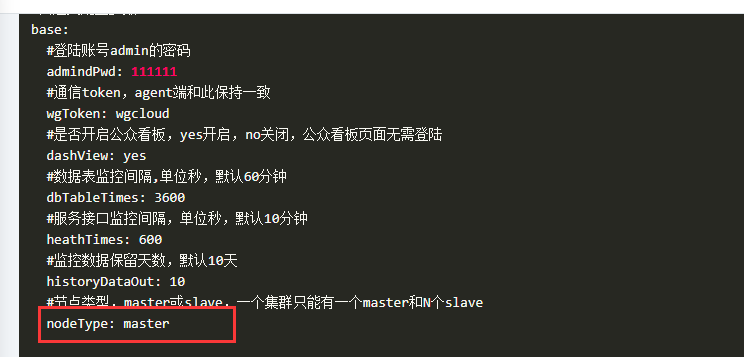
4.如下是nginx的相关配置:
    upstream wgcloudServer {
            server 172.17.188.27:9999 weight=10;#这是slave节点
            server 172.17.188.28:9999 weight=10;#这是slave节点
            server 172.17.188.29:9999 weight=5;#这是master节点
            ip_hash;
    }

    server {
        listen       8888;
        server_name  localhost;

        #charset koi8-r;

        #access_log  logs/host.access.log  main;

        location / {
            proxy_pass http://wgcloudServer;
            #root   html;
            #index  index.html index.htm;
        }

        #error_page  404              /404.html;

        # redirect server error pages to the static page /50x.html
        #
        error_page   500 502 503 504  /50x.html;
        location = /50x.html {
            root   html;
        }

        # proxy the PHP scripts to Apache listening on 127.0.0.1:80
        #
        #location ~ \.php$ {
        #    proxy_pass   http://127.0.0.1;
        #}

        # pass the PHP scripts to FastCGI server listening on 127.0.0.1:9000
        #
        #location ~ \.php$ {
        #    root           html;
        #    fastcgi_pass   127.0.0.1:9000;
        #    fastcgi_index  index.php;
        #    fastcgi_param  SCRIPT_FILENAME  /scripts$fastcgi_script_name;
        #    include        fastcgi_params;
        #}

        # deny access to .htaccess files, if Apache's document root
        # concurs with nginx's one
        #
        #location ~ /\.ht {
        #    deny  all;
        #}
}5.最后在agent里的配置,注意serverUrl是nginx的访问地址,如果nginx端口是80,也要保留端口,如http://localhost:80

评论
登录后参与技术讨论,分享你的经验与见解。
登录 / 注册暂无评论