商品后台表格数据的展现方式

文章目录
表格数据的展现方式
编辑页面
</script>-->
            <table class="easyui-datagrid" style="width:500px;height:300px" data-options="url:'datagrid_data.json',method:'get',fitColumns:true,singleSelect:true,pagination:true">
                <thead>
                    <tr>
                        <th data-options="field:'code',width:100">Code</th>
                        <th data-options="field:'name',width:100">Name</th>
                        <th data-options="field:'price',width:100,align:'right'">Price</th>
                    </tr>
                </thead>
            </table>
返回值类型的说明
属性信息: total/rows/属性元素
{
    "total":2000,
    "rows":[
        {"code":"A","name":"果汁","price":"20"},
        {"code":"B","name":"汉堡","price":"30"},
        {"code":"C","name":"鸡柳","price":"40"},
        {"code":"D","name":"可乐","price":"50"},
        {"code":"E","name":"薯条","price":"10"},
        {"code":"F","name":"麦旋风","price":"20"},
        {"code":"G","name":"套餐","price":"100"}
    ]
}
JSON的简单介绍
JSON(JavaScript Object Notation) 是一种轻量级的数据交换格式。它使得人们很容易的进行阅读和编写。
Object对象类型
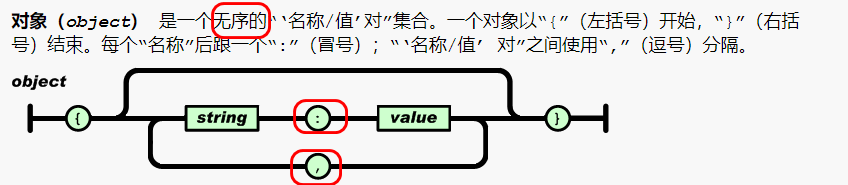
Array格式

嵌套格式

例如:
{"id":"100","hobbys":["玩游戏","敲代码","看动漫"],"person":{"age":"19","sex":["男","女","其他"]}}编辑EasyUITable的VO对象
package com.jt.vo;
import com.jt.pojo.Item;
import lombok.AllArgsConstructor;
import lombok.Data;
import lombok.NoArgsConstructor;
import lombok.experimental.Accessors;
import java.util.List;
@Data
@Accessors(chain = true)
@NoArgsConstructor
@AllArgsConstructor
public class EasyUITable {
    private Long total;
    private List<Item> rows;
}
商品列表展现
页面分析
说明: 当用户点击列表按钮时.以跳转到item-list.jsp页面中.会解析其中的EasyUI表格数据.发起请求url:’/item/query’
要求返回值必须满足特定的JSON结构,所以采用EasyUITable方法进行数据返回.
<table class="easyui-datagrid" id="itemList" title="商品列表"
       data-options="singleSelect:false,fitColumns:true,collapsible:true,pagination:true,url:'/item/query',method:'get',pageSize:20,toolbar:toolbar">
    <thead>
        <tr>
            <th data-options="field:'ck',checkbox:true"></th>
            <th data-options="field:'id',width:60">商品ID</th>
            <th data-options="field:'title',width:200">商品标题</th>
            <th data-options="field:'cid',width:100,align:'center',formatter:KindEditorUtil.findItemCatName">叶子类目</th>
            <th data-options="field:'sellPoint',width:100">卖点</th>
            <th data-options="field:'price',width:70,align:'right',formatter:KindEditorUtil.formatPrice">价格</th>
            <th data-options="field:'num',width:70,align:'right'">库存数量</th>
            <th data-options="field:'barcode',width:100">条形码</th>
            <th data-options="field:'status',width:60,align:'center',formatter:KindEditorUtil.formatItemStatus">状态</th>
            <th data-options="field:'created',width:130,align:'center',formatter:KindEditorUtil.formatDateTime">创建日期</th>
            <th data-options="field:'updated',width:130,align:'center',formatter:KindEditorUtil.formatDateTime">更新日期</th>
        </tr>
    </thead>
</table>
请求路径的说明
请求路径: /item/query
参数: page=1 当前分页的页数.
rows = 20 当前分页行数.
当使用分页操作时,那么会自动的拼接2个参数.进行分页查询.
编辑ItemController
@RestController//由于ajax调用,采用JSON串返回
@RequestMapping("/item")
public class ItemController {

   @Autowired
 private ItemService itemService;
   /**
 * url:http://localhost:8091/item/query?page=1&rows=20 * 请求参数:
 *        page=1 当前分页的页数
 *        row=20 当前分页的行数
 * 返回值结果:EasyUITable
 * */ @RequestMapping("/query")
   public EasyUITable findItemByPage(Integer page, Integer rows){
      return itemService.findItemByPage(page,rows);
   }
编辑ItemServiceImpl
@Service
public class ItemServiceImpl implements ItemService {

    @Autowired
    private ItemMapper itemMapper;

    /**
     * 分页查询商品信息
     * Sql语句: 每页20条
     *         select * from tb_item limit 起始位置,查询的行数
     * 查询第一页
     *        select * from tb_item limit 0,20;     [0-19]
     * 查询第二页
     *         select * from tb_item limit 20,20;    [20,39]
     * 查询第三页
     *          select * from tb_item limit 40,20;    [40,59]
     * 查询第N页
     *         select * from tb_item limit (n-1)*rows,rows;
     *
     *
     * @param rows
     * @return
     */
    @Override
    public EasyUITable findItemByPage(Integer page, Integer rows) {
        //1.手动完成分页操作
        int startIndex = (page-1) * rows;
        //2.数据库记录
        List<Item> itemList = itemMapper.findItemByPage(startIndex,rows);
        //3.查询数据库总记录数
        Long total = Long.valueOf(itemMapper.selectCount(null));
        //4.将数据库记录 封装为VO对象
        return new EasyUITable(total,itemList);

        //MP
    }
}
页面效果展现

参数格式化说明
商品价格格式化说明
1).页面属性说明
当数据在进行展现时,会通过formatter关键字之后进行数据格式化调用. 具体的函数为KindEditorUtil.formatPrice函数.
<th data-options="field:'price',width:70,align:'right',formatter:KindEditorUtil.formatPrice">价格</th>
2).页面JS分析
// 格式化价格  val="数据库记录"  展现的应该是缩小100倍的数据
    formatPrice : function(val,row){
        return (val/100).toFixed(2);
    },
格式化状态信息
1). 页面标识
<th data-options="field:'status',width:60,align:'center',formatter:KindEditorUtil.formatItemStatus">状态</th>2).页面JS分析
// 格式化商品的状态
    formatItemStatus : function formatStatus(val,row){
        if (val == 1){
            return '<span style="color:green;">正常</span>';
        } else if(val == 2){
            return '<span style="color:red;">下架</span>';
        } else {
            return '未知';
        }
    },
格式化叶子类目
页面分析
说明:根据页面标识, 要在列表页面中展现的是商品的分类信息. 后端数据库只传递了cid的编号.我们应该展现的是商品分类的名称.方便用户使用…
<th data-options="field:'cid',width:100,align:'center',formatter:KindEditorUtil.findItemCatName">叶子类目</th>
页面js分析
 //格式化名称  val=cid  返回商品分类名称
    findItemCatName : function(val,row){
        var name;
        $.ajax({
            type:"get",
            url:"/item/cat/queryItemName",  //
            data:{itemCatId:val},
            cache:true,    //缓存
            async:false,    //表示同步   默认的是异步的true
            dataType:"text",//表示返回值参数类型
            success:function(data){
                name = data;
            }
        });
        return name;
    }
编辑ItemCatPOJO对象
@TableName("tb_item_cat")
@Data
@Accessors(chain = true)
public class ItemCat extends BasePojo{
    @TableId(type = IdType.AUTO)
    private Long id;
    private Long parentId;
    private String name;
    private Integer status;
    private Integer sortOrder;
    private Boolean isParent;  //数据库进行转化

}
编辑ItemCatController
@RequestMapping("/item/cat")
public class ItemCatController {

    @Autowired
    private ItemCatService itemCatService;

    /**
     * url地址:/item/cat/queryItemName
     * 参数: {itemCatId:val}
     * 返回值: 商品分类名称
     */
    @RequestMapping("/queryItemName")
    public String findItemCatNameById(Long itemCatId){

        //根据商品分类Id查询商品分类对象
        ItemCat itemCat = itemCatService.findItemCatById(itemCatId);
        return itemCat.getName();   //返回商品分类的名称
    }

}
编辑ItemCatServiceImpl
@Service
public class ItemCatSercviceImpl implements ItemCatService{
   @Autowired
 private ItemCatMapper itemCatMapper;
    @Override
 public ItemCat findItemCatById(Long itemCatId) {
        return itemCatMapper.selectById(itemCatId);
    }
页面效果展现

关于Ajax嵌套问题说明
问题描述
当将ajax改为异步时,发现用户的请求数据不能正常的响应。
//格式化名称  val=cid  返回商品分类名称
    findItemCatName : function(val,row){
        var name;
        $.ajax({
            type:"get",
            url:"/item/cat/queryItemName",
            data:{itemCatId:val},
            //cache:true,    //缓存
            async:true,    //表示同步   默认的是异步的true
            dataType:"text",//表示返回值参数类型
            success:function(data){
                name = data;
            }
        });
        return name;
    },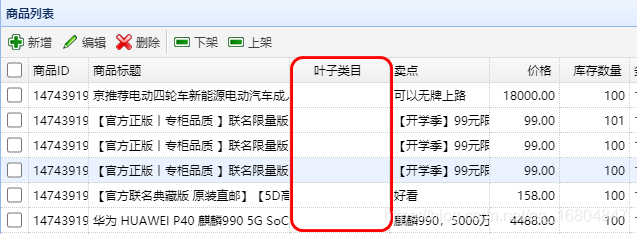
问题分析
商品的列表中发起2次ajax请求
1).
data-options="singleSelect:false,fitColumns:true,collapsible:true,pagination:true,url:'/item/query',method:'get',pageSize:20,toolbar:toolbar">
2).ajax请求
解决方案
说明:一般条件下的ajax嵌套会将内部的ajax设置为同步的调用,不然可能会由于url调用的时间差导致数据展现不完全的现象。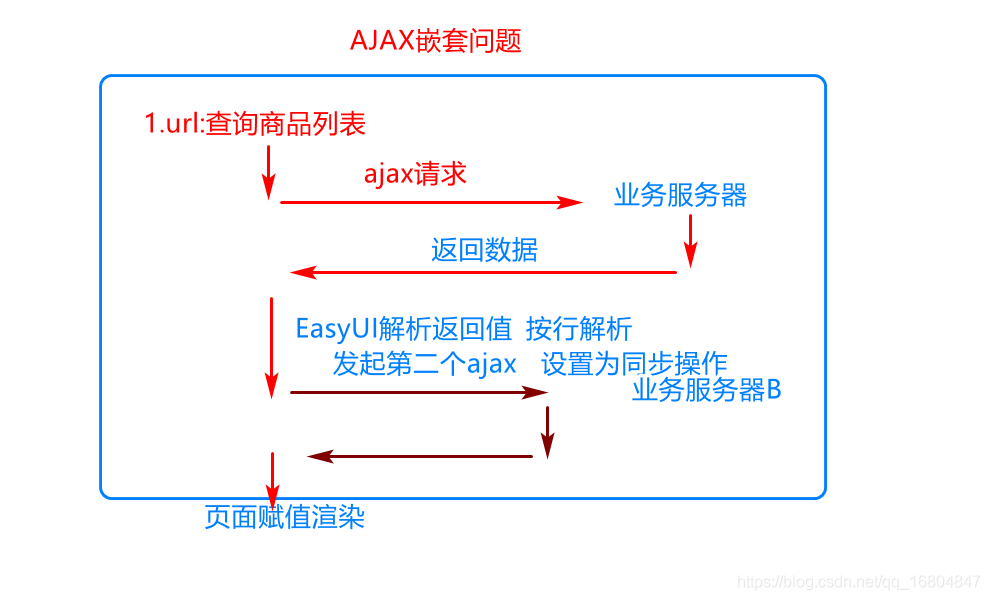
关于端口号占用问题


关于项目中common.js引入问题
说明:一般会将整夜页面的JS通过某个页面进行标识,之后被其他的页面引用即可,方便以后的JS的切换。
1).引入xxx.js页面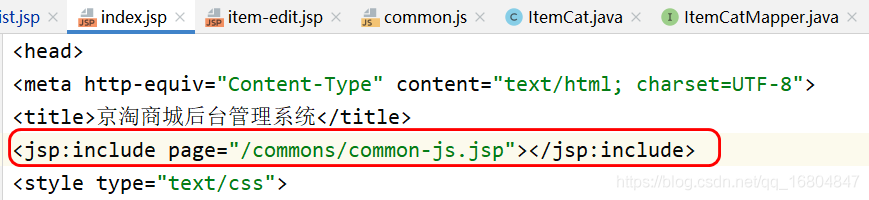
2).页面引入JS
MybatisPlus 完成分页操作
编辑ItemService
//使用MP方式实现分页操作:
@Override
public EasyUITable findItemByPage(Integer page, Integer rows) {
   QueryWrapper queryWrapper=new QueryWrapper();
   queryWrapper.orderByDesc("updated");
   //暂时之封装了两个数据    页数/条数
 IPage<Item> iPage=new Page<>(page,rows);
   //MP 传递了对应的参数,则分页就会在内部完成,返回分页对象
 iPage=itemMapper.selectPage(iPage, queryWrapper);
   //获取分页的总记录数
 Long total=iPage.getTotal();
   //获取分页的结果
 List<Item> list=iPage.getRecords();
   return new EasyUITable(total,list);
}
编辑配置类
@Configuration //标识我是一个配置类
public class MyBatisPlusConfig {
    //MP 是Mybatis增强的一种工具   关键点在limit分页上,只要是分页就要用MP中分页拦截器的操作
 @Bean
 public PaginationInterceptor paginationInterceptor() {
        PaginationInterceptor paginationInterceptor = new PaginationInterceptor();
        // 设置请求的页面大于最大页后操作, true调回到首页,false 继续请求  默认false
 // paginationInterceptor.setOverflow(false); // 设置最大单页限制数量,默认 500 条,-1 不受限制
 // paginationInterceptor.setLimit(500);
 // 开启 count 的 join 优化,只针对部分 left join paginationInterceptor.setCountSqlParser(new JsqlParserCountOptimize(true));
        return paginationInterceptor;
    }
}
评论
登录后参与技术讨论,分享你的经验与见解。
登录 / 注册暂无评论