SpringClub02-eureka注册中心

文章目录
二、注册中心
1.eureka介绍
eureka是微服务系统的核心服务
作用:注册和发现
所有服务启动,都要把自己的地址注册到注册中心;要调用其他服务,从注册中心获得注册表,来发现其他服务。
服务id
主机地址
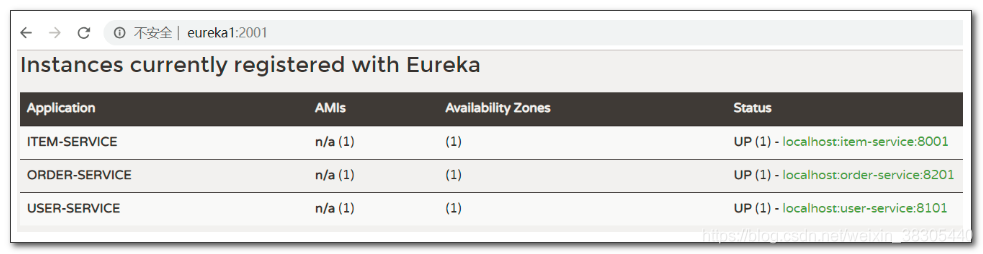
item-service---localhost:8001
user-service---localhost:8101
order-service---localhost:8201
2.eureka的工作机制:
注册
- 服务提供者启动时,会一次次反复尝试向eureka注册,直到注册成功为止
拉取
- 消费者每30秒拉取一次注册表,来刷新注册表
心跳
- 服务提供者,每30秒向eureka发送一次心跳数据
- eureka服务器如果连续3次收不到一个服务的心跳,会删除这个服务的注册信息
自我保护模式
- 如果因为网络不稳定,15分钟内,85%的服务器出现心跳异常,会自动进入自我保护模式
- 所有注册信息都不会删除
- 等网络恢复后,可以自动退出保护模式,恢复正常
- 开发调试期间,可以禁用保护模式,避免影响测试
3.搭建eureka服务器
3.1 创建eurekaserver项目
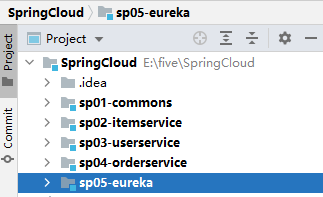
3.2 编辑pom.xml
<?xml version="1.0" encoding="UTF-8"?>
<project xmlns="http://maven.apache.org/POM/4.0.0" xmlns:xsi="http://www.w3.org/2001/XMLSchema-instance"
    xsi:schemaLocation="http://maven.apache.org/POM/4.0.0 https://maven.apache.org/xsd/maven-4.0.0.xsd">
    <modelVersion>4.0.0</modelVersion>
    <parent>
        <groupId>org.springframework.boot</groupId>
        <artifactId>spring-boot-starter-parent</artifactId>
        <version>2.2.1.RELEASE</version>
        <relativePath/> <!-- lookup parent from repository -->
    </parent>
    <groupId>cn.tedu</groupId>
    <artifactId>sp05-eureka</artifactId>
    <version>0.0.1-SNAPSHOT</version>
    <name>sp05-eureka</name>
    <description>Demo project for Spring Boot</description>

    <properties>
        <java.version>1.8</java.version>
        <spring-cloud.version>Hoxton.RELEASE</spring-cloud.version>
    </properties>

    <dependencies>
        <dependency>
            <groupId>org.springframework.cloud</groupId>
            <artifactId>spring-cloud-starter-netflix-eureka-server</artifactId>
        </dependency>

        <dependency>
            <groupId>org.springframework.boot</groupId>
            <artifactId>spring-boot-starter-test</artifactId>
            <scope>test</scope>
            <exclusions>
                <exclusion>
                    <groupId>org.junit.vintage</groupId>
                    <artifactId>junit-vintage-engine</artifactId>
                </exclusion>
            </exclusions>
        </dependency>
    </dependencies>

    <dependencyManagement>
        <dependencies>
            <dependency>
                <groupId>org.springframework.cloud</groupId>
                <artifactId>spring-cloud-dependencies</artifactId>
                <version>${spring-cloud.version}</version>
                <type>pom</type>
                <scope>import</scope>
            </dependency>
        </dependencies>
    </dependencyManagement>

    <build>
        <plugins>
            <plugin>
                <groupId>org.springframework.boot</groupId>
                <artifactId>spring-boot-maven-plugin</artifactId>
            </plugin>
        </plugins>
    </build>
</project>
3.3 修改application.yml
首先将application.propertie改为application.yml
spring:
  application:
    name: eureka-server

server:
  port: 2001

eureka:
  server:
    enable-self-preservation: false
  instance:
    hostname: eureka1
  client:
    register-with-eureka: false
fetch-registry: false- eureka 集群服务器之间,通过
hostname来区分 eureka.server.enable-self-preservation
eureka 的自我保护状态:心跳失败的比例,在15分钟内是否超过85%,如果出现了超过的情况,Eureka Server会将当前的实例注册信息保护起来,同时提示一个警告,一旦进入保护模式,Eureka Server将会尝试保护其服务注册表中的信息,不再删除服务注册表中的数据。也就是不会注销任何微服务eureka.client.register-with-eureka=false
不向自身注册eureka.client.fetch-registry=false
不从自身拉取注册信息eureka.instance.lease-expiration-duration-in-seconds
最后一次心跳后,间隔多久认定微服务不可用,默认90
3.4 修改主程序
- 添加
@EnableEurekaServer
package cn.tedu.sp05;
import org.springframework.boot.SpringApplication;
import org.springframework.boot.autoconfigure.SpringBootApplication;
import org.springframework.cloud.netflix.eureka.server.EnableEurekaServer;
@EnableEurekaServer
@SpringBootApplication
public class Sp05EurekaApplication {
    public static void main(String[] args) {
        SpringApplication.run(Sp05EurekaApplication.class, args);
    }
}
3.4 修改hosts文件添加eureka域名映射
C:WindowsSystem32driversetchosts
添加内容:
127.0.0.1       eureka1
127.0.0.1       eureka2`
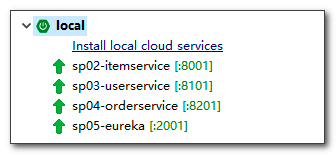
3.5 启动,并访问测试

4. service provider服务提供者
- 修改 item-service、user-service、order-service,把微服务注册到 eureka 服务器
4.1 pom.xml 添加eureka依赖
<dependency>
    <groupId>org.springframework.cloud</groupId>
    <artifactId>spring-cloud-starter-netflix-eureka-client</artifactId>
</dependency>
4.2 application.yml 添加eureka注册配置
eureka:
  client:
    service-url:
      defaultZone: http://eureka1:2001/eureka
eureka.instance.lease-renewal-interval-in-seconds
心跳间隔时间,默认 30 秒- defaultZone,默认位置,可以修改为具体地理位置,比如:beiJing, shangHai, shenZhen 等,表示 eureka 服务器的部署位置, 需要云服务器提供
eureka.client.registry-fetch-interval-seconds
拉取注册信息间隔时间,默认 30 秒
4.3 启动服务,在eureka中查看注册信息
5. eureka和“服务提供者”的高可用
5.1 item-service 高可用
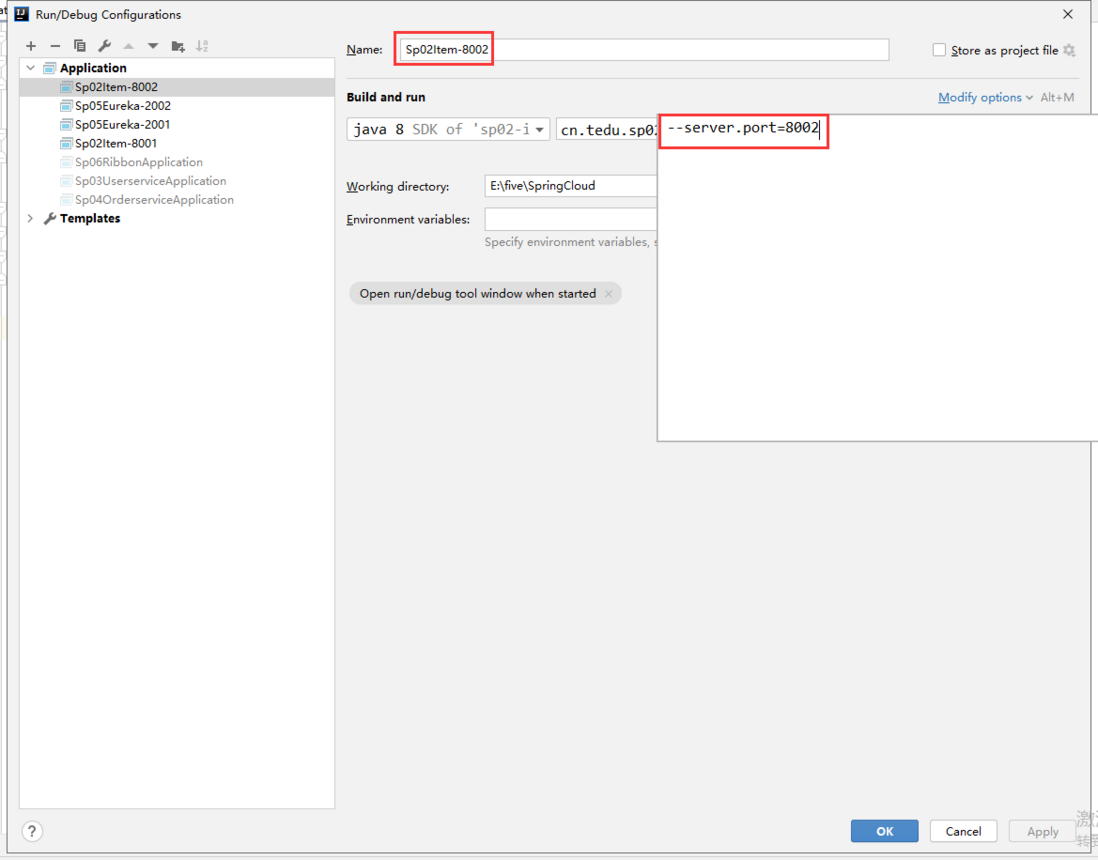
启动参数 --server.port 可以覆盖yml中的端口配置
5.1.2 配置启动参数
- item-service-8001

- item-service-8002
5.1.3 启动测试
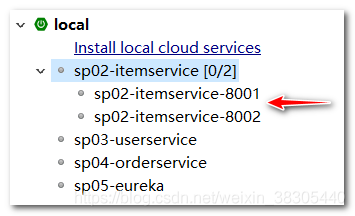
- 访问 eureka 查看 item-service 注册信息

5.2 eureka 高可用
5.2.1.添加两个服务器的 profile 配置文件
application-eureka1.yml
`eureka:
  instance:
    hostname: eureka1
  client:
    register-with-eureka: true #profile的配置会覆盖公用配置
    fetch-registry: true #profile的配置会覆盖公用配置
    service-url:
      defaultZone: http://eureka2:2002/eureka  #eureka1启动时向eureka2注册`
application-eureka2.yml
eureka:
  instance:
    hostname: eureka2
  client:
    register-with-eureka: true #profile的配置会覆盖公用配置
    fetch-registry: true #profile的配置会覆盖公用配置
    service-url:
      defaultZone: http://eureka1:2001/eureka  #eureka2启动时向eureka1注册
5.2.2 配置启动参数
--spring.profiles.active 和 --server.port
- eureka1 启动参数:
--spring.profiles.active=eureka1 --server.port=2001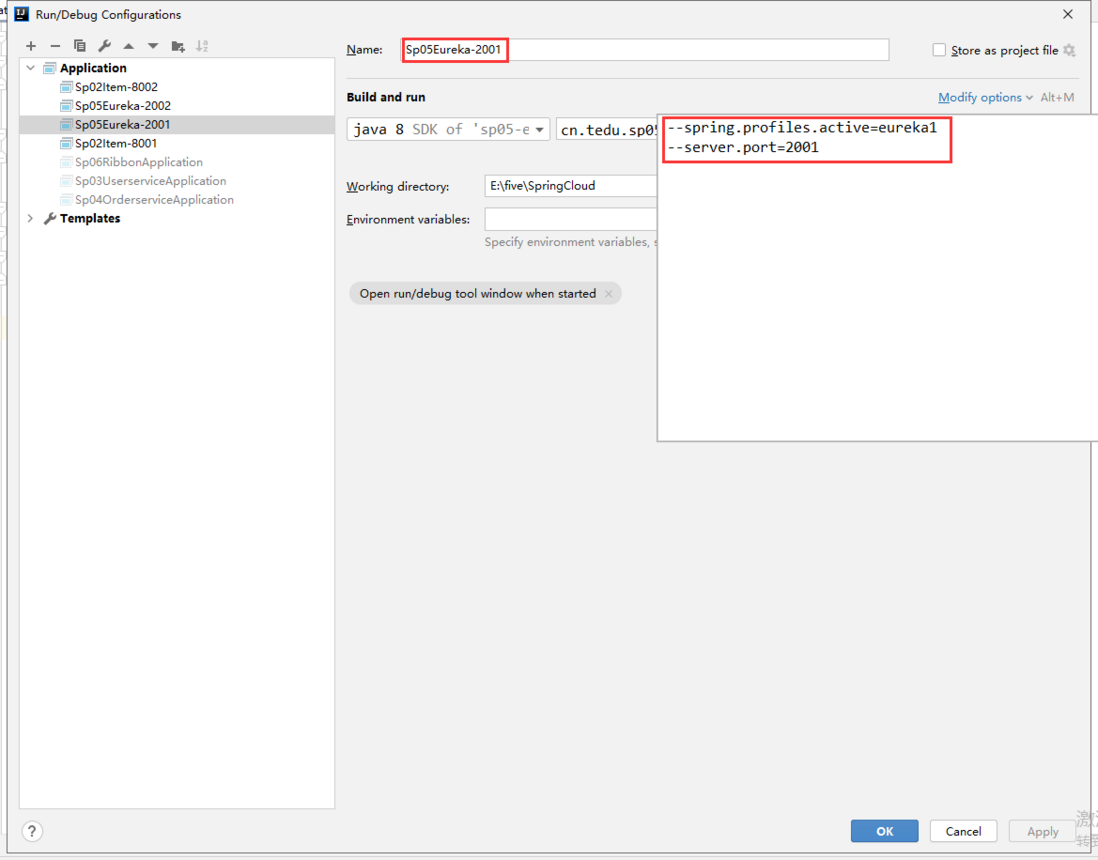
- eureka2 启动参数:
--spring.profiles.active=eureka2 --server.port=2002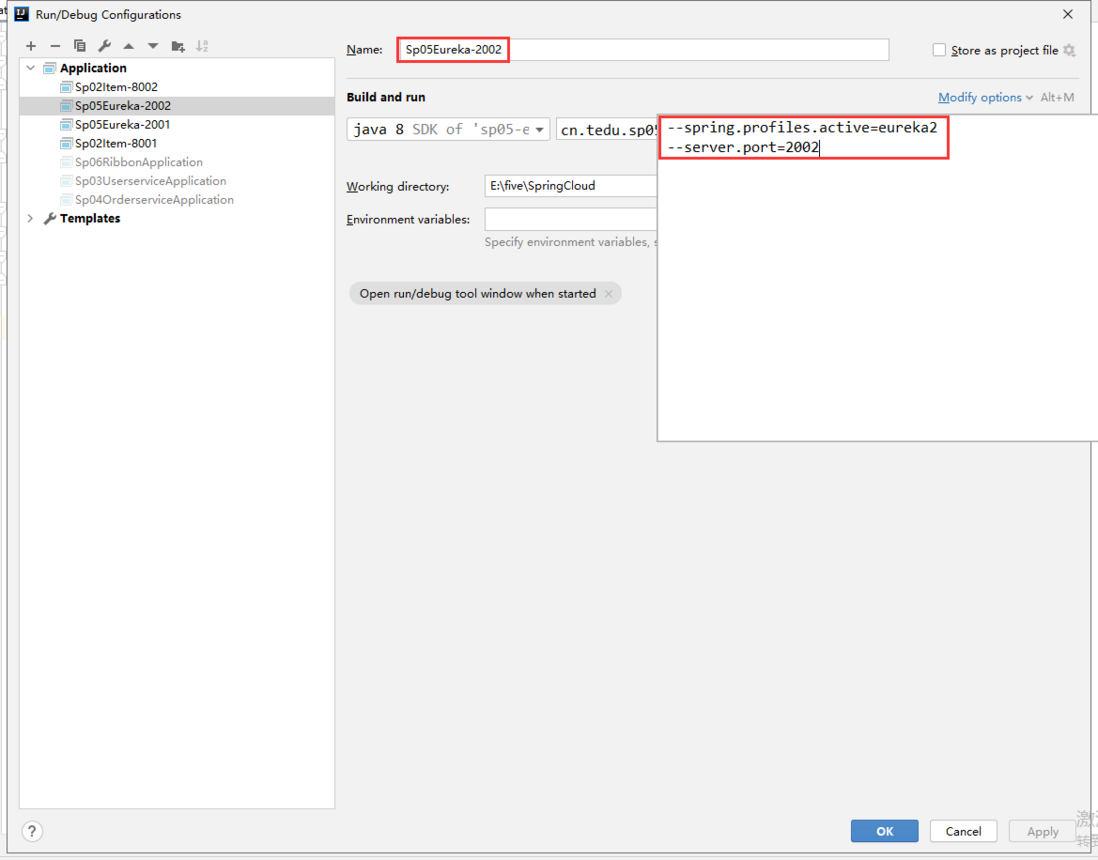
5.2.3访问 eureka 服务器,查看注册信息

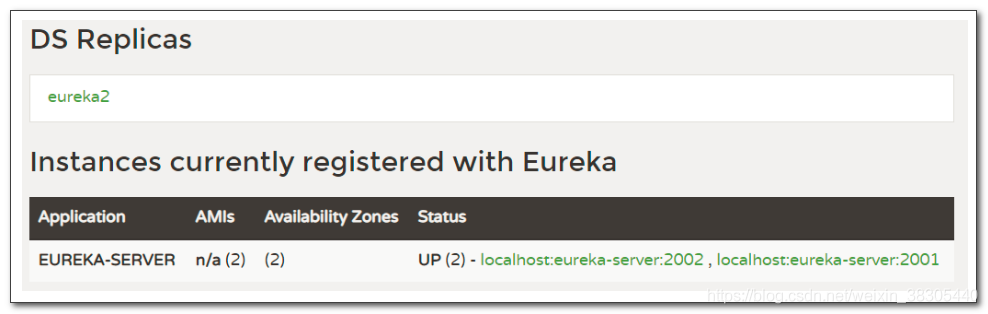

5.2.4 eureka客户端注册时,向两个服务器注册
修改以下微服务
- sp02-itemservice
- sp03-userservice
- sp04-orderservice
eureka:
  client:
    service-url:
      defaultZone: http://eureka1:2001/eureka, http://eureka2:2002/eureka
当一个 eureka 服务宕机时,仍可以连接另一个 eureka 服务
评论
登录后参与技术讨论,分享你的经验与见解。
登录 / 注册暂无评论