vue如何优雅引入高频组件

文章目录
首先组件的目录如下: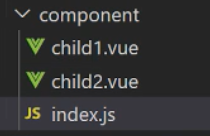
index.js:
import Vue from 'vue'

function changeStr(str) {
  return str.charAt(0).toUpperCase() + str.slice(1);
}

function parseVarNameByFilePath(path, ext = '.vue') {
  path = path.split('/');
  path = path[path.length - 1];
  // return path
  if (!path.endsWith(ext)) return null;
  if (!/[_$a-zA-Z]/.test(path[0])) return null;
  return path.slice(0, -ext.length);
}

// 通过webpackAPI拿到vue文件
const requireComponent = require.context('./', true, /\.vue$/);
console.log(requireComponent.keys())
const install = (Vue) => {
  requireComponent.keys().forEach(fileName => {

    let config = requireComponent(fileName);
    console.log(config)
    console.log(requireComponent.default)
    // console.log(parseVarNameByFilePath(fileName))
    // let componentName = changeStr(parseVarNameByFilePath(fileName))
    let componentName = parseVarNameByFilePath(fileName)
    console.log(componentName)
    // let componentName = changeStr(
    //   fileName.replace(/^\.\//, '').replace(/\.\w+$/, '')
    // )

    Vue.component(componentName, config.default || config);
  })
}

export default {
  install
}
requireComponent.keys()输出的是['./child1.vue', './child2.vue']
main.js引入该文件
Vue.use(index);
评论
登录后参与技术讨论,分享你的经验与见解。
登录 / 注册暂无评论