OpenSIPS 一键安装脚本-及 OpenSIPs+N个FreeSWITCH 实战技巧

文章目录
<!-- /\* Font Definitions \*/ @font-face {font-family:等线; mso-font-alt:"Arial Unicode MS"; mso-font-charset:134; mso-generic-font-family:auto; mso-font-pitch:variable; mso-font-signature:0 953122042 22 0 262159 0;} @font-face {font-family:"\\@等线"; mso-font-charset:134; mso-generic-font-family:auto; mso-font-pitch:variable; mso-font-signature:0 953122042 22 0 262159 0;} /\* Style Definitions \*/ p.MsoNormal, li.MsoNormal, div.MsoNormal {mso-style-unhide:no; mso-style-qformat:yes; mso-style-parent:""; margin:0cm; margin-bottom:.0001pt; text-align:justify; text-justify:inter-ideograph; mso-pagination:none; font-size:10.5pt; mso-bidi-font-size:11.0pt; font-family:等线; mso-ascii-font-family:等线; mso-ascii-theme-font:minor-latin; mso-fareast-font-family:等线; mso-fareast-theme-font:minor-fareast; mso-hansi-font-family:等线; mso-hansi-theme-font:minor-latin; mso-bidi-font-family:"Times New Roman"; mso-bidi-theme-font:minor-bidi; mso-font-kerning:1.0pt;} a:link, span.MsoHyperlink {mso-style-priority:99; color:#0563C1; mso-themecolor:hyperlink; text-decoration:underline; text-underline:single;} a:visited, span.MsoHyperlinkFollowed {mso-style-noshow:yes; mso-style-priority:99; color:#954F72; mso-themecolor:followedhyperlink; text-decoration:underline; text-underline:single;} .MsoChpDefault {mso-style-type:export-only; mso-default-props:yes; font-family:等线; mso-bidi-font-family:"Times New Roman"; mso-bidi-theme-font:minor-bidi;} /\* Page Definitions \*/ @page {mso-page-border-surround-header:no; mso-page-border-surround-footer:no;} @page WordSection1 {size:612.0pt 792.0pt; margin:72.0pt 90.0pt 72.0pt 90.0pt; mso-header-margin:36.0pt; mso-footer-margin:36.0pt; mso-paper-source:0;} div.WordSection1 {page:WordSection1;} -->
本文提供一个OpenSIPS的一键安装包,OpenSIPs 可以作为FreeSwitch 的前端代理,实现多个FreeSwitch 负载均衡处理呼叫流量。
以 opensips-2.1.2.tar.gz 为例
安装环境CentOS 6.x 64 bit
Step 1 Download
下载数据库配置文件 修改数据库信息
wget https://hk-area1-file.oss-cn-...
下载安装脚本
wget https://hk-area1-file.oss-cn-hongkong.aliyuncs.com/fsgui/opensips_install.sh
安装命令
sh opensips_install.sh
安装完成 opensips 自定启动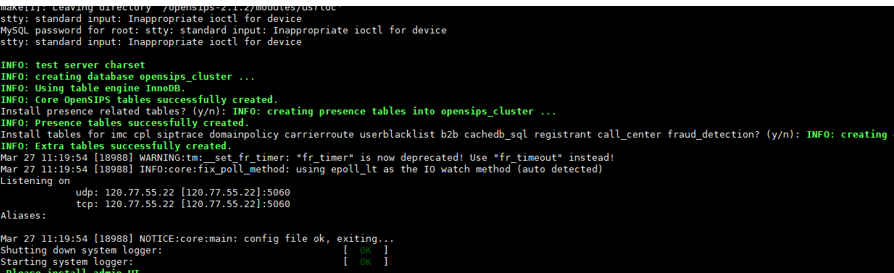
Step 2 启动
/usr/local/sbin/opensipsctl start
停止
/usr/local/sbin/opensipsctl stop
Step 3 常用命令
/usr/local/sbin/opensipsctl start
ps -ef|grep opensips
/usr/local/sbin/opensipsctl stop
ps aux | grep opensips(查看进程)
netstat -ulpn|grep opensips(查看UDP链接状态)
netstat -utpn|grep opensips(查看TCP链接状态)
/usr/local/sbin/opensips -c 检查配置是否正确
增加freeswitch 后端服务器
opensipsctl dispatcher show
dispatcher addgw <setid> <destination> <socket> <state> <weight> <attrs> [description]
* Examples: dispatcher addgw 1 sip:1.2.3.1:5050 '' 0 50 'og1' 'Outbound Gateway1'
* dispatcher addgw 2 sip:1.2.3.4:5050 '' 0 50 'og2' 'Outbound Gateway2'
* dispatcher rmgw 4
opensipsctl dispatcher addgw 1 sip:47.91.133.205:5099 "" 0 50 'us1' 'cs.wdjbp.com'
opensipsctl dispatcher addgw 1 sip:47.89.33.209:5099 "" 0 50 'us2' 'wandan.wdjbp.com'
insert into load_balancer (group_id,dst_uri,resources,description) values (1,'sip:47.91.133.205:5099','pstn=100','hk1');
insert into load_balancer (group_id,dst_uri,resources,description) values (1,'sip:47.89.33.209:5099','pstn=100','hk2');
opensipsctl fifo lb_reload
dispatcher show ..................... show dispatcher gateways
dispatcher reload ................... reload dispatcher gateways
dispatcher dump ..................... show in memory dispatcher gateways
dispatcher addgw <setid> <destination> <socket> <state> <weight> <attrs> [description]
.......................... add gateway
dispatcher rmgw <id> ................ delete gateway
增加freeswitch 后端服务器
opensipsctl dispatcher show
dispatcher gateways
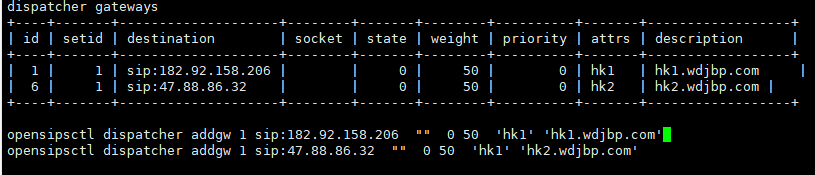
opensipsctl dispatcher addgw 1 sip:182.92.158.206 "" 0 50 'hk1' 'hk1.wdjbp.com'
opensipsctl dispatcher addgw 1 sip:47.88.86.32 "" 0 50 'hk1' 'hk2.wdjbp.com'
SIP账号登陆前 先确保
vi /usr/local/freeswitch/conf/vars.xml
修改了vars.xml中的 domain 参数
<X-PRE-PROCESS cmd="set" data="domain=2224{local_ip_v4}"/>
改为
<X-PRE-PROCESS cmd="set" data="domain=h5.wdjbp.com"/>
FS节点需要在ACL里面把 opensips 所在IP 加入白名单
测试验证: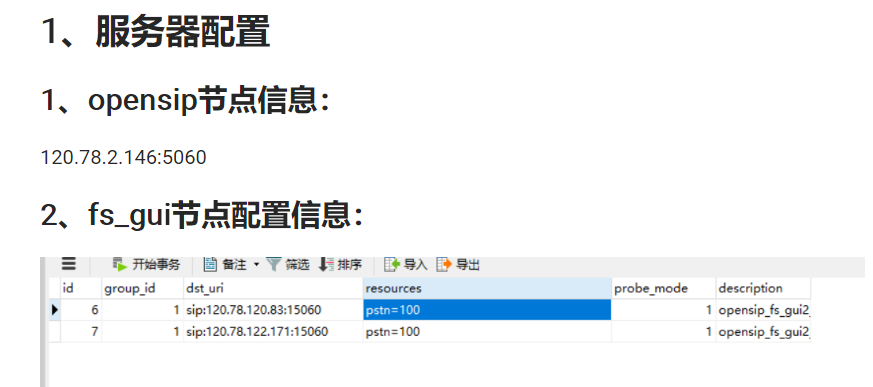
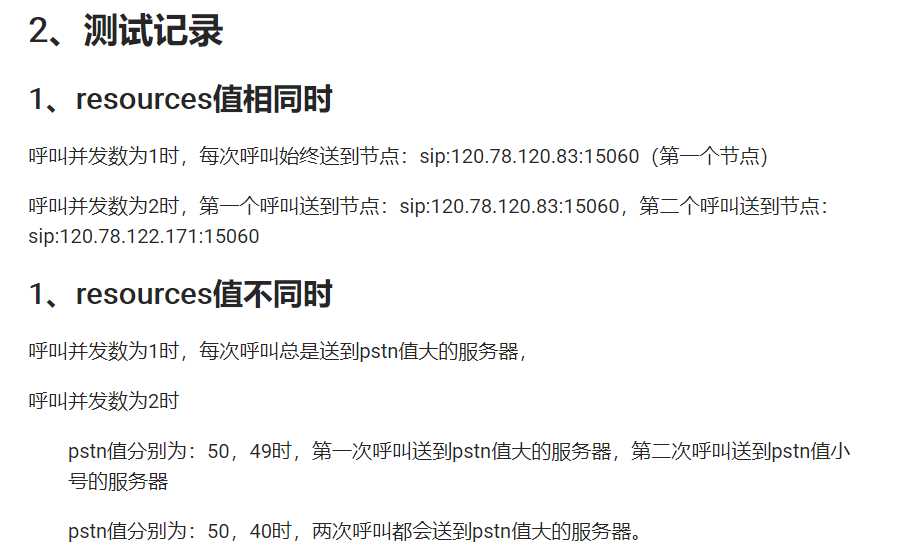

文档介绍:http://zengqf.gitee.io/ifrees...
详细了解:qizhikefu2
评论
登录后参与技术讨论,分享你的经验与见解。
登录 / 注册暂无评论