✨One DEMO系列之SpringBoot整合Dubbo

文章目录
1. 服务提供者
1.1 引入dubbo依赖
<!--Dubbo-->
<dependency>
    <groupId>org.apache.dubbo</groupId>
    <artifactId>dubbo-spring-boot-starter</artifactId>
    <version>2.7.4.1</version>
</dependency>
<!-- zookeeper依赖 Dubbo的stater没有提供访问ZK的依赖,需要手动引入-->
<dependency>
    <groupId>org.apache.dubbo</groupId>
    <artifactId>dubbo-registry-zookeeper</artifactId>
    <version>3.0.0</version>
    <scope>test</scope>
</dependency>
1.2 配置属性文件
# 服务名称
dubbo.application.name=dubbo-provider
# zk地址
dubbo.registry.address=zookeeper://127.0.0.1:2181
# 协议名称
dubbo.protocol.name=dubbo
# 协议端口
dubbo.protocol.port=20880
1.3 建立od-dubbo-api模块
以Maven模块化开发规范
<?xml version="1.0" encoding="UTF-8"?>
<project xmlns="http://maven.apache.org/POM/4.0.0"
         xmlns:xsi="http://www.w3.org/2001/XMLSchema-instance"
         xsi:schemaLocation="http://maven.apache.org/POM/4.0.0 http://maven.apache.org/xsd/maven-4.0.0.xsd">
    <parent>
        <artifactId>od-dubbo</artifactId>
        <groupId>com.onedemo</groupId>
        <version>0.0.1-SNAPSHOT</version>
    </parent>
    <modelVersion>4.0.0</modelVersion>

    <artifactId>od-dubbo-api</artifactId>

    <properties>
        <maven.compiler.source>8</maven.compiler.source>
        <maven.compiler.target>8</maven.compiler.target>
    </properties>

</project>
1.4 创建实体、接口

@Data
@Builder
@ToString
@AllArgsConstructor
@NoArgsConstructor
public class User implements Serializable {

    private static final long serialVersionUID = 3310145922651871266L;

    private Long id;

    private String username;

    private String password;
}
public interface UserService {

    User getUser(Long userId);
}
1.5 建立od-dubbo-provider模块
以Maven模块化开发规范

1.6 编写实现类、启动类
@Service // Service使用Dubbo包下的
@Component
public class UserServiceImpl implements UserService {

    @Override
    public User getUser(Long userId) {
        return User.builder()
                .id(userId)
                .username("Lee")
                .password("1204").build();
    }
}
@EnableDubbo
@SpringBootApplication
public class OdDubboApplication {

    public static void main(String[] args) {
        SpringApplication.run(OdDubboApplication.class, args);
    }
}
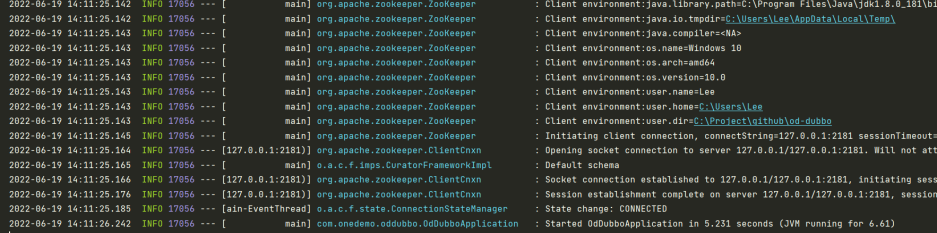
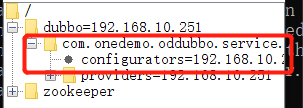
1.7 运行启动类,看到日志、ZK节点列表,代表成功
2. 服务消费者
2.1 建立od-dubbo-customer模块

2.2 引入api依赖
<dependency>
    <groupId>com.onedemo</groupId>
    <artifactId>od-dubbo-api</artifactId>
    <version>0.0.1-SNAPSHOT</version>
</dependency>
2.3 配置属性文件
# 服务端口
server.port=8081
# dubbo 程序名称
dubbo.application.name=dubbo-customer
# zk地址
dubbo.registry.address=zookeeper://127.0.0.1:2181
2.4 在启动类编写消费测试案例
@SpringBootApplication
public class CustomerApplication {

    /**
     * 使用Reference注解提供依赖
     */
    @Reference
    private UserService userService;

    public static void main(String[] args) {
        SpringApplication.run(CustomerApplication.class, args);
    }

    /**
     * 在启动任务测试
     * @return void
     */
    @Bean
    public ApplicationRunner getProviderBean() {
        return args -> {
            System.out.println(userService.getUser(10000L));
        };
    }
}
2.5 启动消费者类,观察结果
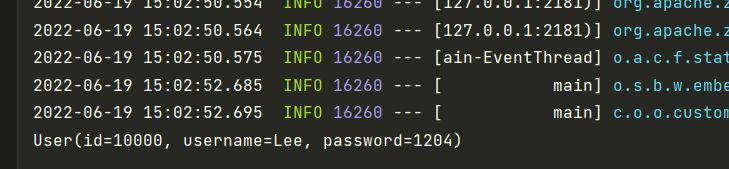
可以看到消费者在使用接口时,Dubbo直接在zk上找到了接口的实现,使其注入
评论
登录后参与技术讨论,分享你的经验与见解。
登录 / 注册暂无评论