Jaeger

文章目录
官方地址https://www.jaegertracing.io/
安装
https://www.jaegertracing.io/download/
All in One安装
多合一是用于快速本地测试的可执行文件,具有内存存储组件,可启动Jaeger UI,收集器,查询和代理。
docker安装
$ docker run -d --name jaeger \
  -e COLLECTOR_ZIPKIN_HTTP_PORT=9411 \
  -p 5775:5775/udp \
  -p 6831:6831/udp \
  -p 6832:6832/udp \
  -p 5778:5778 \
  -p 16686:16686 \
  -p 14268:14268 \
  -p 14250:14250 \
  -p 9411:9411 \
  jaegertracing/all-in-one:1.17
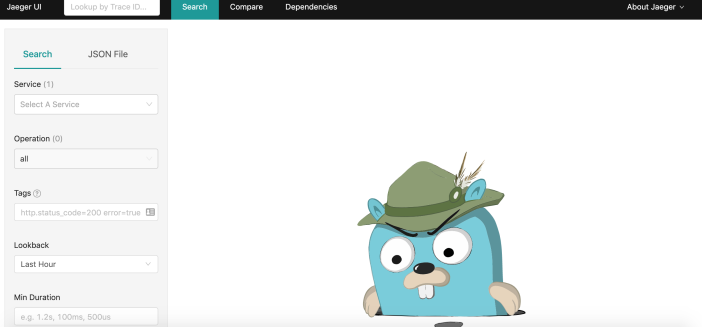
UI端口是16686 例如本地http://localhost:16686/
二进制文件安装
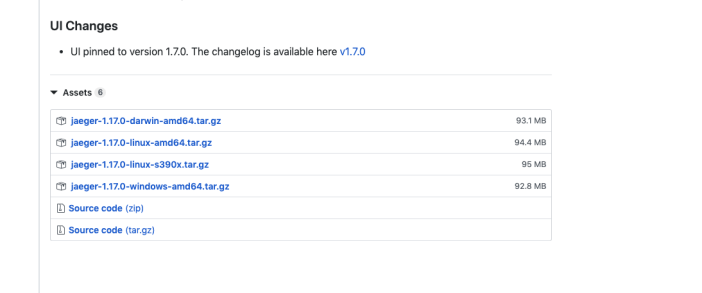
二进制文件下载地址https://github.com/jaegertracing/jaeger/releases/
UIChanges
UIpinnedtoversion1.7.0.Thchalgisaile..
Assets
ijaeger-1.17.0-darwin-amd64.tar.gz
93.1MB
ijaeger-1.17.0-linux-amd64.tar.gz
94.4MB
ijaeger-1.17.0-linux-s390x.tar.gz
95MB
6jaeger-1.17.0-windows-amd64.tar.gz
92.8MB
uSourcecode(zip)
pSourcecode(tar.gz)
容器需要暴露的端口
Port
Protocol
Component
Function
5775
UDP
agent
accept zipkin.thrift over compact thrift protocol (deprecated, used by legacy clients only)
6831
UDP
agent
accept jaeger.thrift over compact thrift protocol
6832
UDP
agent
accept jaeger.thrift over binary thrift protocol
5778
HTTP
agent
serve configs
16686
HTTP
query
serve frontend
14268
HTTP
collector
accept jaeger.thrift directly from clients
14250
HTTP
collector
accept model.proto
9411
HTTP
collector
Zipkin compatible endpoint (optional)
Go客户端
Github地址:https://github.com/jaegertracing/jaeger-client-go
config设定
其中关于SamplerConfig的Type可以选择
- const,全量采集。param采样率设置0,1 分别对应打开和关闭
- probabilistic ,概率采集。param默认万份之一,0~1之间取值,
- rateLimiting ,限速采集。param每秒采样的个数
- remote 动态采集策略。param值于probabilistic的参数一样。在收到实际值之前的初始采样率。改值可以通过环境变量的JAEGER_SAMPLER_PARAM设定
生成jaeger tracer
opentracing.SetGlobalTracer(t) 方法执行会将jaeger tracer注册到全局,接下来只需要使用opentracing 的标准API便可以了。 如果不想使用jaeger了,想替换成其他分布式追踪工具,只需要工具支持opentracing标准,并将main函数的SetGlobalTracer操作替换即可,其他文件都不需要更改。
设置为全局的单例tracer
生成开始一个Span
返回span的SpanContext的reference
生成子Span
记录关于Span相关的key:value数据
到此如果只需要追踪在同一process的链路就已经可以了。如果希望能够追踪不同进程中的链路例如,客户端通过http请求服务端,服务端回应整个链路的追踪需要用到以下的处理。
使用Inject和Extract通过RPC calls传递span context
Client端
添加import
添加Inject
Server端
添加import
从request抽取出span context
通过引用从Client端传来的span context生成新的child span
参考
https://www.jaegertracing.io/docs/
https://juejin.im/post/5d8f5cd2f265da5b62533852
https://github.com/jukylin/blog
https://github.com/LynnChen1989/tracing
https://juejin.im/post/5cdc03f551882535fc1dd868
https://sdgmf.github.io/goproject/
https://cloud.tencent.com/developer/article/1160850
本文同步分享在 博客“羊羽”(other)。
如有侵权,请联系 support@oschina.cn 删除。
本文参与“OSC源创计划”,欢迎正在阅读的你也加入,一起分享。
评论
登录后参与技术讨论,分享你的经验与见解。
登录 / 注册暂无评论