python-Gooey速成GUI程序

文章目录
1.安装需要的库
pip install Gooey2.导入需要的库
from gooey import Gooey, GooeyParser 3.代码部分
@Gooey(
    richtext_controls=True,
    language='chinese',
    header_show_title=False,
    program_name="处理工具v1.0",
    encoding="utf-8",
    default_size=(650, 555),
    progress_expr="current / total * 100",

    # 再次执行,清除之前执行的日志
    clear_before_run = True,
    timing_options = {'show_time_remaining':True,'hide_time_remaining_on_complete':False}
)

def main():
    desc = "工具说明:"+"\n"+"   "+"1.本工具仅作为xxx使用"
    file_help_msg = "help...info"

    my_cool_parser = GooeyParser(description=desc)

    my_cool_parser.add_argument(option_strings=['-u', '--username'],dest='账号', widget="TextField")
    my_cool_parser.add_argument(option_strings=['-p', '--password'],dest='密码', widget="TextField")
    my_cool_parser.add_argument(option_strings=['-v', '--verify_number'],dest='验证码', widget="TextField")
    my_cool_parser.add_argument(option_strings=['-f', '--file_path'], dest="待匹配文件路径", widget="FileChooser")

    # 获取参数
    args = my_cool_parser.parse_args()
    print(args)


def here_is_more():
    pass
5.Demo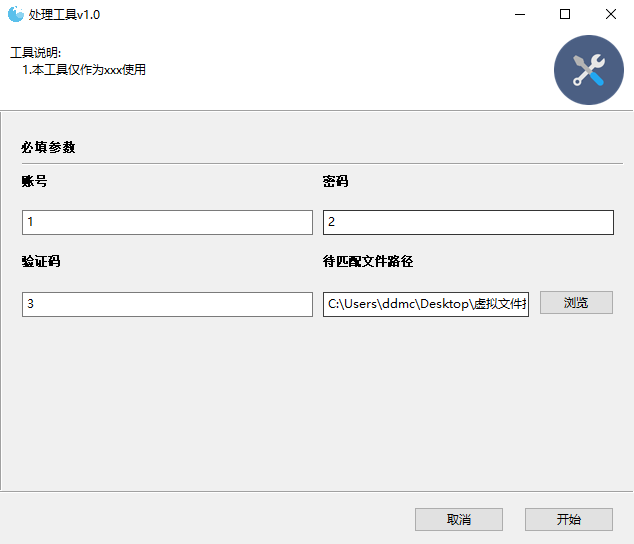

评论
登录后参与技术讨论,分享你的经验与见解。
登录 / 注册暂无评论