1.初次使用easyui,小说控件

文章目录
应为要做一个统计系统,界面我不太懂,想找款简单的ui框架。最好能搭上css和js,最终看到easyui、
说来也怪,这偌大的一篇doc我也看不出啥东西,看demo也是云里雾里。
最后,反正就做了个简单的界面。
首先加入几行引入库。
<link rel="stylesheet" type="text/css" href="../../themes/default/easyui.css">
<link rel="stylesheet" type="text/css" href="../../themes/icon.css">
<script type="text/javascript" src="../../jquery.min.js"></script>
<script type="text/javascript" src="../../jquery.easyui.min.js"></script>
然后就可以使用他自带的一些空间了。
先说说DateBox
<input class="easyui-datebox"></input>
这样就行了,一个好看的
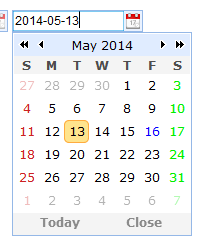
默认的日期选择格式是mm-dd-yyyy,如果要像图片一样显示,而且日历使用中文的话,
只需要加入 本地化文件就ok了~
<script type="text/javascript" src="https://my.oschina.net/sjsc/easyui/easyui-lang-zh_CN.js"></script>
这个文件在下载easyui目录中自带,有各国语言。
再来说说另外一个组件
ComboGrid
combo就是下拉,grid就是表,所以就是一个下拉的表,可以显示一条记录的多个内容,
只需要在页面中加入
 <select class="easyui-combogrid" style="width:250px" data-options="
panelWidth: 500,
multiple: true,
idField: 'itemid',
textField: 'productname',
url: 'datagrid_data1.json',
method: 'get',
columns: [[
{field:'ck',checkbox:true},
{field:'itemid',title:'Item ID',width:80},
{field:'productname',title:'Product',width:120},
{field:'listprice',title:'List Price',width:80,align:'right'},
{field:'unitcost',title:'Unit Cost',width:80,align:'right'},
{field:'attr1',title:'Attribute',width:200},
{field:'status',title:'Status',width:60,align:'center'}
]],
fitColumns: true
">
</select>
其中columns:每个field是显示的字段。
method:http提交请求的方式。
url:加载的路径,
idField: 选择后的值是哪个字段决定
textField:选择后的显示是哪个字段决定
multiple:是否多选,如果多选直观,可在字段中加入{field:'ck',checkbox:true}, 这样效果更好,
好了,上个图大家看看:

下面说说DataGrid
这就是个数据表格:
同样,上代码来着
 <table id='datashow' class="easyui-datagrid" title="数据查询" style="width:927px;height:500px"
 data-options="singleSelect:true,collapsible:true,url:'',method:'get'">
 <thead>
 <tr>
 <th data-options="field:'ywjgdm',width:100">医院名称</th>
 <th data-options="field:'ghjl',width:100">门诊挂号记录</th>
 <th data-options="field:'listprice',width:100">门诊就诊记录</th>
 <th data-options="field:'unitcost',width:100">门诊用药记录</th>
 <th data-options="field:'attr1',width:100,align:'right'">门诊收费记录</th>
 </tr>
 </thead>
 </table>
哎哟,不小心暴露了,哈哈
是一个table,
其中singleSelect 表示是否单选
url:加载的路径
method:请求的方式
collapsible:是否可折叠,为true则右上角有个按钮,会最小化到一横。
上图。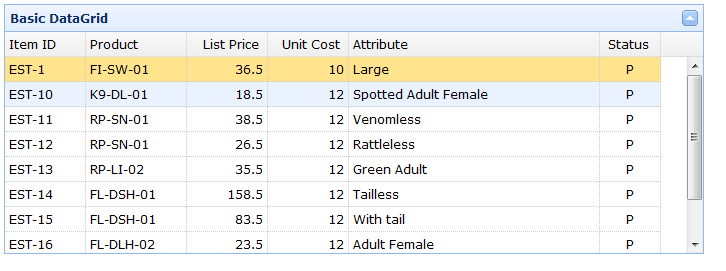
hehe
大家觉得怎么样~
其中的属性基本上在data-options中设置。
今天不早了,大家洗洗睡啦,木有妹纸好可怜。
建议大家上easyui官网看看界面demo,还有附带的代码。就是e文不好的话就够呛(- -!)——本人也是
基本上上面的控件加上文本框,按钮,树,菜单,tab&win,做个小东西就够了吧~
下次有空,用到其他的,或者上面控件的复杂功能再继续补充,
下一节说一下控件的方法,获取值等。
再见
评论
登录后参与技术讨论,分享你的经验与见解。
登录 / 注册暂无评论