记录在amis踩到的坑

文章目录
table2 自动生成的修改和编辑等弹框点击没有反应
https://github.com/baidu/amis/issues/10352
官方issue如上,关键是要如何调整而不是这个问题是不是open状态,目前发现的几种方式:
方式1:在外围添加page
先说下缺点吧:样式问题
- 先拖一个flex
- 把所有内容塞入flex
- 每个按钮需要在外层添加一层page
- 修改样式, flex 所在层级添加样式,比如
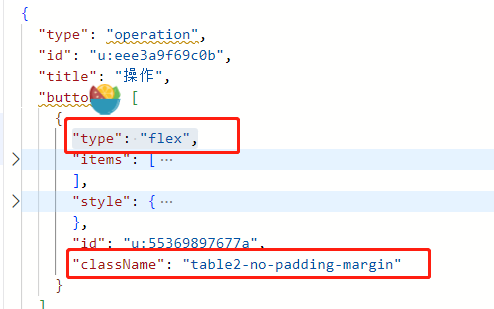
添加全局样式:
.table2-no-padding-margin .antd-Page-body{
padding:0;
margin:0;
}
- 给这一列设置下列宽
{
"type": "operation",
"id": "u:eee3a9f69c0b",
"title": "操作",
"width": 60,
我怀疑这里的问题在于,里面没有遍历数组,而是只做了对象的遍历,导致必须是对象
结论:非常不方便;最好还是拿源代码改,这个估计半天就扯完了,我这样研究来研究去花了好几天
添加后整体结构如下
[
// 按钮1 日志,需要弹出弹框,里面是一个时间轴,需要在弹框外围添加page
{
"type": "page",
"body": []
},
// 按钮2打开新页面,正常即可
// 按钮3打开一个对话框,正常即可
]
案例如下:{
  "type": "operation",
  "id": "u:800ecc8556f9",
  "title": "操作",
  "buttons": [
    {
      "id": "u:bf1a61fcf4d9",
      "body": [
        {
          "id": "u:e4aaf98c4960",
          "type": "button",
          "label": "日志",
          "level": "link",
          "onEvent": {
            "click": {
              "actions": [
                {
                  "dialog": {
                    "body": [
                      {
                        "api": {
                          "url": "/public/change_log",
                          "data": {
                            "recordId": "${event.data.id}",
                            "tableName": "env_list"
                          },
                          "method": "get"
                        },
                        "body": [
                          {
                            "type": "timeline",
                            "source": "${items}",
                            "labelTpl": "${title}",
                            "valueTpl": "${time}"
                          }
                        ],
                        "type": "service"
                      },
                      {
                        "type": "button",
                        "label": "确定",
                        "level": "primary",
                        "actionType": "close"
                      }
                    ]
                  },
                  "actionType": "dialog"
                }
              ]
            }
          },
          "themeCss": {
            "className": {
              "padding-and-margin:default": {
                "marginTop": "0px",
                "marginLeft": "0px",
                "paddingTop": "0px",
                "marginRight": "0px",
                "paddingLeft": "0px",
                "marginBottom": "0px",
                "paddingRight": "0px",
                "paddingBottom": "0px"
              }
            }
          }
        }
      ],
      "type": "page",
      "regions": [
        "body"
      ],
      "className": "no-padding-margin",
      "pullRefresh": {
        "disabled": true
      },
      "asideResizor": false
    },
    {
      "id": "u:e4aaf98c4960",
      "type": "button",
      "label": "打开日志",
      "level": "link",
      "onEvent": {
        "click": {
          "actions": [
            {
              "script": "window.open('/page/change_log?tableName=env_list&recordId=' + event.data.id);",
              "actionType": "custom"
            }
          ]
        }
      },
      "behavior": "View"
    },
    {
      "id": "u:b0fefd422bac",
      "type": "button",
      "label": "删除",
      "level": "link",
      "onEvent": {
        "click": {
          "actions": [
            {
              "data": {
                "&": "$$"
              },
              "actionType": "ajax"
            },
            {
              "groupType": "component",
              "actionType": "search",
              "componentId": "u:9ce7381063ee"
            }
          ]
        }
      },
      "behavior": "Delete",
      "className": "m-r-xs text-danger",
      "confirmText": "确认要删除数据"
    }
  ]
}
方式2 不要用table2
其实主要是下面两个属性:
- type : crud2 还是 crud
- mode:table 还是table2
这几个排列组合没一个完全正常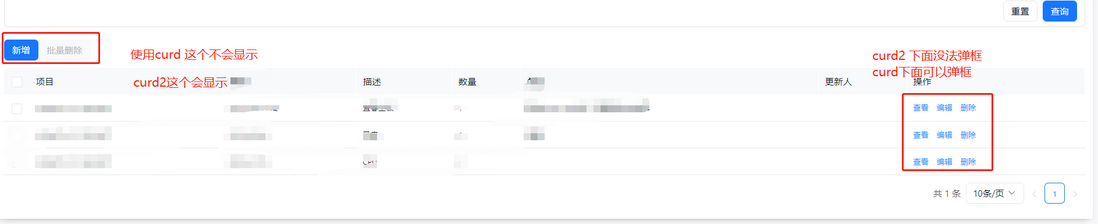
不过不要这样直接改,要用table就正常拖个table出来
评论
登录后参与技术讨论,分享你的经验与见解。
登录 / 注册暂无评论