现代应用的启动屏幕如何更美观?这款第三方控件你使用了吗?

文章目录
具有皮肤感知功能的初始屏幕。

- 颜色和字体设置取决于皮肤。
- 您可以自定义并在代码中显示此初始屏幕。
显示并关闭启动画面
您可以使用静态SplashScreenManager.ShowSkinSplashScreen方法手动创建并显示皮肤启动屏幕(例如可以在应用程序启动时调用它),该方法的参数允许您指定预定义区域、屏幕位置、淡入淡出动画效果等的内容,下图演示了您可以自定义的初始屏幕区域。
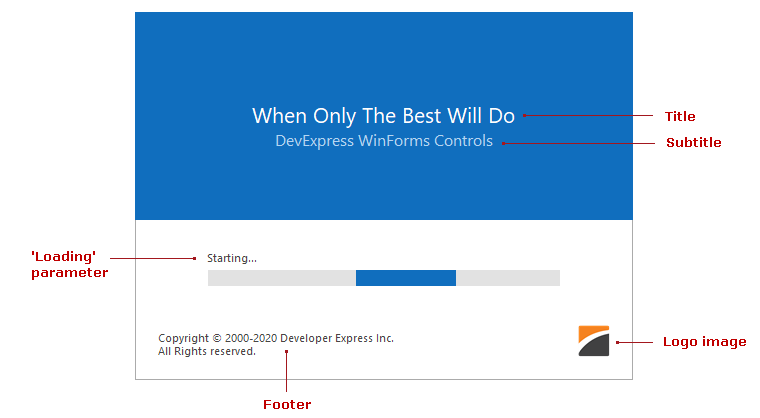
要关闭启动画面,请使用静态SplashScreenManager.CloseForm方法。
C#
`using DevExpress.XtraSplashScreen;
// Logo image.
Image myLogoImage = Resources.Logo;
// Show a splashscreen.
SplashScreenManager.ShowSkinSplashScreen(
logoImage: myLogoImage,
title: "When Only The Best Will Do",
subtitle: "DevExpress WinForms Controls",
footer: "Copyright © 2000 - 2020 Developer Express Inc." + Environment.NewLine + "All Rights reserved.",
loading: "Starting...",
parentForm: this
);
//Do an operation
//...
//Close the splashscreen
DevExpress.XtraSplashScreen.SplashScreenManager.CloseForm();`
VB.NET
`Imports DevExpress.XtraSplashScreen
' Logo image.
Dim myLogoImage As Image = My.Resources.Logo
' Show a splashscreen.
DevExpress.XtraSplashScreen.SplashScreenManager.ShowSkinSplashScreen(
logoImage:=myLogoImage,
title:="When Only The Best Will Do",
subtitle:="DevExpress WinForms Controls",
footer:="Copyright © 2000 - 2020 Developer Express Inc." & Environment.NewLine & "All Rights reserved.",
loading:="Starting...",
parentForm:=Me
)
'Do an operation
'...
'Close the splashscreen
DevExpress.XtraSplashScreen.SplashScreenManager.CloseForm()`
动态更新启动画面
启动屏幕显示在单独的线程中,您可以使用通过SplashScreenManager.SendCommand方法发送的命令动态更新当前初始屏幕的内容。
C#
SplashScreenManager.Default.SendCommand(SkinSplashScreenCommand.UpdateLoadingText, "Done");
VB.NET
SplashScreenManager.Default.SendCommand(SkinSplashScreenCommand.UpdateLoadingText, "Done")
DevExpress.XtraSplashScreen.SkinSplashScreenCommand类型枚举支持的命令。
C#
`public enum SkinSplashScreenCommand {
UpdateTitle,
UpdateSubtitle,
UpdateFooter,
UpdateLoadingText,
UpdateLogoImage,
UpdateSvgImageSize
}`
VB.NET
`Public Enum SkinSplashScreenCommand
UpdateTitle = 0
UpdateSubtitle = 1
UpdateFooter = 2
UpdateLoadingText = 3
UpdateLogoImage = 4
UpdateSvgImageSize = 5
End Enum`
评论
登录后参与技术讨论,分享你的经验与见解。
登录 / 注册暂无评论