跨域

文章目录
一、同源策略(Same origin Policy)
浏览器出于安全方面的考虑,只允许与本域下的接口交互。不同源的客户端脚本在没有明确授权的情况下,不能读写对方的资源。
1、同源(本域)
所谓“同源”指的是”三个相同“。相同的域名、端口和协议,这三个相同的话就视为同一个域,本域下的JS脚本只能读写本域下的数据资源,无法访问其它域的资源。
- 协议相同 (都是http或者https)
- 域名相同 (都是http://jirengu.com/a> 和 和...
- 不同源情况:
http://jirengu.com/main.js> 和 https://jirengu.com/a.php (协议不同)
http://jirengu.com/main.js> 和 http://bbs.jirengu.com/a.php (域名不同,域名必须完全相同才可以)
http://jiengu.com/main.js> 和... (端口不同,第一个是80)
2、Ajax 跨域报错实例
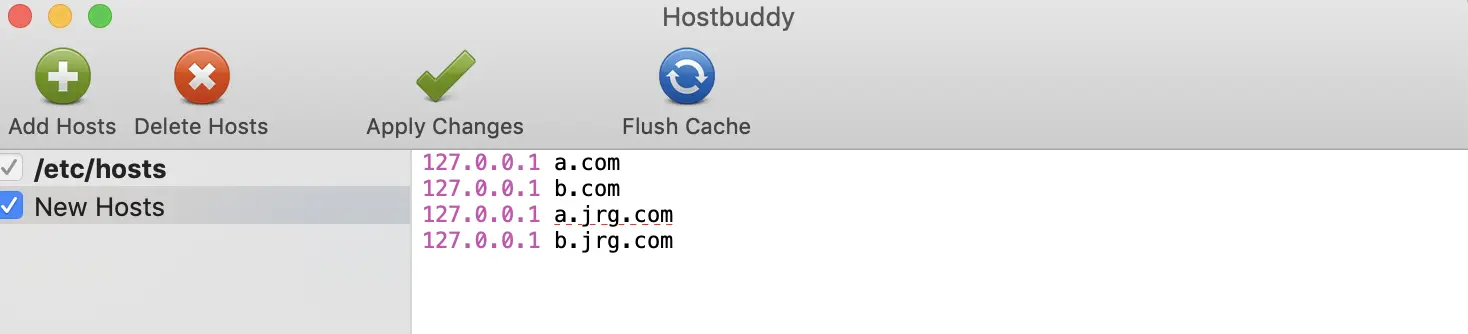
(1)修改host文件:给host文件里添加两条记录,方便跨域操作

上图意思是访问 a.com 或是 b.com 相当于访问本机, 可以实现一个场景:浏览器是a.com,而接口是b.com,虽说最终对应的是本机,但是域名不一样
(2)建一个index.html文件,获取数据
<h1>hello world</h1>
<script>
  var xhr = new XMLHttpRequest()
  xhr.open('GET','http://localhost:8080/getWeather', true)
  xhr.send()
  xhr.onload = function(){
    console.log(xhr.responseText)
  }
</script>
(3)建一个server.js文件,实现静态文件、动态路由功能
var http = require('http')
var fs = require('fs')
var path = require('path')
var url = require('url')

http.createServer(function(req, res){

  var pathObj = url.parse(req.url, true)

  switch (pathObj.pathname) {
    case '/getWeather':
      res.end(JSON.stringify({beijing: 'sunny'}))
      break;

    default:
      fs.readFile(path.join(__dirname, pathObj.pathname), function(e, data){
        if(e){
          res.writeHead(404, 'not found')
          res.end('<h1>404 Not Found</h1>')
        }else{
          res.end(data)
        }
      })
  }
}).listen(8080)
(4)执行结果
打开终端,cd 到当前文件夹,然后输入node server.js,启动静态服务器
A、浏览器地址栏输入
localhost:8080/index.html,获取到了数据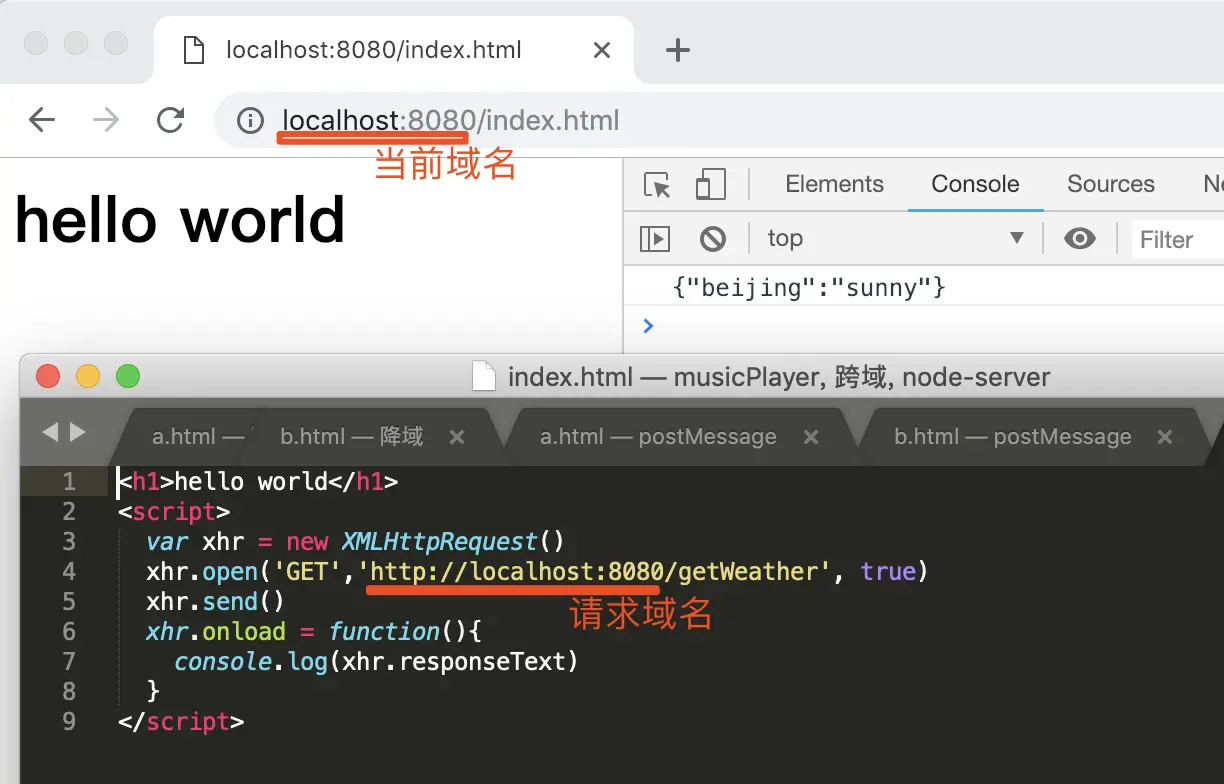
B、浏览器地址改为127.0.0.1:8080/index.html,就报错啦,因为当前域名和请求域名不一样
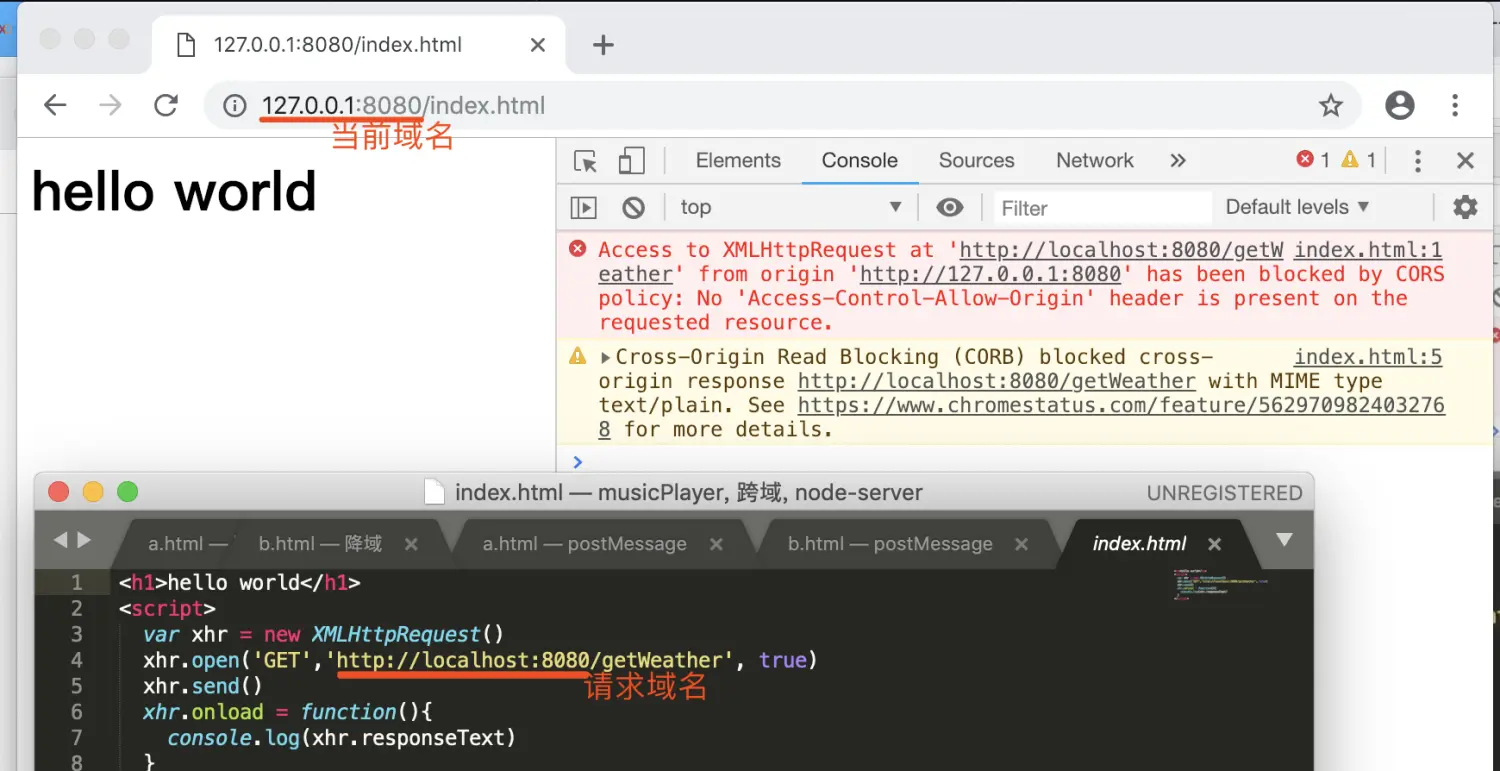
C、如果浏览器改成a.com或是b.com 也是会报错的,就算它们都是指向同一个本机
总结一下:只有在请求域名和当前域名相同的情况下,才能获取数据,才不会报错。
注:跨域的资源内嵌是被允许的,对于当前页面来说页面存放的 JS 文件的域不重要,重要的是加载该 JS 页面所在什么域
二、跨域
解决同源策略带来的不便,突破同源策略的限制去获取不同源之间的数据信息或者进行不同源之间的信息传递。
解决办法
1、 JSONP
HTML 中 script 标签可以加载其他域下的js,比如我们经常引入一个其他域下线上cdn的jQuery。
可以这样子实现从其他域下获取数据
<script src="http://api.jirengu.com/weather.php"></script>这时候会向天气接口发送请求获取数据,获取数据后做为 js 来执行。 但这里有个问题, 数据是 JSON 格式的数据,直接作为 JS 运行的话,如何去得到这个数据来操作呢?
此时需要后端的配合,因为后端的接口需要根据约定的参数获取回调函数名,然后跟返回数据进行拼接,最后进行响应
<script src="http://api.jirengu.com/weather.php?callback=showData"></script>这个请求到达后端后,后端会去解析callback这个参数获取到字符串showData,在发送数据做如下处理:
之前后端返回数据: {"city": "hangzhou", "weather": "晴天"}
现在后端返回数据: showData({"city": "hangzhou", "weather": "晴天"})
前端script标签在加载数据后会把 「showData({“city”: “hangzhou”, “weather”: “晴天”})」做为 js 来执行。
这实际上就是调用showData这个函数,同时参数是 {“city”: “hangzhou”, “weather”: “晴天”}。
当然前端提前在页面定义好showData这个全局函数,在函数内部处理参数即可。
<script>
function showData(ret){
console.log(ret);
}
</script>
<script src="http://api.jirengu.com/weather.php?callback=showData"></script>
总结一下:
(1)JSONP是通过 script 标签加载数据的方式去获取数据当做 JS 代码来执行
(2)提前在页面上声明一个函数,函数名通过接口传参的方式传给后台,后台解析到函数名后在原始数据上「包裹」这个函数名,发送给前端。
换句话说,JSONP 需要对应接口的后端的配合才能实现
举个例子
server.js 文件
var http = require('http')
var fs = require('fs')
var path = require('path')
var url = require('url')

http.createServer(function(req, res){
  var pathObj = url.parse(req.url, true)

  switch (pathObj.pathname) {
    case '/getNews':
      var news = [
        "第11日前瞻:中国冲击4金 博尔特再战200米羽球",
        "正直播柴飚/洪炜出战 男双力争会师决赛",
        "女排将死磕巴西!郎平安排男陪练模仿对方核心"
        ]
      res.setHeader('Content-Type','text/json; charset=utf-8')
      if(pathObj.query.callback){
        res.end(pathObj.query.callback + '(' + JSON.stringify(news) + ')')
      }else{
        res.end(JSON.stringify(news))
      }

      break;

    default:
      fs.readFile(path.join(__dirname, pathObj.pathname), function(e, data){
        if(e){
          res.writeHead(404, 'not found')
          res.end('<h1>404 Not Found</h1>')
        }else{
          res.end(data)
        }
      })
  }
}).listen(8080)
html文件
<!DOCTYPE html>
<html>
<body>
  <div class="container">
    <ul class="news">
    </ul>
    <button class="show">show news</button>
  </div>

<script>

  $('.show').addEventListener('click', function(){
    var script = document.createElement('script');
    script.src = 'http://127.0.0.1:8080/getNews?callback=appendHtml';
    document.head.appendChild(script);
   //script标签放到head上,并向http://127.0.0.1:8080/getNews?callback=appendHtml发请求,获取到        并执行
    document.head.removeChild(script);// 为了显示好看,加上移除这句
  })

  function appendHtml(news){
    var html = '';
    for( var i=0; i<news.length; i++){
      html += '<li>' + news[i] + '</li>';
    }
    console.log(html);
    $('.news').innerHTML = html;
  }

  function $(id){
    return document.querySelector(id);
  }
</script>
</html>
打开终端,cd 到当前文件夹,然后输入node server.js,启动静态服务器
显示结果:

图中Request URL :http://127.0.0.1:8080/getNews?callback=appendHtml 会向浏览器发请求,得到数据,然后当成 js 去执行,因为页面上已经有了appendHtml函数,然后去执行这个函数,把appendHtml 括号里的内容作为参数传递进去

2、CORS
全称是跨域资源共享(Cross-Origin Resource Sharing),是一种 ajax 跨域请求资源的方式,支持现代浏览器,IE支持10以上。
实现方式:
当你使用 XMLHttpRequest 发送请求时,浏览器发现该请求不符合同源策略,会给该请求加一个请求头:Origin,后台进行一系列处理:
(1)如果确定接受请求则在返回结果中加入一个响应头:Access-Control-Allow-Origin; 浏览器判断该相应头中是否包含 Origin 的值。
(2)如果有则浏览器会处理响应,我们就可以拿到响应数据。
(3)如果不包含浏览器直接驳回,这时我们无法拿到响应数据。
所以 CORS 的表象是让你觉得它与同源的 ajax 请求没啥区别,代码完全一样。
举个例子
server.js文件
var http = require('http')
var fs = require('fs')
var path = require('path')
var url = require('url')

http.createServer(function(req, res){
  var pathObj = url.parse(req.url, true)

  switch (pathObj.pathname) {
    case '/getNews':
      var news = [
        "第11日前瞻:中国冲击4金 博尔特再战200米羽球",
        "正直播柴飚/洪炜出战 男双力争会师决赛",
        "女排将死磕巴西!郎平安排男陪练模仿对方核心"
        ]

      res.setHeader('Access-Control-Allow-Origin','http://localhost:8080')
      //访问控制允许的域 http://localhost:8080
      //res.setHeader('Access-Control-Allow-Origin','*')
      res.end(JSON.stringify(news))
      break;
    default:
      fs.readFile(path.join(__dirname, pathObj.pathname), function(e, data){
        if(e){
          res.writeHead(404, 'not found')
          res.end('<h1>404 Not Found</h1>')
        }else{
          res.end(data)
        }
      })
  }
}).listen(8080)
index.html文件
<!DOCTYPE html>
<html>
<body>
  <div class="container">
    <ul class="news">

    </ul>
    <button class="show">show news</button>
  </div>

<script>

  $('.show').addEventListener('click', function(){
    var xhr = new XMLHttpRequest()
    xhr.open('GET', 'http://127.0.0.1:8080/getNews', true)
    xhr.send()
    xhr.onload = function(){
      appendHtml(JSON.parse(xhr.responseText))
    }
  })

  function appendHtml(news){
    var html = ''
    for( var i=0; i<news.length; i++){
      html += '<li>' + news[i] + '</li>'
    }
    $('.news').innerHTML = html
  }

  function $(selector){
    return document.querySelector(selector)
  }
</script>
</html>
显示结果
(1)输入http://127.0.0.1:8080/index.html 发送请求时,不需要跨域,请求头什么都没有

(2)输入http://localhost:8080/index.html,此时出现跨域
响应头有Access-Control-Allow-Origin: http://localhost:8080
请求头有Origin: http://localhost:8080
表示两者相同,可以获取数据
(3)输入http://a.com:8080/index.html 时,就报错啦
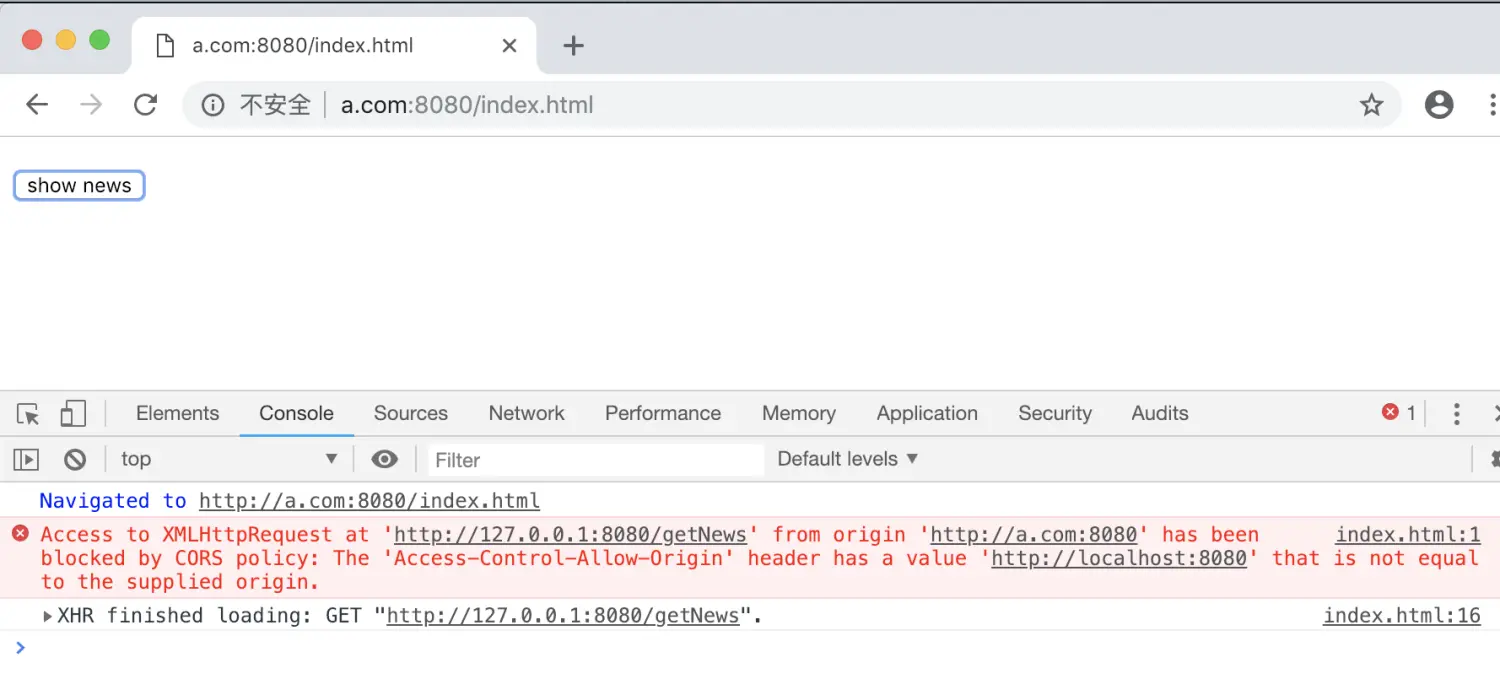
因为服务端不允许a.com 获取数据

响应头 Access-Control-Allow-Origin 设置为星号,表示同意任意跨源请求
Access-Control-Allow-Origin: '*'那么http://a.com:8080/index.html就能获取数据啦!
3、降域
(1)iframe 不同源
iframe里面加载的页面,它的域名,如果和我当前的是属于不同域,虽然iframe里面的东西可以加载,但外部的js无法去获取或操作的。
也就是说,只有在相同域名下的iframe,才可以去访问里面的东西举个例子
a.html
<!DOCTYPE html>
<html>
<head>
    <title></title>
</head>

<style>
    .ct{
        width: 910px;
        margin: 0 auto;
    }
    .main{
        float: left;
        width: 450px;
        height: 300px;
        border: 1px solid #ccc;
    }
    .main input{
        margin: 20px;
        width: 200px;
    }
    .iframe{
        float: right;
    }
    iframe{
        width: 450px;
        height: 300px;
        border: 1px dashed #ccc;
    }
</style>

<body>
<div class="ct">
    <h1>使用降域实现跨域</h1>
    <div class="main">
        <input type="text" placeholder="http://a.com:8080/a.html">
    </div>
    <iframe src="http://b.com:8080/b.html" frameborder="0"></iframe>
</div>

<script>
//URL  http://a.jrg.com:8080/a.html
document.querySelector('.main input').addEventListener('input',function(){
        console.log(this.value);
        window.frames[0].document.querySelector('input').value = this.value;
})
document.domain = "jrg.com"
</script>
</body>
</html>
b.html
<!DOCTYPE html>
<html>
<head>
    <title></title>
</head>
<style>
    html,body{
        margin: 0;
    }
    input{
        margin: 20px;
        width: 200px;
    }
</style>
<body>
<input id = "input" type="text" placeholder="http://b.jrg.com:8080/b.html">

<script>
// URL http://b.jrg.com:8080/b.html
document.querySelector('#input').addEventListener('input',function(){
    window.parent.document.querySelector('input').value = this.value;
})
document.domain = 'jrg.com';
</script>
</body>
</html>
同样先是host 文件添加两条记录
打开终端,cd 到当前文件夹,启动http-server
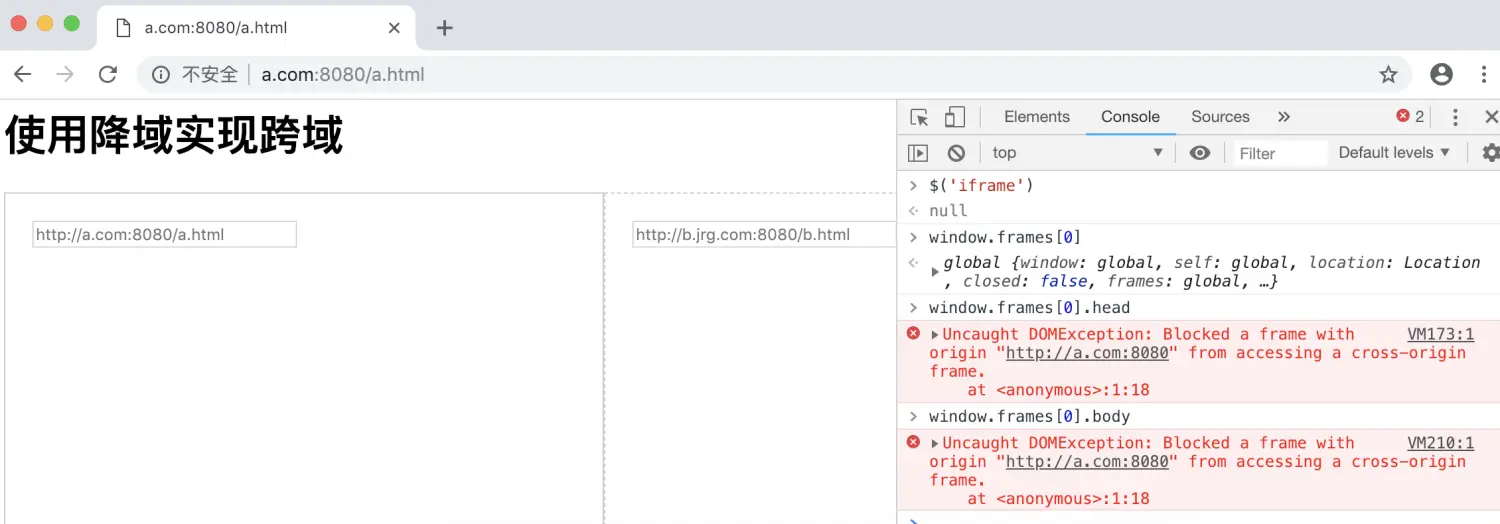
用a.com 打开a.html, http://a.com:8080/a.html , 其中页面iframe的地址是b.com,和网页不同源的。可以看到该frame可以正确加载,但我们不能用js操作它
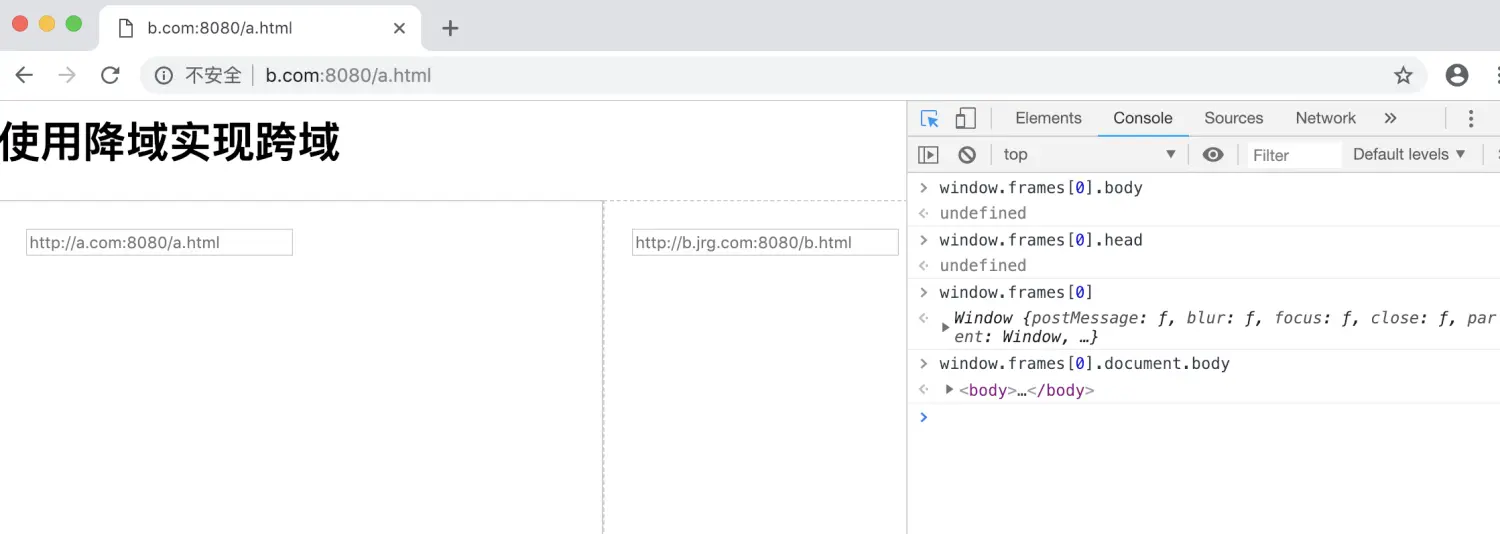
用b.com 打开a.html, http://b.com:8080/a.html , 其中frame 的地址是b.com,和网页同源的,现在我们就可以用 js 获取 iframe里面的内容
(2)修改源 document.domain
当两个url的主域名不同,但子域名相同的情况下,我们可以通过<iframe>标签将目标url先嵌入html中,再设置页面的document.domain值为两个url共同的子域名,即可实现降域
注:两个url的子域名必须相同
举个例子
a.jrg.com:8080/a.html 和 b.jrg.com:8080/b.html 页面代码都加上document.domain = "jrg.com"
在a.html页面中建一个iframe,通过iframe,两个js文件即可交互数据
a.html
<div class="ct">
  <h1>使用降域实现跨域</h1>
  <div class="main">
    <input type="text" placeholder="http://a.jrg.com:8080/a.html">
  </div>
  <iframe src="http://b.jrg.com:8080/b.html" frameborder="0" ></iframe>
</div>

<script>
//URL: http://a.jrg.com:8080/a.html
document.querySelector('.main input').addEventListener('input', function(){
  console.log(this.value);
  window.frames[0].document.querySelector('input').value = this.value;
})
document.domain = "jrg.com"
</script>
b.html
<script>
// URL: http://b.jrg.com:8080/b.html
document.querySelector('#input').addEventListener('input', function(){
    window.parent.document.querySelector('input').value = this.value;
})
document.domain = 'jrg.com';
</script>
4、PostMessage
允许来自不同源的脚本采用异步方式进行有限的通信,可以实现跨文本档、多窗口、跨域消息传递。
举个例子 (实现iframe跨域通信)
a.html
<!DOCTYPE html>
<html>
<head>
    <title></title>
</head>

<style>
    .ct{
        width: 910px;
        margin: 0 auto;
    }
    .main{
        float: left;
        width: 450px;
        height: 300px;
        border: 1px solid #ccc;
    }
    .main input{
        margin: 20px;
        width: 200px;
    }
    .iframe{
        float: right;
    }
    iframe{
        width: 450px;
        height: 300px;
        border: 1px dashed #ccc;
    }
</style>

<body>
    <div class="ct">
        <h1>使用postMessage实现跨域</h1>
    </div>
    <div class="main">
        <input type="text" placeholder="http://a.jrg.com:8080/a.html">
    </div>
    <iframe src="http://localhost:8080/b.html" frameborder="0"></iframe>

<script>
//URL http://a.jrg.com:8080/a.html

$('.main input').addEventListener('input',function(){
    console.log(this.value);
    window.frames[0].postMessage(this.value,'*');
    // a.html向跨域的iframe页面http://localhost:8080/b.html传递数据
})

//监听有没有数据发送过来
window.addEventListener('message',function(e){
    $('.main input').value = e.data
    console.log(e.data)
})
function $(id){
    return document.querySelector(id)
}
</script>
</body>
</html>
b.html
<!DOCTYPE html>
<html>
<head>
    <title></title>
</head>
<style>
    html,body{
        margin: 0;
    }

    input{
        margin: 20px;
        width: 200px;
    }
</style>
<body>
<input id="input" type="text" placeholder="http://b.jrg.com:8080/b.html">

<script>
// URL http://b.jrg.com:8080/b.html

$('#input').addEventListener('input',function(){
    window.parent.postMessage(this.value,'*')
})

window.addEventListener('message',function(e){
    $('#input').value = e.data
    console.log(e.data)
})

function $(id){
    return document.querySelector(id)
}
</script>
</body>
</html>
启动http-server,查看执行结果
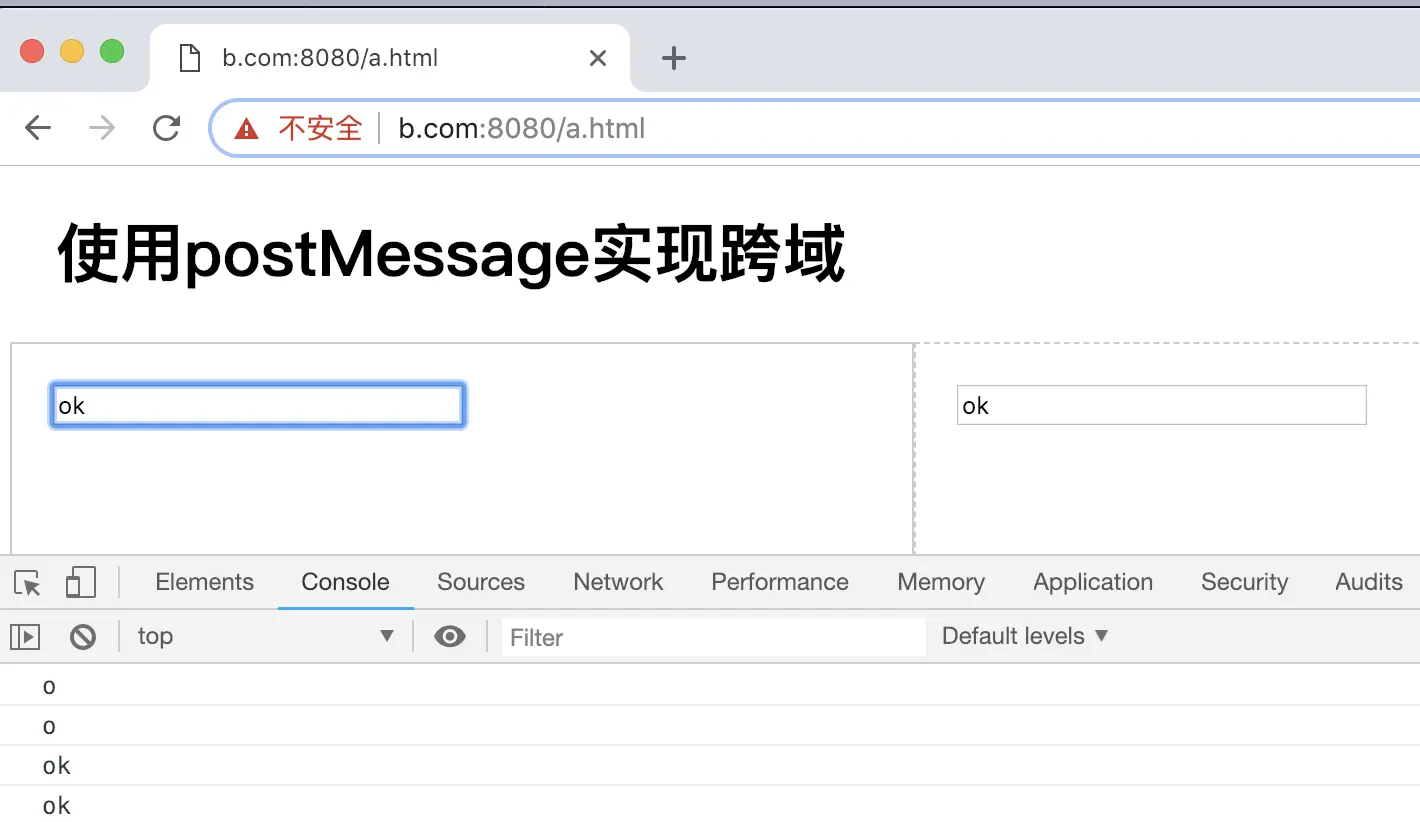
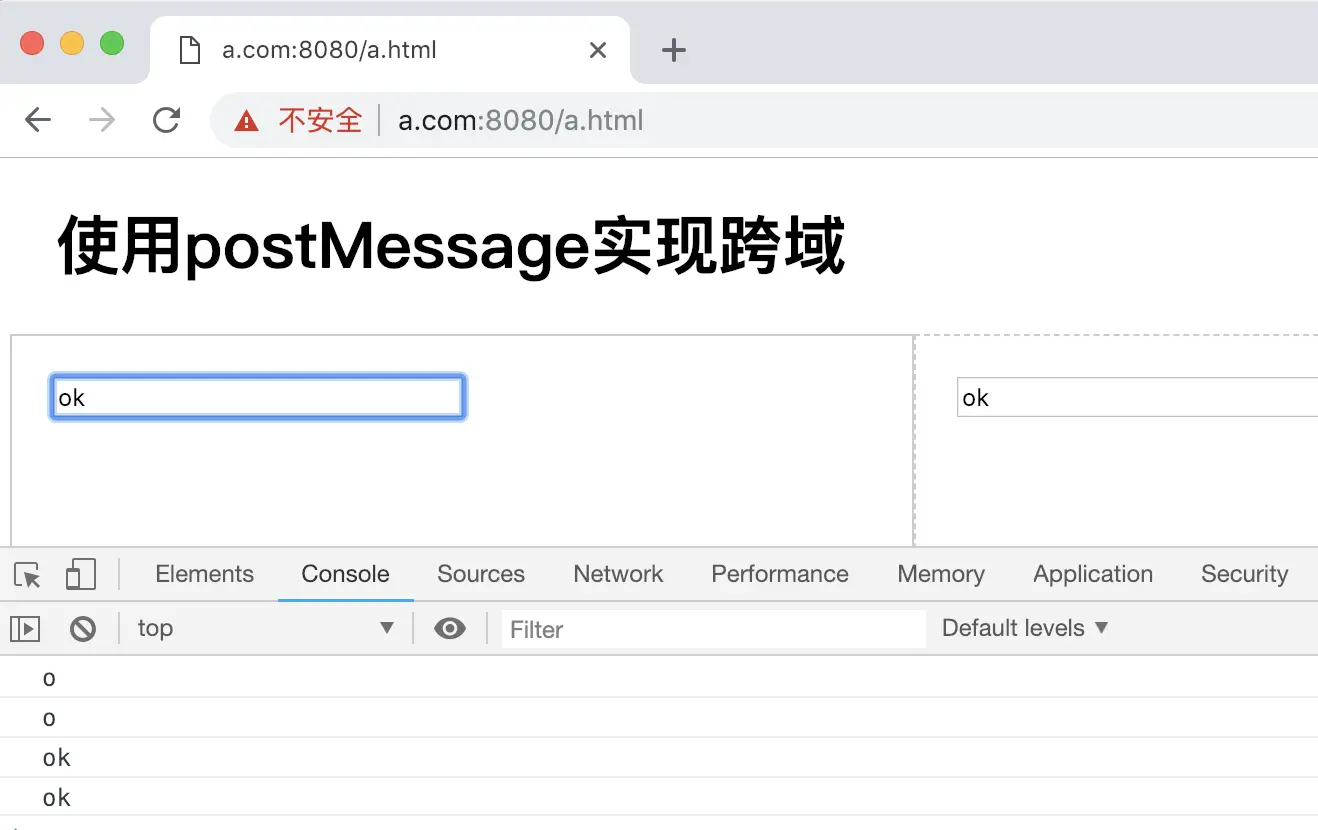
总结一下:
A、a.html 通过
window.postMessage()发送一个信息给b.htmlB、b.html 在
window上添加一个事件监听绑定message事件,可以接收到来自任何不同域名通过postMessage方法发送过来的信息C、当 b.html 接收到 a.html 发送过来的信息时执行监听事件就 OK,在监听事件的
event参数中包含了所有message事件接收到的相关数据。包括发送信息的内容event.data,发送信息的域名event.origin等等同样的,在 a.html 内添加一个事件监听绑定
message事件,在 b.html 内通过postMessage方法发送信息给 a.html 一样可以进行跨域通信 - 不同源情况:
评论
登录后参与技术讨论,分享你的经验与见解。
登录 / 注册暂无评论