gitlab在阿里云的安装

文章目录
[toc]
gitlab阿里云搭建
1. 阿里云购买(略)
2. gitlab搭建
2.1 环境依赖搭建
yum -y install policycoreutils openssh-server openssh-clients postfix
yum install  policycoreutils-python
systemctl enable sshd && sudo systemctl start sshd
systemctl enable postfix && systemctl start postfix如果postfix启动失败报警如下:
Job for postfix.service failed because the control process exited with error code. See "systemctl status postfix.service" and "journalctl -xe" for details.需要修改配置,而后重试:
vim /etc/postfix/main.cf
#修改内容如下:
inet_protocols = ipv4
inet_interfaces = all
2.2 关闭防火墙或者防火墙增加白名单
systemctl stop firewalld.service
2.3 下载软件并安装
wget --content-disposition https://packages.gitlab.com/gitlab/gitlab-ce/packages/el/7/gitlab-ce-15.4.3-ce.0.el7.x86_64.rpm/download.rpm

# 从这里可以找到响应的包来选择:https://packages.gitlab.com/gitlab/gitlab-ce/
2.4 修改配置
#大约在33行 注意123.123.123.123是你的公网IP
external_url 'http://123.123.123.123:8280'
#大约在1456行
nginx['listen_port'] = 8280
2.5 重新启动
gitlab-ctl reconfigure
gitlab-ctl restart
2.6 访问页面:如上
输入账号密码:root/xxx
默认密码存储在 /etc/gitlab/initial_root_password, 有效期24小时;赶紧登陆修改。
3 卸载
3.1 停止
gitlab-ctl stop停止后马上~马上啊! 我1核4G的系统cpu就下来了~~~
3.2 卸载
然后卸载:
rpm -e gitlab-ce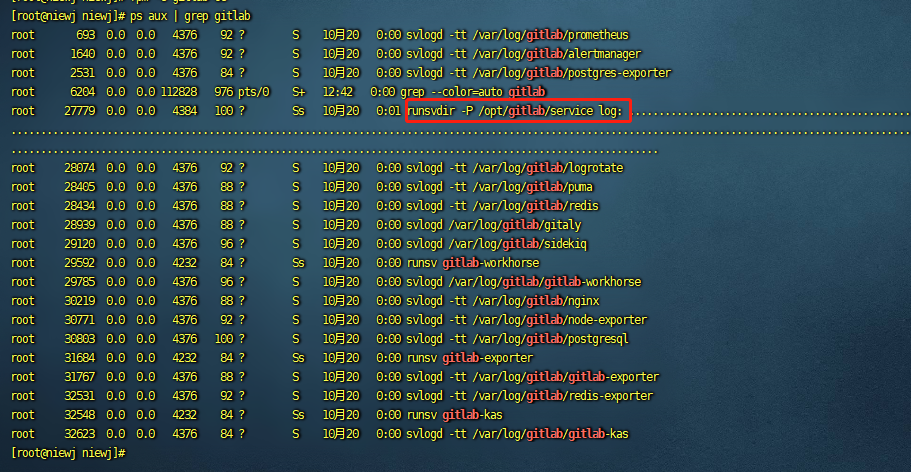
杀掉runsvdir这个进程,省略号最多的这个!
3.3 清理
find / -name gitlab | xargs rm -rf一段时间后OK!
评论
登录后参与技术讨论,分享你的经验与见解。
登录 / 注册暂无评论