IM4Java + GraphicsMagick 实现高清图片剪裁处理

文章目录
简单介绍
GraphicsMagick是ImageMagick的一个分支,相对于ImageMagick而言,TA处理速度更快,消耗资源更少。GraphicsMagick 是一个用来读写、生成超过90种图像格式的工具集合,支持包括 TIFF, JPEG, JPEG-2000,PNG, PDF, PhotoCD, SVG, 和GIF 等图像格式。GraphicsMagick 是基于 ImageMagick 开发的。
im4java是ImageMagick的另一个Java开源接口。与JMagick不同之处在于im4java只是生成与ImageMagick相对应的命令行,然后将生成的命令行传至选中的IM-command(使用java.lang.ProcessBuilder.start()实现)来执行相应的操作。它支持大部分ImageMagick命令,可以针对不同组的图片多次复用同一个命令行。im4java也是能够高清压缩图片,而且它也特别强大,至少一些基本常见的业务都是可以完美实现的。
Cropper是一款使用简单且功能强大的图片剪裁jQuery插件。该图片剪裁插件支持图片放大缩小,支持鼠标滚轮操作,支持图片旋转,支持触摸屏设备,支持canvas,并且支持跨浏览器使用。
技术选型
ImageCropper + GraphicsMagick + im4java + SpringMVC
ImageCropper官网: http://fengyuanchen.github.io/cropper/
GraphicsMagick官网: http://www.graphicsmagick.org/
im4java下载: http://sourceforge.net/projects/im4java/files/?source=navbar
处理逻辑
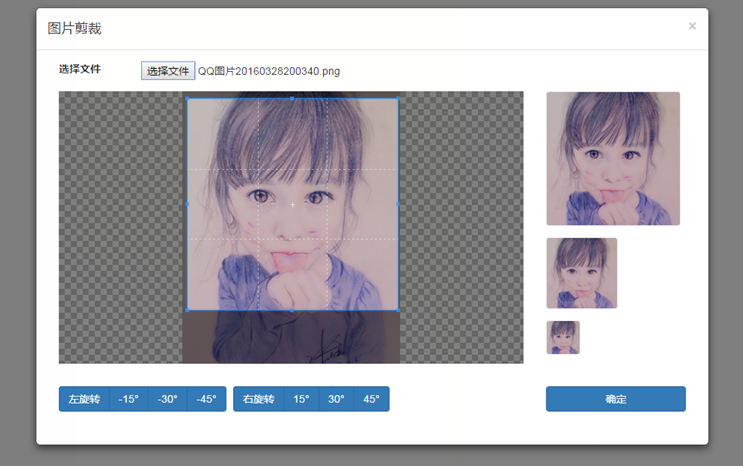
1、前端进行图片剪裁,并展示剪裁后的效果图;
2、点击确定后,将参数(x,y坐标,长宽,旋转角度)传到后端,并将图片上传至服务器,在调用im4java api进行图片处理。
3、返回处理后的图片路径,前端展示。
编程实现
图片剪裁处理类
package org.hcm.utils;

import java.io.File;
import java.io.FileNotFoundException;
import java.io.FileOutputStream;
import java.io.IOException;
import java.io.InputStream;

import org.apache.commons.logging.Log;
import org.apache.commons.logging.LogFactory;
import org.im4java.core.ConvertCmd;
import org.im4java.core.IM4JavaException;
import org.im4java.core.IMOperation;

import com.alibaba.fastjson.JSON;
import com.alibaba.fastjson.JSONObject;


public class ImageUtils {

    private static Log logger = LogFactory.getLog(ImageUtils.class);

    /**
     * 保存文件
     *
     * @param inputStream
     * @param path
     * @param fileName
     */
    public static void saveFileFromInputStream(InputStream inputStream, String path, String fileName) {
        File file = new File(path + fileName);
        FileOutputStream fs = null;
        try {
            fs = new FileOutputStream(file);
            byte[] buffer = new byte[1024 * 1024];
            int byteread = 0;
            while ((byteread = inputStream.read(buffer)) != -1) {
                fs.write(buffer, 0, byteread);
                fs.flush();
            }
        } catch (FileNotFoundException e) {
            logger.error("File Not Found !", e);
        } catch (IOException e) {
            logger.error("", e);
        } finally {
            try {
                if (fs != null) {
                    fs.close();
                }
                if (inputStream != null) {
                    inputStream.close();
                }
            } catch (IOException e) {
                logger.error("", e);
            }
        }
    }


    /**
     * 裁剪图片
     *
     * @param imagePath
     *            源图片路径
     * @param newPath
     *            处理后图片路径
     * @param x
     *            起始X坐标
     * @param y
     *            起始Y坐标
     * @param width
     *            裁剪宽度
     * @param height
     *            裁剪高度
     * @return 返回true说明裁剪成功,否则失败
     */
    public static boolean cutImage(String imagePath, String newPath, int x, int y, int width, int height) {
        boolean flag = false;
        try {
            IMOperation op = new IMOperation();
            op.addImage(imagePath);
            /** width:裁剪的宽度 * height:裁剪的高度 * x:裁剪的横坐标 * y:裁剪纵坐标 */
            op.crop(width, height, x, y);
            op.addImage(newPath);
            ConvertCmd convert = new ConvertCmd(true);
            convert.run(op);
            flag = true;
        } catch (IOException e) {
            logger.error("读取文件出错", e);
        } catch (InterruptedException e) {
            logger.error("", e);
        } catch (IM4JavaException e) {
            logger.error("", e);
        }

        return flag;
    }

    /**
     * 根据尺寸缩放图片[等比例缩放:参数height为null,按宽度缩放比例缩放;参数width为null,按高度缩放比例缩放]
     *
     * @param imagePath
     *            源图片路径
     * @param newPath
     *            处理后图片路径
     * @param width
     *            缩放后的图片宽度
     * @param height
     *            缩放后的图片高度
     * @return 返回true说明缩放成功,否则失败
     */
    public static boolean zoomImage(String imagePath, String newPath, Integer width, Integer height) {
        boolean flag = false;
        try {
            IMOperation op = new IMOperation();
            op.addImage(imagePath);
            if (width == null) {                // 根据高度缩放图片
                op.resize(null, height);
            } else if (height == null) {        // 根据宽度缩放图片
                op.resize(width);
            } else {
                op.resize(width, height);
            }
            op.addImage(newPath);
            ConvertCmd convert = new ConvertCmd(true);
            convert.run(op);
            flag = true;
        } catch (IOException e) {
            logger.error("读取文件出错", e);
        } catch (InterruptedException e) {
            logger.error("", e);
        } catch (IM4JavaException e) {
            logger.error("", e);
        }

        return flag;
    }

    /**
     * 图片旋转
     *
     * @param imagePath
     *            源图片路径
     * @param newPath
     *            处理后图片路径
     * @param degree
     *            旋转角度
     */
    public static boolean rotate(String imagePath, String newPath, double degree) {
        boolean flag = false;
        try {
            // 1.将角度转换到0-360度之间
            degree = degree % 360;
            if (degree <= 0) {
                degree = 360 + degree;
            }
            IMOperation op = new IMOperation();
            op.addImage(imagePath);
            op.rotate(degree);
            op.addImage(newPath);
            ConvertCmd cmd = new ConvertCmd(true);
            cmd.run(op);
            flag = true;
        } catch (Exception e) {
            logger.error("图片旋转处理失败!", e);
        }

        return flag;
    }


    public static boolean imgProcessing(String srcPath, String destPath, int x, int y, int width, int height, double rotate) {
        boolean flag = false;
        try {
            IMOperation op = new IMOperation();
            op.addImage(srcPath);
            /** 旋转 */
            op.rotate(rotate);
            /** width:裁剪的宽度 * height:裁剪的高度 * x:裁剪的横坐标 * y:裁剪纵坐标 */
            op.crop(width, height, x, y);
            op.addImage(destPath);
            ConvertCmd convert = new ConvertCmd(true);
            convert.run(op);
            flag = true;
        } catch (IOException e) {
            logger.error("读取文件出错", e);
        } catch (InterruptedException e) {
            logger.error("", e);
        } catch (IM4JavaException e) {
            logger.error("", e);
        }

        return flag;
    }

    public static void main(String[] args) {
//        ImageUtils.zoomImage("f://temp//test.jpg", "f://temp//test5.jpg", 200, 200);
//        ImageUtils.rotate("f://temp//test1.jpg", "f://temp//test2.jpg", -90);
//        ImageUtils.cutImage("f://temp//test5.jpg", "f://temp//test5.jpg", 32, 30, 200, 200);

        String data = "{'x':100.001, 'y':100.9}";

        System.out.println(data);

        JSONObject jsonData = JSON.parseObject(data);


        System.out.println(jsonData.getIntValue("x"));
        System.out.println(jsonData.getIntValue("y"));


    }

}
控制类
package org.hcm.controller;

import java.io.IOException;
import java.util.HashMap;
import java.util.Map;

import javax.servlet.http.HttpServletRequest;
import javax.servlet.http.HttpServletResponse;

import org.apache.commons.lang.StringUtils;
import org.hcm.utils.ImageUtils;
import org.springframework.stereotype.Controller;
import org.springframework.web.bind.annotation.RequestMapping;
import org.springframework.web.bind.annotation.RequestMethod;
import org.springframework.web.multipart.MultipartFile;
import org.springframework.web.multipart.MultipartHttpServletRequest;

import com.alibaba.fastjson.JSON;
import com.alibaba.fastjson.JSONObject;


@Controller
@RequestMapping(value = "/image")
public class ImageController {

    @RequestMapping(value = "/upload", method = RequestMethod.POST)
    public void upload(HttpServletRequest req, HttpServletResponse resp) throws IOException {
        Map<String, Object> result = new HashMap<String, Object>();
        MultipartHttpServletRequest multipartRequest = (MultipartHttpServletRequest) req;
        MultipartFile file = multipartRequest.getFile("avatar_file");
        String data = req.getParameter("avatar_data");
        String fileName = String.valueOf(System.currentTimeMillis()) + getExtension(file.getOriginalFilename());
        String savePath = req.getServletContext().getRealPath("/upload");
        if (!file.isEmpty()) {
            // 保存原图
            ImageUtils.saveFileFromInputStream(file.getInputStream(), savePath + "\\source\\", fileName);
            // 处理图片
            result = imageProcessing(data, savePath, fileName, req.getContextPath());
        }

        resp.getWriter().print(JSON.toJSON(result));
    }

    private Map<String, Object> imageProcessing(String data, String savePath, String fileName, String contextPath) {
        Map<String, Object> map = new HashMap<String, Object>();
        JSONObject object = JSONObject.parseObject(data);

        int x = (int) object.getIntValue("x");
        int y = object.getIntValue("y");
        int height = object.getIntValue("height");
        int width = object.getIntValue("width");
        int rotate = object.getIntValue("rotate");

        String srcPath = savePath + "\\source\\" + fileName;
        String destPath = savePath + "\\procesed\\" + fileName;
        String serverPath = contextPath + "/upload/procesed/" + fileName;

        ImageUtils.imgProcessing(srcPath, destPath, x, y, width, height, rotate);

        map.put("state", 200);
        map.put("result", serverPath);
        return map;

    }


    private String getExtension(String fileName) {
        if (StringUtils.INDEX_NOT_FOUND == StringUtils.indexOf(fileName, "."))
            return StringUtils.EMPTY;
        String ext = StringUtils.substring(fileName, StringUtils.lastIndexOf(fileName, "."));
        return StringUtils.trimToEmpty(ext);
    }

}
效果预览
_
_
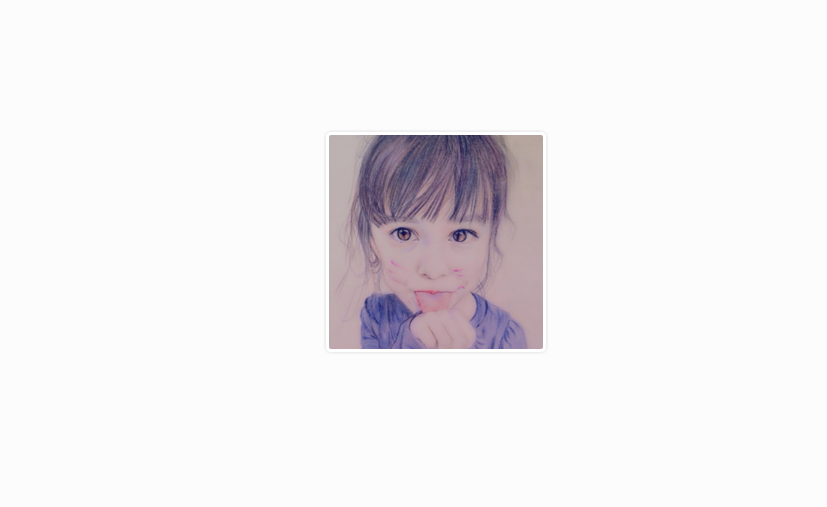
(完)
评论
登录后参与技术讨论,分享你的经验与见解。
登录 / 注册暂无评论