如何制作一个自己的composer包

文章目录
点击了解 CRMEB多商户 其他开源项目源码 :了解更多
小姐姐二维码
一. 在gitee上创建一个仓库,这里就不详细赘述应该都会的,地址:https://gitee.com。
二. 在本地将仓库拉去下来。
- 创建文件夹,然后克隆下来
直接在工作目录下执行一下命令
mkdir sms #sms 是你想创建的文件夹名称
cd sms
git init
touch README.md
git add README.md
git commit -m "first commit"
git remote add origin https://gitee.com/<username>/<packname>.git  #这里的地址改为你自己的
git push -u origin master
三. composer包的制作
在刚才创建的文件夹下执行
composer init#初始化一个composer包 composer init Welcome to the Composer config generator This command will guide you through creating your composer.json config. #给你的包取过名字 Package name (<vendor>/<name>) [inuo/sms]: qinii/sms #给你的包做个简短的介绍 Description []: 短sms #备注包的作者信息 Author [qinii <904531094@qq.com>, n to skip]: #包的最低稳定版本 给个dev或跳过 Minimum Stability []: #包的封装类型 选择 库 Package Type (e.g. library, project, metapackage, composer-plugin) []: library #包的授权协议 开源协议 License []: MIT Define your dependencies. #是否需要添加其他的依赖库,我选择是 Would you like to define your dependencies (require) interactively [yes]? yes #这里搜索你需要依赖的库的名称 Search for a package: php Warning from https://mirrors.aliyun.com/composer: You are using an outdated version of Composer. Composer 2 is now available and you should upgrade. See https://getcomposer.org/2 #输入依赖库的要求 我输入 >=7.0 Enter the version constraint to require (or leave blank to use the latest version): >=7.0 #不需要其他依赖了 以下几项直接回车 Search for a package: Would you like to define your dev dependencies (require-dev) interactively [yes]? Search for a package: { "name": "qinii/sms", "description": "sms", "type": "l", "require": { "php": ">=7.0" }, "license": "MIT", "authors": [ { "name": "qinii", "email": "904531094@qq.com" } ] } #是否创建 composer.json 文件 Do you confirm generation [yes]? yes #是否将vendor文件夹加入到忽略文件中去 Would you like the vendor directory added to your .gitignore [yes]? yes #是安装相关的依赖库 Would you like to install dependencies now [yes]?编辑
composer.json增加指定文件夹路径,别忽略上面的逗号{ "name": "qinii/sms", "description": "sms", "type": "l", "require": { "php": ">=7.0" }, "license": "MIT", "authors": [ { "name": "qinii", "email": "904531094@qq.com" } ], "autoload":{ "psr-4":{ "Qinii\\":"src/" } } }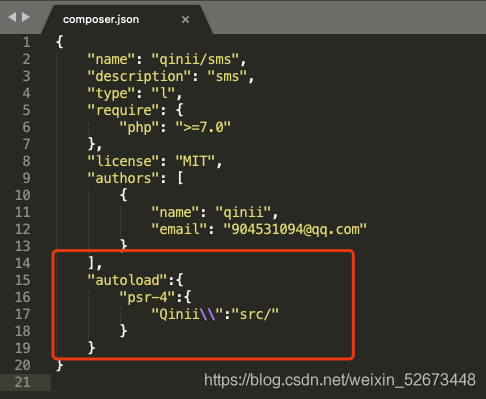
- 命令行执行
composer dump-autoload更新一下composer文件 创建
src文件夹,创建src/index.php<?php namespace Qinii; class Index { public function index() { echo '如果看到我,说明你成功了'; } }创建
sms/index.php<?php require "vendor/autoload.php"; $index = new Qinii\Index(); $index->index();- 在当前目录执行一下
php index.php,出现刚才写的就说明包是没问题的;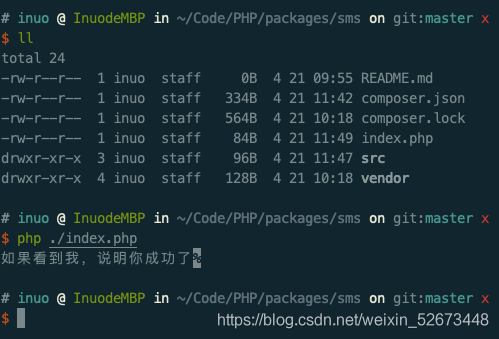
将包全部上传
git add .
git commit -m 'test‘
git push
四. 提交到 composer
- 进入 composer 官网
- 登陆个人账户,选择右上角的 submit 按钮
- 填写刚才的仓库地址,点击 check

- 检测完毕后,上传就好了。

这里用的是gitee的仓库,如果要用github也是只需要更一下仓库地址就行了
评论
登录后参与技术讨论,分享你的经验与见解。
登录 / 注册暂无评论