Mybatis深入源码分析之SqlSessionFactory二级缓存原理分析

文章目录

上篇内容回顾可以参考;Mybatis深入源码分析之SQLSession一级缓存原理分析
这里再概括下上篇源码分析内容:
一:Mybatis一级缓存
mybatis的一级缓存是SqlSession缓存,在操作数据库的时候需要先创建SQL会话对象,在对象中有个HashMap用于存储缓存数据,此HashMap是当前对象私有的,其它SqlSession会话对象无法访问。
具体流程:
- 第一次执行select完毕会将查到的数据写入SqlSession内的HashMap中缓存起来
- 第二次执行select会从缓存中查数据,如果select相同且传参数一样,那么就能从缓存中返回数据,不用去查询数据库了,从而提高程序执行效率。
注意事项:
- 如果SqlSession执行了DML操作(insert、update、delete),并commit了,那么mybatis就会清空当前SqlSession缓存中所有的缓存数据,这样可以保证缓存中的缓存数据永远和数据库中的一致,避免出现脏读。
- 当一个SqlSession结束后,那么它里面的一级缓存也就不存在了,Mybatis默认是开启一级缓存,不需要配置。
- mybatis缓存是基于【namespzce:sql语句:参数】来进行缓存的,意思就是:sqlSession的HashMap存储缓存数据时,是使用【namespace:sql:参数】作为key
- 注意服务器集群的时候,每个sqlSession都有自己独立的缓存且互不共享,所以在服务器集群的时候容易产生数据冲突问题。
如何禁止一级缓存
- 方案1 在sql语句上 随机生成 不同的参数 存在缺点:map集合可能爆 内存溢出的问题
- 方案2 开启二级缓存
- 方案3 使用sqlSession强制清除缓存
- 方案4 创建新的sqlSession连接。
二:Mybatis二级缓存SessionFactory
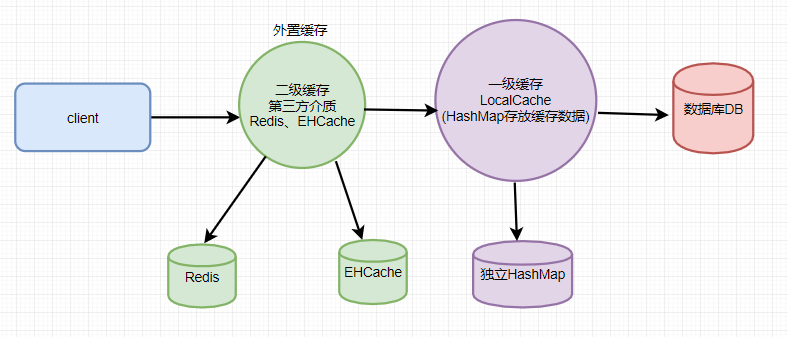
MyBatis使用Redis作为二级缓存
二级缓存默认是没有开启的,需要在setting全局参数中配置开启二级缓存,还需要对实体类实现序列化接口
开启二级缓存
在mapper配置文件中加入下面这段配置:表示缓存淘汰策略,和指定缓存类型
在源码中,是如何解析配置的缓存呢?下面我们找到这段源码:
private void configurationElement(XNode context) { try { String namespace = context.getStringAttribute("namespace"); if (namespace != null && !namespace.equals("")) { this.builderAssistant.setCurrentNamespace(namespace); this.cacheRefElement(context.evalNode("cache-ref")); this.cacheElement(context.evalNode("cache")); //解析mapper配置文件中配置的缓存结点cache this.parameterMapElement(context.evalNodes("/mapper/parameterMap")); this.resultMapElements(context.evalNodes("/mapper/resultMap")); this.sqlElement(context.evalNodes("/mapper/sql")); this.buildStatementFromContext(context.evalNodes("select|insert|update|delete")); } else { throw new BuilderException("Mapper's namespace cannot be empty"); } } catch (Exception var3) { throw new BuilderException("Error parsing Mapper XML. Cause: " + var3, var3); } }
private void cacheElement(XNode context) throws Exception { if (context != null) { String type = context.getStringAttribute("type", "PERPETUAL"); Class<? extends Cache> typeClass = this.typeAliasRegistry.resolveAlias(type); String eviction = context.getStringAttribute("eviction", "LRU"); //淘汰策略 Class<? extends Cache> evictionClass = this.typeAliasRegistry.resolveAlias(eviction); Long flushInterval = context.getLongAttribute("flushInterval"); Integer size = context.getIntAttribute("size"); boolean readWrite = !context.getBooleanAttribute("readOnly", false); boolean blocking = context.getBooleanAttribute("blocking", false); Properties props = context.getChildrenAsProperties(); this.builderAssistant.useNewCache(typeClass, evictionClass, flushInterval, size, readWrite, blocking, props);//使用Java的反射机制初始化 } }
this.builderAssistant.useNewCache(typeClass, evictionClass, flushInterval, size, readWrite, blocking, props);
public Cache useNewCache(Class<? extends Cache> typeClass, Class<? extends Cache> evictionClass, Long flushInterval, Integer size, boolean readWrite, boolean blocking, Properties props) { Cache cache = (new CacheBuilder(this.currentNamespace)).implementation((Class)this.valueOrDefault(typeClass, PerpetualCache.class)).addDecorator((Class)this.valueOrDefault(evictionClass, LruCache.class)).clearInterval(flushInterval).size(size).readWrite(readWrite).blocking(blocking).properties(props).build(); this.configuration.addCache(cache); //将cache配置添加到configura中 this.currentCache = cache; return cache; }
测试代码
// 4.获取Session SqlSession sqlSession = sqlSessionFactory.openSession(); SqlSession sqlSession2 = sqlSessionFactory.openSession(); // 5.操作Mapper接口 UserMapper mapper = sqlSession.getMapper(UserMapper.class);
System.out.println("第一次调用...."); UserEntity o = sqlSession.selectOne("com.mayikt.mapper.UserMapper.getUser", 1); //断点① System.out.println(o.getName());
System.out.println("第二次调用...."); UserEntity o2 = sqlSession2.selectOne("com.mayikt.mapper.UserMapper.getUser", 1); //断点② System.out.println(o2.getName());

public T selectOne(String statement, Object parameter) { List list = this.selectList(statement, parameter);//进入这里 if (list.size() == 1) { return list.get(0); } else if (list.size() > 1) { throw new TooManyResultsException("Expected one result (or null) to be returned by selectOne(), but found: " + list.size()); } else { return null; } }
public List selectList(String statement, Object parameter) { return this.selectList(statement, parameter, RowBounds.DEFAULT);//进入这里 }
public List selectList(String statement, Object parameter, RowBounds rowBounds) { List var5; try { MappedStatement ms = this.configuration.getMappedStatement(statement);//拿到sql语句的对象 var5 = this.executor.query(ms, this.wrapCollection(parameter), rowBounds, Executor.NO_RESULT_HANDLER);//到这里 } catch (Exception var9) { throw ExceptionFactory.wrapException("Error querying database. Cause: " + var9, var9); } finally { ErrorContext.instance().reset(); } return var5; }
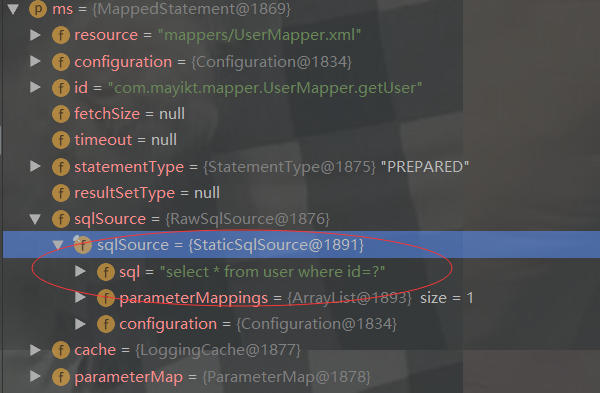
因为我们配置了外置缓存Redis缓存所以先走CacheExecutor执行器(代表二级缓存)

public List query(MappedStatement ms, Object parameterObject, RowBounds rowBounds, ResultHandler resultHandler) throws SQLException { BoundSql boundSql = ms.getBoundSql(parameterObject); //拿到SQL语句 CacheKey key = this.createCacheKey(ms, parameterObject, rowBounds, boundSql); //创建缓存key return this.query(ms, parameterObject, rowBounds, resultHandler, key, boundSql); }
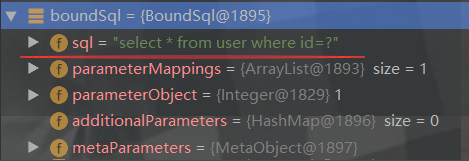
CacheKey key = this.createCacheKey(ms, parameterObject, rowBounds, boundSql);//创建缓存key

执行query方法:
return this.query(ms, parameterObject, rowBounds, resultHandler, key, boundSql);
public List query(MappedStatement ms, Object parameterObject, RowBounds rowBounds, ResultHandler resultHandler, CacheKey key, BoundSql boundSql) throws SQLException { Cache cache = ms.getCache(); if (cache != null) { this.flushCacheIfRequired(ms); //缓存不为空,刷新缓存配置,清除缓存 if (ms.isUseCache() && resultHandler == null) { this.ensureNoOutParams(ms, parameterObject, boundSql); List list = (List)this.tcm.getObject(cache, key); //查询二级缓存数据 if (list == null) { //第一次查询肯定没有。执行下面代码 list = this.delegate.query(ms, parameterObject, rowBounds, resultHandler, key, boundSql); this.tcm.putObject(cache, key, list); } return list; } }
cache不为空:

private void flushCacheIfRequired(MappedStatement ms) { Cache cache = ms.getCache(); if (cache != null && ms.isFlushCacheRequired()) { this.tcm.clear(cache); //缓存不为空,清空缓存 } }
list = this.delegate.query(ms, parameterObject, rowBounds, resultHandler, key, boundSql);
二级缓存没有数据,就执行BaseExecutor查询一级缓存数据

public List query(MappedStatement ms, Object parameter, RowBounds rowBounds, ResultHandler resultHandler, CacheKey key, BoundSql boundSql) throws SQLException { ErrorContext.instance().resource(ms.getResource()).activity("executing a query").object(ms.getId()); if (this.closed) { throw new ExecutorException("Executor was closed."); } else { if (this.queryStack == 0 && ms.isFlushCacheRequired()) { this.clearLocalCache(); } List list; try { ++this.queryStack; list = resultHandler == null ? (List)this.localCache.getObject(key) : null; //判断一级缓存是否有数据,这里第一次查询也是没有的 if (list != null) { this.handleLocallyCachedOutputParameters(ms, key, parameter, boundSql); } else { //进入这块 list = this.queryFromDatabase(ms, parameter, rowBounds, resultHandler, key, boundSql); //先去查询数据库 } } finally { --this.queryStack; } if (this.queryStack == 0) { Iterator i$ = this.deferredLoads.iterator();
        while(i$.hasNext()) {
            BaseExecutor.DeferredLoad deferredLoad = (BaseExecutor.DeferredLoad)i$.next();
            deferredLoad.load();
        }

        this.deferredLoads.clear();
        if (this.configuration.getLocalCacheScope() == LocalCacheScope.STATEMENT) {
            this.clearLocalCache();
        }
    }
    return list;
}
}
list = this.queryFromDatabase(ms, parameter, rowBounds, resultHandler, key, boundSql);//查询数据库
private List queryFromDatabase(MappedStatement ms, Object parameter, RowBounds rowBounds, ResultHandler resultHandler, CacheKey key, BoundSql boundSql) throws SQLException { this.localCache.putObject(key, ExecutionPlaceholder.EXECUTION_PLACEHOLDER); //先使用占位符去缓存一个key,表示我现在要去查询数据库了 List list; try { list = this.doQuery(ms, parameter, rowBounds, resultHandler, boundSql); //去查询数据库数据 } finally { this.localCache.removeObject(key); //将之前缓存的占位符key删除了 } this.localCache.putObject(key, list); //再将查询到的数据缓存到一级缓存中 if (ms.getStatementType() == StatementType.CALLABLE) { this.localOutputParameterCache.putObject(key, parameter); } return list; }
this.tcm.putObject(cache, key, list);再把一级缓存数据放入二级缓存中
发现第二次查询的时候:二级缓存还是没有数据,这是为什么?
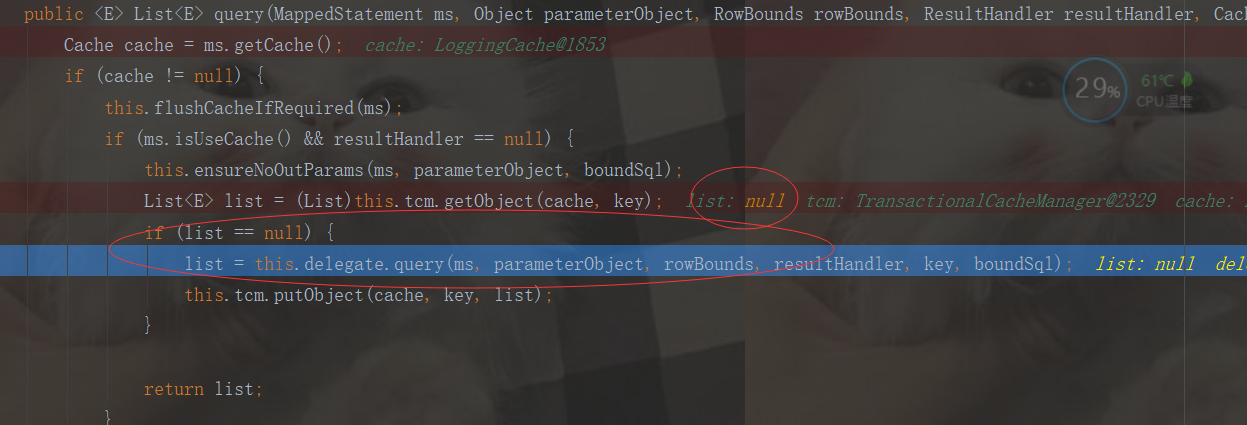
我们地清除地知道,每次调用openSession地时候,开启了二级缓存,每次都会new CacheExecutor执行器(二级缓存)
Executor executor = this.configuration.newExecutor(tx, execType);
public Executor newExecutor(Transaction transaction, ExecutorType executorType) { executorType = executorType == null ? this.defaultExecutorType : executorType; executorType = executorType == null ? ExecutorType.SIMPLE : executorType; Object executor; if (ExecutorType.BATCH == executorType) { executor = new BatchExecutor(this, transaction); } else if (ExecutorType.REUSE == executorType) { executor = new ReuseExecutor(this, transaction); } else { executor = new SimpleExecutor(this, transaction); } if (this.cacheEnabled) { executor = new CachingExecutor((Executor)executor); //每次开启了二级缓存,都会器new 一个CachingExecutor二级缓存执行器 } Executor executor = (Executor)this.interceptorChain.pluginAll(executor); return executor; }
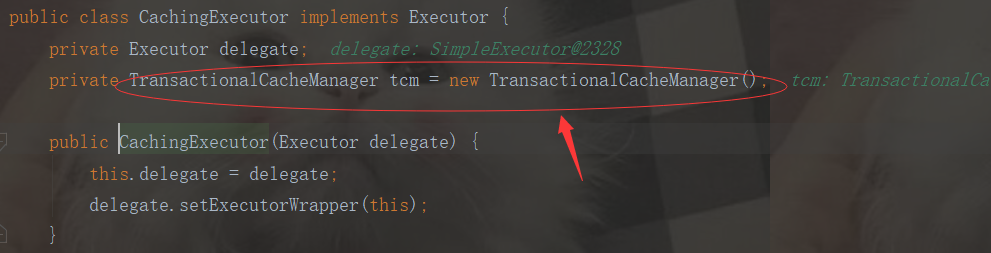
我们可以知道了:每次new一个CachingExecutor二级缓存执行器,都会new TransactionalCacheManager()
所以:TransactionalCacheManager管理我们地TransactionalCache和SQLSession绑定
我们执行下代码:发现执行了两次SQL查询
第一次调用....
11:08:35.474 [main] DEBUG com.mayikt.cache.MybatisRedisCache - >>>>>>>>>>>>>>>>>>>>>>>>getObject:-978696591:1452564226:com.mayikt.mapper.UserMapper.getUser:0:2147483647:select * from user where id=?:1:development=null
Cache Hit Ratio [com.mayikt.mapper.UserMapper]: 0.0
Opening JDBC Connection
Created connection 294184992.
Setting autocommit to false on JDBC Connection [com.mysql.jdbc.JDBC4Connection@1188e820]
==> Preparing: select * from user where id=?
==> Parameters: 1(Integer)
<== Columns: id, name, update_time
<== Row: 1, xuyu, 2019-03-13 14:27:49.0
<== Total: 1
xuyu
第二次调用....
11:08:35.704 [main] DEBUG com.mayikt.cache.MybatisRedisCache - >>>>>>>>>>>>>>>>>>>>>>>>getObject:-978696591:1452564226:com.mayikt.mapper.UserMapper.getUser:0:2147483647:select * from user where id=?:1:development=null
Cache Hit Ratio [com.mayikt.mapper.UserMapper]: 0.0
Opening JDBC Connection
Created connection 1268959798.
Setting autocommit to false on JDBC Connection [com.mysql.jdbc.JDBC4Connection@4ba2ca36]
==> Preparing: select * from user where id=?
==> Parameters: 1(Integer)
<== Columns: id, name, update_time
<== Row: 1, xuyu, 2019-03-13 14:27:49.0
<== Total: 1
xuyu
假如我们在查询中间添加:
sqlSession.close();
结果如下:我们发现,第一次查询了数据库,第二次直接走缓存了,没有再去查询数据库,缓存生效了,这是为什么呢?下面我们开始源码分析
第一次调用....
11:10:06.121 [main] DEBUG com.mayikt.cache.MybatisRedisCache - >>>>>>>>>>>>>>>>>>>>>>>>getObject:-978696591:1452564226:com.mayikt.mapper.UserMapper.getUser:0:2147483647:select * from user where id=?:1:development=null
Cache Hit Ratio [com.mayikt.mapper.UserMapper]: 0.0
Opening JDBC Connection
Created connection 294184992.
Setting autocommit to false on JDBC Connection [com.mysql.jdbc.JDBC4Connection@1188e820]
==> Preparing: select * from user where id=?
==> Parameters: 1(Integer)
<== Columns: id, name, update_time
<== Row: 1, xuyu, 2019-03-13 14:27:49.0
<== Total: 1
xuyu
11:10:06.350 [main] DEBUG com.mayikt.cache.MybatisRedisCache - >>>>>>>>>>>>>>>>>>>>>>>>putObject:-978696591:1452564226:com.mayikt.mapper.UserMapper.getUser:0:2147483647:select * from user where id=?:1:development=[com.mayikt.entity.UserEntity@1dd02175]
Resetting autocommit to true on JDBC Connection [com.mysql.jdbc.JDBC4Connection@1188e820]
Closing JDBC Connection [com.mysql.jdbc.JDBC4Connection@1188e820]
Returned connection 294184992 to pool.
第二次调用....
11:10:06.404 [main] DEBUG com.mayikt.cache.MybatisRedisCache - >>>>>>>>>>>>>>>>>>>>>>>>getObject:-978696591:1452564226:com.mayikt.mapper.UserMapper.getUser:0:2147483647:select * from user where id=?:1:development=[com.mayikt.entity.UserEntity@2357d90a]
Cache Hit Ratio [com.mayikt.mapper.UserMapper]: 0.5
xuyu
重点来看下这段代码:
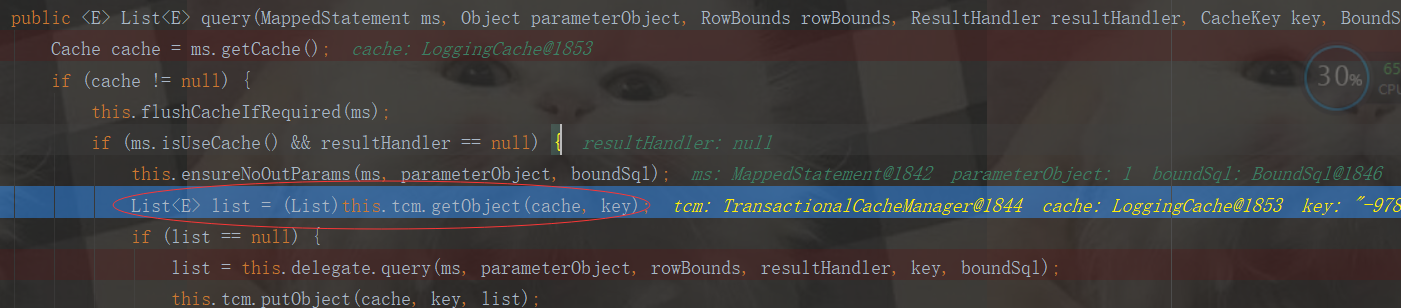
先看下tcm指什么?指的是TransactionalCacheManager,作为二级缓存查询
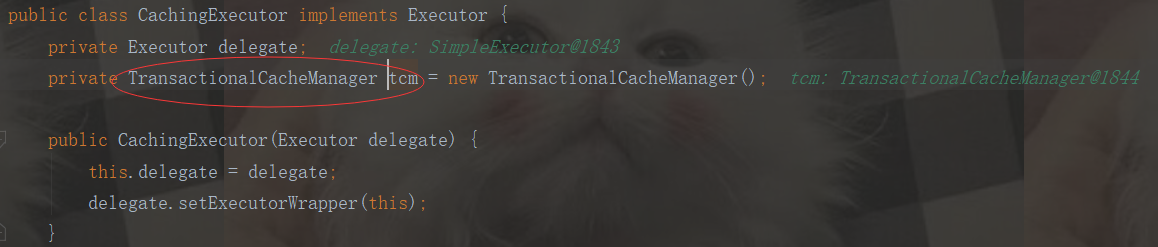
public Object getObject(Cache cache, CacheKey key) { return this.getTransactionalCache(cache).getObject(key); }
public Object getObject(Object key) { Object object = this.delegate.getObject(key); if (object == null) { this.entriesMissedInCache.add(key); } return this.clearOnCommit ? null : object; }
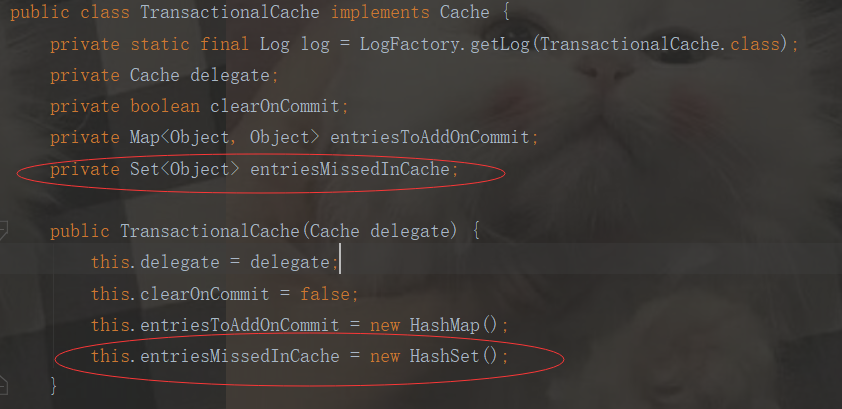
private Set
评论
登录后参与技术讨论,分享你的经验与见解。
登录 / 注册暂无评论