不是吧,不是还有人不知道绝对定位和相对定位的区别吧

文章目录
相对定位和绝对定位区别
相对定位
position:relative
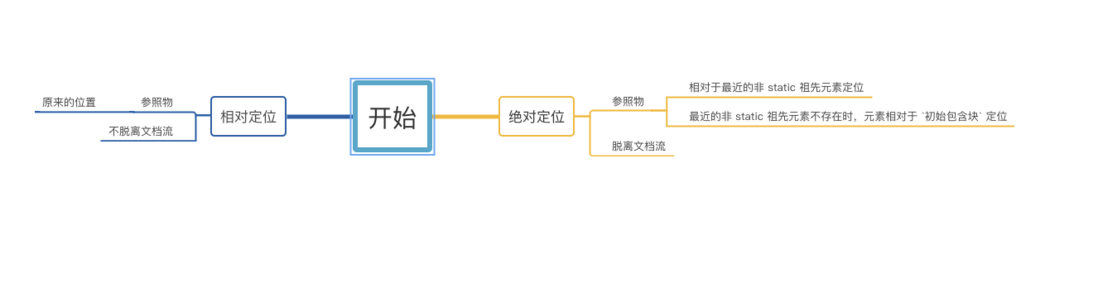
相对于原来的位置移动,元素不脱离文档流,不影响其他元素的布局
举个?
.box {
      position: relative;
      top: 100px;
      left: 100px;
      width: 100px;
      height: 100px;
      background-color: red;
    }
复制代码
<body>
<div class="box"></div>
</body>
复制代码
由图片可以见 box 定位后相对于原来的位置上偏移 100px ,左偏移 100px
绝对定位
position:absolute
元素会脱离文档流,如果设置偏移量,会影响其他元素的位置定位
1.相对于最近的非 static 祖先元素定位
举个?
 body{
          position: relative;
          height: 100px;
        }

    .box {
      position: absolute;
      top: 100px;
      left: 100px;
      width: 100px;
      height: 100px;
      background-color: red;
    }
复制代码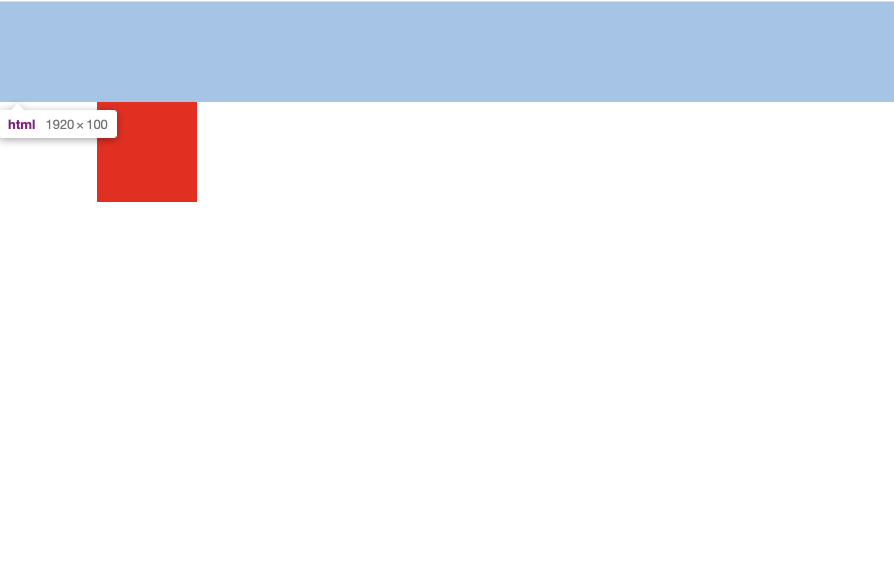
由图片可以见 box 绝对定位后相对于相对定位的父元素body上偏移 100px ,左偏移 100px
2.在1说明的祖先元素不存在时,元素相对于 初始包含块 定位
举个?
初始包含块: 包含根元素html的一个矩形。他的尺寸是视口 viewport (for continuous media) 或分页媒体 page media (for paged media)
 body{
        height: 100px;
      }

    .box {
      position: absolute;
      bottom: 100px;
      left: 100px;
      width: 100px;
      height: 100px;
      background-color: red;
    }
复制代码
由图片可以见 box 绝对定位后相对于初始包含块下偏移 100px ,左偏移 100px
网上很多资料说当父级元素中不存在相对定位,那么它的参照物就是body或者html都是不对的,感兴趣的小伙伴可以试一试
速记图
源码
- 相对定位
<!DOCTYPE html>
<html>
<head>
  <meta http-equiv="X-UA-Compatible" content="IE=Edge">
  <meta charset="UTF-8">
  <style> * {
      margin: 0;
      padding: 0;
    }

    .box {
      position: relative;
      top: 100px;
      left: 100px;
      width: 100px;
      height: 100px;
      background-color: red;
    } </style>
</head>
<body>
  <div class="box"></div>
</body>
</html>
复制代码- 绝对定位1
<!DOCTYPE html>
<html>
<head>
  <meta http-equiv="X-UA-Compatible" content="IE=Edge">
  <meta charset="UTF-8">
  <style> * {
      margin: 0;
      padding: 0;
    }

    body{
      position: relative;
      height: 100px;
    }

    .box {
      position: absolute;
      top: 100px;
      left: 100px;
      width: 100px;
      height: 100px;
      background-color: red;
    } </style>
</head>
<body>

<div class="box"></div>

</body>
</html>
复制代码- 绝对定位2
<!DOCTYPE html>
<html>
<head>
  <meta http-equiv="X-UA-Compatible" content="IE=Edge">
  <meta charset="UTF-8">
  <style> * {
      margin: 0;
      padding: 0;
    }

    body{
      height: 100px;
    }

    .box {
      position: absolute;
      bottom: 100px;
      left: 100px;
      width: 100px;
      height: 100px;
      background-color: red;
    } </style>
</head>
<body>

<div class="box"></div>

</body>
</html>
评论
登录后参与技术讨论,分享你的经验与见解。
登录 / 注册暂无评论