git 常用操作

文章目录
账号密码过期
git账号密码过期了,在gitlab上修改后,本地还没进行同步时,连接远端仓库,报了这个错
解决
- 清空本地保存的用户名、密码(需要管理员身份)
git config --system --unset credential.helper- 此时重连会提示输入用户名密码
- 重新配置用户名密码
git config --global user.email "you@example.com"
git config --global user.name "Your Name"- 发现每次都会要求输入用户名密码,设置将凭证存起来
git config --global credential.helper store不想用命令行,也可以直接手动修改配置文件。
解析
git 配置文件
git 有多个范围(scope)的的配置文件,范围小的,覆盖范围大的
一般有system、global、local、worktree
存放目录如下:
| scope | location | filename |
|---|---|---|
| system | <git-install-root>\etc\,如:C:\Program Files\Git\etc\ | gitconfig |
| global | C:\Users\<username>\ | .gitconfig |
| local | <git-repo>.git\ | config |
| worktree | 同上 | config.worktree |
查找Git配置文件
记不住配置了哪些scope,可以使用以下命令查看所有的git配置文件
git config --list --show-origin详细地列出配置内容和配置文件路径
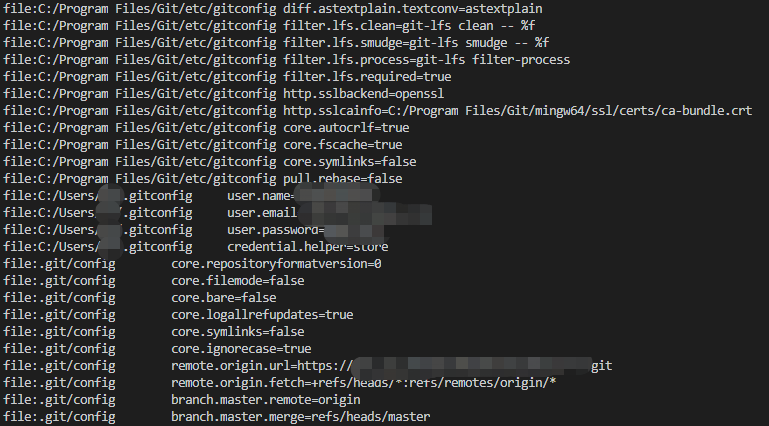
与下面命令不同的是,下面命令只显示配置信息,不显示路径
git config --list
git 凭证存储
git 如果是通过http访问远程仓库,需要输入用户名和密码,此时,如果不将凭证存储,则需要一遍一遍地输入用户名密码。
git config credential.helper "$helper $options"| 模式 | 存储时长 | 存储位置 |
|---|---|---|
| 不缓存【默认】 | -- | -- |
| cache | 15min | 内存 |
| store | 永久 | 磁盘 |
| [其他] | -- | -- |
修改commit的邮箱
如果你只需要修改最新的 commit ,直接使用:
git commit --amend --author="AuthorName <email@address.com>"
评论
登录后参与技术讨论,分享你的经验与见解。
登录 / 注册暂无评论