Linux 下 mysql 重置密码

文章目录
查看服务状态:
ps -ef | grep mysqld

service mysqld status

关闭服务
service mysqld stop增加配置:无权限认证
vi /etc/my.cnf
增加行 skip-grant-tables
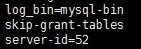
:wq
cat /etc/my.cnf
启动服务
service mysqld start登录服务
mysql查看
mysql> select host,user,authentication_string from mysql.user;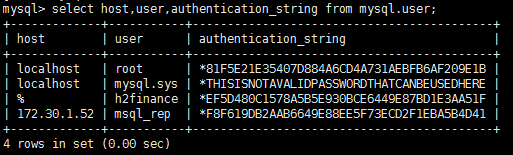
更新root用户密码为root
 mysql> update mysql.user set  authentication_string = password('root') where user ='root';
 mysql> quit;
加载权限表
mysql> flush privileges;
**删除无权限认证配置**,并重启
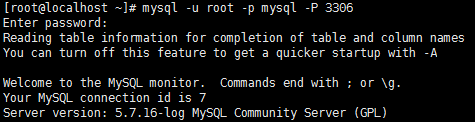
service mysqld restart验证 * mysql -uroot -proot * mysql -u root -p mysql -P 3306
评论
登录后参与技术讨论,分享你的经验与见解。
登录 / 注册暂无评论