上传文件大小限制配置

文章目录
项目需要支持能上传最大100M大小的附件,.net平台,IIS部署。
1、从项目配置app.config或web.config 中 增加配置
 <system.web>
    <httpRuntime maxRequestLength="102400"/>
 </system.web>
2、修改IIS中配置
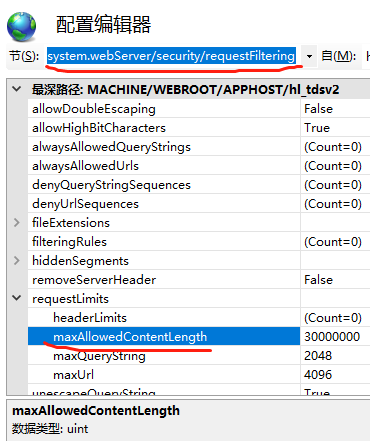
依次为 选中网站->双击配置编辑器-> system.webServer/security/requestFiltering,找到requestLimits中maxAllowedContentLength,默认应该是30000000(30M),进行修改。

评论
登录后参与技术讨论,分享你的经验与见解。
登录 / 注册暂无评论